Best Laptop for Contractors in 2026
A contractor’s laptop does not live on a desk. It lives on a truck seat, a folding table in a half framed house, and a tailgate. It gets opened with dusty hands, read in full sun, knocked off sawhorses, and asked to price a change order before the client changes their mind. That life kills ordinary laptops in predictable ways: cracked screens, dust choked fans and batteries that die at noon.
So this guide judges laptops the way a job site does. Durability comes first, and every durability claim below is the manufacturer’s own published rating, a MIL-STD-810H test result or an IP code, never a marketing adjective. After that comes the screen, because plans are read where the work is, then battery life that survives a full site day, then the ports and power to run the software contracting actually uses: Bluebeam, Procore, estimating spreadsheets and invoicing apps. If your work leans toward the office side, our guide to the best laptops for construction management covers that split in depth. This one is for the people out on site.
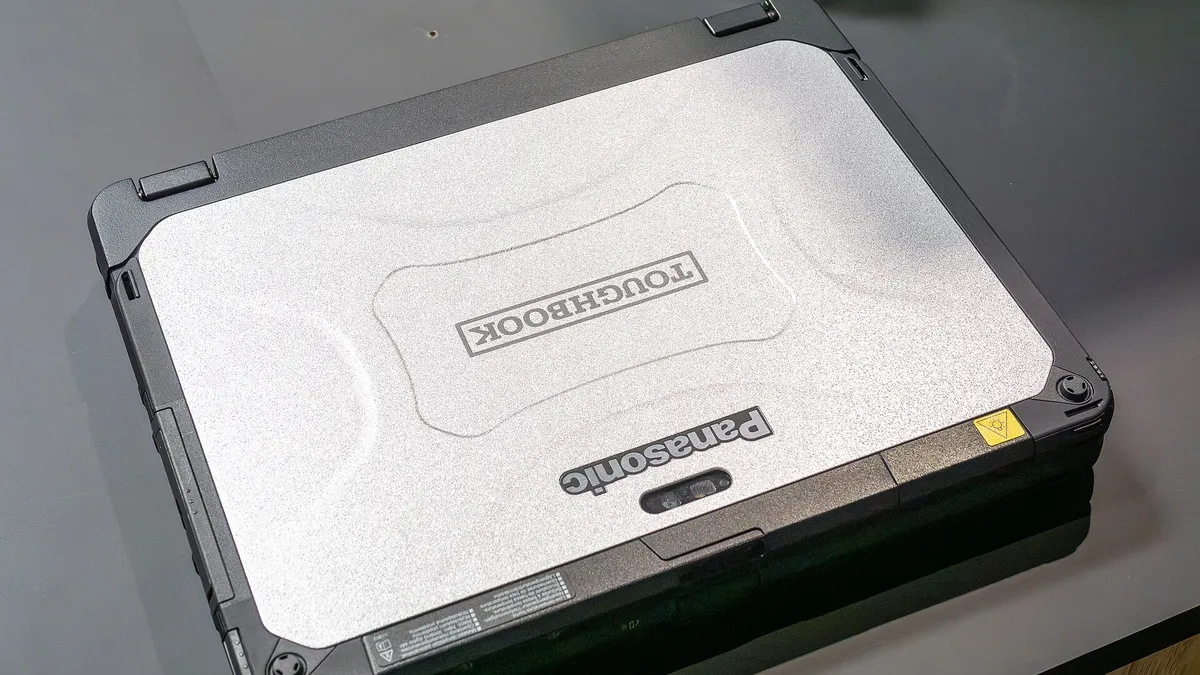
Quick Answer: The Panasonic Toughbook 55 Mk3 is the best laptop for most contractors in 2026. It is semi-rugged to IP53 and MIL-STD-810H, its Full HD touch screen option reaches 1,000 nits, and its modular bays let you add a second battery, a second SSD or a serial port as your work changes. Buy the Panasonic Toughbook 40 Mk2 if you need fully rugged IP66 protection that shrugs off rain and six foot drops. Buy the Lenovo ThinkPad E14 Gen 7 if the budget leads: it keeps MIL-STD-810H testing, two memory slots and a big 64Wh battery at a mainstream price.
How we picked these laptops. Every durability rating, brightness figure, weight and port count in this guide comes from the manufacturer’s own published specifications, the Panasonic, Dell, Lenovo and ASUS spec sheets and product pages, cross checked against independent review coverage where it exists. Anything we could not verify from a primary source was left out rather than repeated, and the ranking follows fitness for site work, not price or commission. Prices are not quoted because contractor pricing shifts with configuration and dealer, so each pick links to a live listing instead.
The Best Laptops for Contractors at a Glance
| Model | Durability | Weight | Best For |
|---|---|---|---|
| Panasonic Toughbook 55 Mk3 | IP53, MIL-STD-810H | From 2.08 kg | Best overall for most contractors |
| Panasonic Toughbook 40 Mk2 | IP66, MIL-STD-810H | 3.35 kg | Fully rugged flagship |
| Dell Pro Rugged 14 (RB14250) | IP53, MIL-STD-810H | 2.04 kg | Glove touch and native serial port |
| Lenovo ThinkPad P14s Gen 6 | MIL-STD-810H | From 1.39 kg | CAD and plan work |
| Lenovo ThinkPad T14 Gen 6 | MIL-STD-810H | From 1.38 kg | Best mainstream all-rounder |
| ASUS ExpertBook B5 (B5604) | MIL-STD 810H | From 1.65 kg | Big screen estimating pick |
| Lenovo ThinkPad E14 Gen 7 | MIL-STD-810H | From 1.34 kg | Best value |
1. Panasonic Toughbook 55 Mk3: Best Overall for Most Contractors
The Toughbook 55 Mk3 is the machine most working contractors should buy, because it splits the difference between a fragile business laptop and a fully rugged brick. Panasonic rates it IP53 against dust and sprayed water and tests it to MIL-STD-810H, including 3 foot drops, and the magnesium honeycomb chassis has an integrated carry handle for one handed trips across site. It is protection you will actually carry, instead of protection that stays in the truck for being too heavy.
The screen is the option to choose carefully. Skip the base HD panel and buy the Full HD touch version: Panasonic rates it at up to 1,000 nits with anti-reflective treatment, the difference between reading a plan set in daylight and hunting for shade to squint at it. Underneath, a Core i5 or i7 vPro processor, up to 64GB of memory in two slots and a quick-release SSD are far more than contractor software will ever ask for, and the machine is built to be opened up and repaired rather than replaced.
What makes the 55 unique is its modularity. Three expansion areas, two xPAK slots and a universal bay, accept modules you can swap with a screwdriver: a second SSD, a DVD drive, a fingerprint or smart card reader, extra ports including a true serial connection, even a dedicated graphics module. The option that matters most on site is the second battery. Panasonic rates the standard battery at around ten hours of work, and fitting the second pack roughly doubles that and makes the battery hot-swappable, so a fresh pack goes in without shutting down mid estimate. Add optional 4G or 5G, dedicated GPS and Panasonic’s standard three year warranty, and you have the most adaptable tool in this guide.
The honest compromises are price and pace. Toughbooks cost serious money even next to premium business laptops, the 13th generation processors sit a step behind the newest chips (which contracting software will never notice), and it is no one’s idea of an ultraportable. Toughbooks are bought through Panasonic’s dealer channel, so expect a configurator and a delivery wait rather than next day shipping.
Pros
- ✓ IP53 and MIL-STD-810H rated with 3 ft drop resistance, from 2.08 kg
- ✓ Full HD touch screen option rated at up to 1,000 nits for daylight use
- ✓ Modular xPAK bays: second battery, second SSD, serial port and more
- ✓ User upgradeable memory to 64GB and a quick-release SSD
Cons
- ✗ Expensive, and sold mainly through Panasonic’s dealer channel
- ✗ 13th generation processors rather than the latest chips
- ✗ Heavier and thicker than any business laptop here
Check the latest price on Amazon
Best for: most contractors who need one tough, bright screened laptop that still carries like a normal machine. Not for: anyone who needs full waterproofing (that is the Toughbook 40 below) or the lightest possible carry.
2. Panasonic Toughbook 40 Mk2: The Fully Rugged Flagship
The Toughbook 40 Mk2 is what you buy when the environment itself is the enemy: rain that gets into everything, concrete dust, drops onto hard surfaces, and summers spent in a hot vehicle. Panasonic rates it IP66, which means dust tight and sealed against powerful water jets, and drop tested to 6 feet (180 cm) under MIL-STD-810H, twice the drop height of the semi-rugged machines in this guide, with an operating range from minus 29 to plus 63 degrees Celsius. It keeps working on the days the site itself is barely workable.
The screen matches the brief: a 14 inch Full HD touch panel rated at 1,200 nits, the brightest in this guide, with touch modes for rain and for gloved hands, so you can mark up a drawing without stripping off your gloves in January. Performance is modern flagship class, with Core Ultra H-series vPro processors, memory that is user replaceable up to 64GB, and a quick-release SSD. Panasonic rates battery life at about 12 hours under MobileMark 25, and the optional second battery roughly doubles that to about 24 hours and adds hot swap, so a two battery rotation can keep one machine running around the clock on a long pour.
Modularity goes further here than on the 55: four xPAK areas plus user removable battery, memory, storage and keyboard, with expansion options including a second LAN port, true serial and dedicated graphics modules, plus optional 4G, 5G and GPS. For a fleet buyer standardizing one machine across estimators, supers and field engineers, that flexibility is the argument, and fleets are who it is priced for.
The trade offs are size and money, plainly. At 3.35 kg (7.4 lb), it is a machine you transport rather than carry, and the price sits at the top of this guide by a wide margin. For a solo remodeler it is more protection than the work demands. For utility, industrial and heavy civil crews, it is the correct amount.
Pros
- ✓ IP66 sealing and 6 ft drop resistance, the toughest rating here
- ✓ 1,200 nit touch screen with rain and glove modes
- ✓ About 12 hours rated battery, roughly 24 with the second battery and hot swap
- ✓ Four modular xPAK areas, user replaceable memory, SSD and keyboard
Cons
- ✗ Heavy at 3.35 kg and priced for fleets, not solo buyers
- ✗ Overkill for trailer and office based work
- ✗ Bought through resellers and configurators, not retail shelves
Check the latest price on Amazon
Best for: crews working in rain, concrete dust and drop prone environments where the laptop simply cannot be allowed to fail. Not for: anyone who carries a laptop on foot all day, at 3.35 kg, or who works mostly indoors and would never use the sealing.
3. Dell Pro Rugged 14 (RB14250): Glove Touch and a Real Serial Port
Dell’s Pro Rugged 14, model RB14250, is the Toughbook alternative for buyers who live in Dell’s ecosystem or need one specific old school feature: a native RS-232 serial port, built in rather than hanging off a USB adapter, for talking to older site equipment and machinery controllers. Dell rates the chassis IP53 with MIL-STD-810H testing including a 3 foot transit drop, so on paper it plays in the same league as the Toughbook 55 at about the same weight, 2.04 kg. It is the same machine that tops our guide to the best laptop for automotive diagnostics; the traits that earn their keep in workshops transfer directly to plant rooms and site cabins.
Choose the screen with care, because Dell sells two very different panels under this name. The one to buy is the 1,100 nit touch version, glove capable and protected by Gorilla Glass, a genuine daylight screen for plan work. The 400 nit non-touch version is a trailer screen, fine indoors and frustrating in the sun. Ports are generous: two USB-A, two Thunderbolt 4, HDMI, Ethernet, the serial port, and an optional rear I/O bay that can add a second Ethernet connection and Fischer USB.
Battery life is this machine’s party trick. The system supports two hot-swappable batteries, so like the Toughbooks it never has to shut down for a charge, and a two bay charger keeps the rotation going. Core Ultra U-series processors and up to 64GB of memory in two slots cover plan sets, estimating and office work comfortably, an optional NVIDIA RTX 500 Ada GPU exists for light 3D, and 5G and GPS are on the options list.
The limits: the U-series chips are efficiency parts, so this is not the machine for heavy CAD, the resolution stops at Full HD, and Dell sells it direct and through resellers, which makes pricing less transparent than a retail laptop.
Pros
- ✓ 1,100 nit glove capable touch screen option with Gorilla Glass
- ✓ Native RS-232 serial port plus Ethernet and Thunderbolt 4
- ✓ Dual hot-swappable batteries, IP53 and MIL-STD-810H rated
- ✓ Optional RTX 500 Ada GPU and 5G for a rugged machine
Cons
- ✗ U-series processors are modest for heavy CAD work
- ✗ The 400 nit non-touch screen option is not a daylight screen
- ✗ Sold mainly direct and through resellers, with configurator pricing
Check the latest price on Amazon
Best for: contractors who need a native serial port for older site equipment, or who work the screen with gloves on. Not for: buyers who want Panasonic style modular expansion bays or the brightest screen in this guide.
4. Lenovo ThinkPad P14s Gen 6: The Workstation Pick for Plans and CAD
Not every contractor laptop needs to survive a fall off a scaffold. If your site work is plan heavy, markups, CAD drawings, takeoffs and the occasional 3D model, the ThinkPad P14s Gen 6 is the sweet spot: a proper mobile workstation still light enough to carry all day at 1.39 kg. Lenovo tests it to MIL-STD-810H and fits the spill resistant keyboard every ThinkPad carries, so it shrugs off the bumps and coffee incidents of site cabin life. It has no IP rating, and that is the honest line: this is durability for a laptop that rides in a case between truck and trailer, not one that works in the rain.
The reason to buy it over a standard business laptop is certified graphics and headroom. The P14s is ISV certified for applications like AutoCAD and SOLIDWORKS, meaning the software makers have tested it for the work, and the AMD Ryzen AI PRO processors, up to the 12 core Ryzen AI 9 HX PRO 370, with up to 96GB of memory in two slots, chew through big PDF plan sets, 2D CAD and estimating models without breaking a sweat. Storage runs to 2TB, enough for a library of current and archived projects.
Screen choice matters here too. The standard 400 nit anti-glare panel is the trailer friendly pick, and the 500 nit low power panel is the one to choose if the laptop regularly leaves the trailer, because it buys real margin in bright light. A 2.8K OLED touch option exists too, beautiful for presentations and unnecessary on site. The 57Wh battery option with Rapid Charge, refilling to about 80 percent in an hour, suits a day split between site visits and the office, and the ports plug into any trailer dock without adapters.
Trade offs are the mainstream ones. Integrated graphics set the ceiling: heavy Revit coordination and large 3D models belong on a bigger workstation. There is no glove touch option, and the battery is internal, so multi day off-grid work means a charger, not a battery swap.
Pros
- ✓ ISV certified workstation for AutoCAD and SOLIDWORKS class work
- ✓ Up to 96GB of memory in two slots, from just 1.39 kg
- ✓ MIL-STD-810H tested with a spill resistant keyboard
- ✓ 500 nit low power screen option, Ethernet and Thunderbolt 4 built in
Cons
- ✗ No IP rating; not a work in the rain machine
- ✗ Integrated graphics only on the AMD version, a ceiling for heavy 3D
- ✗ Internal battery, so no hot swap for long off-grid days
Check the latest price on Amazon
Best for: plan heavy site work, CAD drawings, markups and takeoffs, with workstation power at just 1.39 kg. Not for: open site abuse; there is no IP rating, so rain and heavy dust remain its enemies.
5. Lenovo ThinkPad T14 Gen 6: The Durable Mainstream All-Rounder
The T14 Gen 6 is the answer for the contractor whose laptop splits its life between the job site and the office, and who wants one dependable machine rather than a rugged specialist. It carries the same durability credentials as the P14s, MIL-STD-810H testing and a spill resistant keyboard, in a mainstream business laptop that starts at 1.38 kg and looks at home in a client meeting. There is no IP rating, so it stays out of the rain, but for the truck, trailer and site office routine it is tested against exactly the drops and vibration that routine involves.
Everything about the specification is chosen for a long, repairable life. Memory lives in two slots and runs to 64GB, storage is a standard M.2 SSD up to 2TB, and the 57Wh battery option with Rapid Charge covers a working day of plans, email and estimating. The display to pick is the 500 nit low power panel, bright enough for a shaded site cabin; the standard 400 nit panel is fine if the laptop mostly lives indoors. Built in Ethernet still matters for trailer networks and flaky site Wi-Fi, alongside Thunderbolt 4, USB-A and HDMI.
One buying trap needs stating, because it has caught readers of this site before. Lenovo sells cheaper V-series versions of the T14 Gen 6 with soldered memory and different screens under a very similar name. The upgradeable machine in this guide is the standard U, H or AMD PRO version with two memory slots. Check the exact configuration before you pay: it decides whether your laptop can grow from 16GB to 32GB in year three or is frozen as bought.
Against the rugged picks, the T14 gives up sealing, glove touch and daylight screens. Against everything else in a site office, it is the sensible default: proven, upgradeable and easy to service.
Pros
- ✓ MIL-STD-810H tested, spill resistant keyboard, from 1.38 kg
- ✓ Two memory slots to 64GB and a standard M.2 SSD slot
- ✓ Built in Ethernet, Thunderbolt 4 and a 500 nit screen option
- ✓ 57Wh battery option with Rapid Charge for full site days
Cons
- ✗ No IP rating and no glove touch option
- ✗ V-series versions with soldered memory share the name; check the exact build
- ✗ 400 nit base screen is an indoor panel
Check the latest price on Amazon
Best for: contractors whose laptop splits its life between the job site and the office, and who want one dependable all rounder. Not for: full time outdoor site work, since there is no IP sealing against water and dust ingress.
6. ASUS ExpertBook B5 (B5604): The Big Screen Estimating Pick
Estimating is a numbers job done on a screen, and it is better on a bigger one. The ExpertBook B5 puts a 16 inch display and a full numeric keypad in a business laptop that starts at 1.65 kg, light enough to move between office, truck and client table. ASUS tests it to MIL-STD 810H and fits a spill resistant keyboard, so it carries real durability credentials for site office life, while stopping short, like the ThinkPads, of any IP rating.
The hardware is built for the estimating desk. A Core Ultra 7 processor, 16GB of memory in two slots upgradeable to 64GB, and two SSD slots, a main M.2 2280 and a second M.2 2230, so project archives can grow without replacing the boot drive. The 63Wh battery is generous for the class. Ports are a full hand: two Thunderbolt 4, two USB-A, HDMI 2.1, built in Ethernet for the trailer network, and a smart card reader on configured models. A fingerprint reader in the power key and TPM 2.0 cover the security side of carrying bid data around.
The screen is where to spend your attention. The standard panel is a 300 nit anti-glare unit: perfectly good in a trailer or office, not a screen for reading plans in open sun. ASUS sells a brighter WQXGA option in the US range at 500 nits, and that is the configuration to order if this laptop will regularly leave the building. With the bright panel fitted, the B5 is the most comfortable estimating machine in this guide, its numpad doing quiet work every time a takeoff turns into a spreadsheet.
Its limits are about environment, not ability. At 16 inches it is the biggest bag footprint among the business picks, there is no touch or glove option, and none of its testing makes it a rain or dust machine. Inside the trailer and office, though, it is the pick built for the hours contractors actually spend pricing work.
Pros
- ✓ 16 inch screen and a numeric keypad for estimating work
- ✓ MIL-STD 810H tested with a spill resistant keyboard
- ✓ Two memory slots to 64GB and two SSD slots, from 1.65 kg
- ✓ Ethernet, Thunderbolt 4 and a 63Wh battery
Cons
- ✗ Standard 300 nit screen is for indoor use; choose the 500 nit option for site work
- ✗ No IP rating and no touchscreen option
- ✗ 16 inch chassis is the largest here outside the rugged picks
Check the latest price on Amazon
Best for: estimators who live in spreadsheets and want a 16 inch screen with a full numeric keypad. Not for: rough outdoor sites; the 300 nit screen is the dimmest here and there is no IP rating.
7. Lenovo ThinkPad E14 Gen 7: The Value Pick That Still Passes Military Testing
A one person trade business does not have an IT department or a fleet budget, and the honest value question is how much real durability you can buy at a mainstream price. The ThinkPad E14 Gen 7 is the answer we keep coming back to: MIL-STD-810H tested like its expensive siblings, with the same spill resistant keyboard, undercutting them on price by giving up finish and a few options rather than the fundamentals. It anchors the value end of this guide, like the picks in our roundup of the best business laptops under 800.
The specification is generous where it counts. Memory sits in two slots and runs to 64GB, there are two M.2 SSD slots so a second drive can join later, and the 64Wh battery is the largest fitted to any mainstream laptop in this guide, which translates directly into long days between charges. Ports include Thunderbolt 4 or USB4 depending on the processor, two USB-A, HDMI 2.1 and built in Ethernet, so it docks in a trailer without a hub. Core Ultra and Ryzen versions are both sold, and either runs the contractor software stack, Bluebeam, Procore, QuickBooks and spreadsheets, without strain.
What the lower price gives up is mostly light and sealing. The screen is a 300 nit anti-glare panel, fine indoors and in a shaded cab, not a daylight plan reader. There is no IP rating, no glove touch and no hot swap battery, so the site routine here is a decent case and a charge at lunch on the longest days. The base warranty is one year, shorter than the rugged machines’ three years and worth extending. Even so, judged on testing, slots, battery and ports per dollar, nothing else at this level comes close.
Pros
- ✓ MIL-STD-810H tested with a spill resistant keyboard at a mainstream price
- ✓ Two memory slots to 64GB and two M.2 SSD slots
- ✓ 64Wh battery, the largest among the mainstream picks here
- ✓ Ethernet, Thunderbolt 4 or USB4 and HDMI 2.1 built in
Cons
- ✗ 300 nit screen is an indoor panel, not for daylight plan reading
- ✗ No IP rating, glove touch or hot swap battery
- ✗ Base warranty is one year; budget to extend it
Check the latest price on Amazon
Best for: solo trades and small firms that need genuine MIL-STD tested durability at a mainstream price. Not for: buyers who need a bright outdoor readable screen, an IP rating, or premium fit and finish.
How to Choose a Laptop for Contract Work
Do contractors need a fully rugged laptop?
Some do, and most do not, and the difference is where the laptop actually works. If it spends its days outdoors on open sites, rides in an uncovered truck bed, gets used in rain, or works around concrete cutting and earthworks, fully rugged IP65 or IP66 hardware like the Toughbook 40 is insurance that pays out the first time the machine survives a drop that would have ended a normal laptop and the day’s records with it. If the laptop’s real life is the site trailer, the truck cab and the office, a MIL-STD-810H tested business laptop covers the realistic risks at half the price and half the weight. The expensive mistake is the middle path done badly: a consumer laptop with no testing at all, carried hopefully from site to site. Whatever tier you choose, choose one with a published rating.
What screen brightness do you need to read plans outdoors?
Brightness is measured in nits, and daylight is brutally revealing about it. The 250 to 300 nit screens fitted to most laptops are indoor screens; outdoors they wash out even in shade. Around 400 to 500 nits, with an anti-glare finish, is workable in a shaded cab or a trailer with the door open. For reading plans in open sun, you want the 1,000 nit class panels fitted to the Toughbook 55, the Dell Pro Rugged 14 and the Toughbook 40, which exist precisely for this job. Two details matter as much as the number: anti-glare treatment, because a glossy screen mirrors the sky back at you, and touch that registers through gloves, because a daylight screen you have to bare-hand in winter is only half a solution. Our guide to the best laptop for outdoor use goes deeper on screens for outdoor work.
Rugged laptop or a tough case on a normal laptop?
A case protects a laptop while it is closed and being carried. Jobsite damage mostly happens while the laptop is open and working: the knock off the tailgate mid estimate, the rain shower during a walkthrough, the dust that works into fans and ports over a season. A rugged or military tested laptop is protected in exactly those moments, with sealed ports and components rated for vibration and temperature. A rugged case is a reasonable budget compromise for transport, especially around a MIL-STD-810H tested business machine like the ThinkPads in this guide, and many small contractors run exactly that setup happily. But no case turns an untested consumer hinge and fan design into site equipment. Spend on the machine’s own rating first, then add the case.
What software do contractors actually run?
Less exotic software than the ads suggest, which is good news for your budget. Plans and blueprints run through viewers and markup tools, above all Bluebeam Revu, a Windows program, alongside the plan rooms in Procore and Fieldwire that run in a browser. Estimating lives in spreadsheets and takeoff tools, invoicing and job costing in QuickBooks or similar, and insurance and restoration contractors add Xactimate, another Windows staple. Almost none of it needs a graphics card; it needs a processor that stays quick with a 200 page plan set open, 16GB of memory as a floor, 32GB if your plan sets are large, and a fast SSD. That is why this guide spends its money on screens, batteries and durability ratings instead of GPUs, with the P14s reserved for firms whose CAD work genuinely asks for certified graphics.
Contractor Laptop Terms That Actually Matter
MIL-STD-810H, in plain terms. MIL-STD-810H is a US military testing standard: a long list of laboratory procedures covering drops, vibration, dust, humidity and temperature extremes. When a maker says a laptop is tested to it, labs have put the machine through a chosen set of those procedures, and it kept working. Two honest caveats. Makers choose which procedures to run, so it is a strong signal of engineered durability rather than a guarantee. And it says nothing about water on its own; that is what the IP code is for. Every laptop in this guide carries MIL-STD-810H testing, the minimum durability signal a site laptop should have.
IP ratings, decoded. The IP code rates sealing against solids and water, as two numbers. The first, 0 to 6, is dust: 5 means dust protected, and 6 means completely dust tight. The second, 0 to 9, is water: 3 means sprayed water, 5 means water jets, 6 means powerful jets. So the Toughbook 55 and Dell Pro Rugged 14 at IP53 shrug off dust and rain spray, while the Toughbook 40 at IP66 is dust tight and laughs at a hose down. No code means the maker claims nothing, which is why the business laptops here, however well tested for drops, should stay out of the rain.
Nits and daylight, in real terms. A nit is one candela per square meter, but the practical scale is simpler. At 250 to 300 nits a screen is comfortable in an office and washed out outdoors. At 400 to 500 nits it stays readable in shade and bright indoor light. At 1,000 nits and above it stays readable in direct sun, which is why surveyors and site crews end up with rugged machines. Brightness also eats battery, so a 1,200 nit screen at full blast drains a pack faster than at trailer brightness. Buy the brightness your working position demands, not the biggest number on the sheet.
Hot swap batteries, explained. A hot-swappable battery can be removed and replaced while the laptop keeps running, because a second battery or an internal bridge battery carries the load during the swap. On the Toughbook 40, Toughbook 55 and Dell Pro Rugged 14 here, fitting the optional second battery is what enables it. For site work the benefit is absolute: no shutdown, no lost place in a plan set, just a fresh pack clicked in at lunch and the day continues. A spare pack in the truck turns battery life into a non-issue, which is why fleet buyers rank it alongside the durability rating itself.
Frequently Asked Questions
What is the best laptop for contractors overall?
The Panasonic Toughbook 55 Mk3, for most contractors. It is the rare machine that balances the whole job: IP53 and MIL-STD-810H durability with drop resistance, a touch screen option rated at up to 1,000 nits that you can actually read in daylight, modular bays that add a second battery, storage or ports as your business changes, and upgradeable memory and storage that keep it useful for years. Contractors working in genuinely harsh conditions should step up to the fully rugged Toughbook 40 Mk2, and budget led solo operators should look at the ThinkPad E14 Gen 7, which keeps military testing and a big battery at a mainstream price.
How much RAM and storage does a contractor laptop need?
Buy 16GB of memory and a 512GB SSD as the floor, whatever the brand. That combination runs plan viewers, browser based project tools, estimating spreadsheets and invoicing software together without complaint. Step up to 32GB of memory if your work involves very large plan sets, CAD or several heavy programs at once, and to a 1TB drive if you keep years of project photos and documents on the machine. Because project files only grow, prefer laptops with memory slots, as most picks in this guide have, so a machine bought at 16GB can become a 32GB machine later for the price of the sticks.
Can a contractor use a MacBook or a Chromebook?
For the core software of the trade, they are the wrong tools. Bluebeam Revu and Xactimate are Windows programs with no Mac or ChromeOS versions, and the rugged and business Windows machines in this guide are built and tested for the environment in a way neither a MacBook nor a Chromebook is. A Chromebook can survive as a second device for email and browser based project tools like Procore, and a MacBook works in an office that runs entirely on web apps, but as the one laptop a contracting business depends on, Windows on tested hardware is the safe and standard choice.
Is a touchscreen worth it on a job site laptop?
Yes, if you buy the right kind. A touch screen earns its place when you are standing with the laptop in one arm marking up a drawing, flipping through a plan set, or collecting a client’s signature on a change order. The version that matters on site is a bright one, and on the Toughbooks and the Dell Pro Rugged it is rated to work with gloves and, on the Toughbook 40, in the rain. A dim indoor touchscreen on a consumer laptop adds cost without solving any of that. If your laptop will live on a desk or a trailer table with a mouse attached, skip touch and put the money toward brightness or battery instead.
How long should a contractor laptop last?
Plan on four to six years from a properly rated machine, and budget for the consumer alternative lasting half that on site. The picks in this guide are built for that horizon: upgradeable memory and storage, replaceable batteries on the rugged models, modular parts on the Toughbooks, and standard warranties of three years on the rugged machines against one year on mainstream models. Extending the warranty and adding accidental damage cover, where offered, is usually money well spent for a machine that works outdoors. The cheapest laptop is the one you buy once.
The Verdict
Contract work asks a laptop for four things, in this order: survive the site, be readable in daylight, run all day, and run the ordinary Windows software the trade actually uses. Buy the Panasonic Toughbook 55 Mk3 for the best balance of all four, the Panasonic Toughbook 40 Mk2 when the environment is genuinely hostile, and the Dell Pro Rugged 14 for glove touch and a native serial port. The ThinkPad P14s Gen 6 is the pick for CAD and plan heavy work, the ThinkPad T14 Gen 6 the durable all-rounder, the ASUS ExpertBook B5 owns the estimating desk, and the ThinkPad E14 Gen 7 is the value buy that still carries military testing. Whichever you choose, confirm the exact screen and configuration before you buy, because every model name here covers a weaker version, then check the latest price at the links above.