Best Gaming Laptop Under $300 in 2026
Start with the truth, because every other guide in this price bracket avoids it: in 2026 there is no new gaming laptop with a dedicated graphics card that sells for under $300 in the US. Not one.
The cheapest new machines with a real NVIDIA or AMD discrete GPU start well above this budget, and anything new at $300 or less runs on integrated graphics. The old version of this guide pretended otherwise, filling its list with ancient business laptops and calling them gaming machines. This version does not.
So what can $300 actually buy that plays games? Three routes work, and this guide is built around them. If you want the full picture of what each price band buys before you settle on a budget, our guide to how much a laptop costs breaks down the average prices for 2026. For school use, a cheap Windows laptop is not always the best value: our Chromebook vs Windows laptop comparison for students shows where a Chromebook wins on price and battery.
The first is a refurbished or used gaming laptop from a few years ago with a genuine discrete GPU, above all the GTX 1650 generation, which still plays modern games at 1080p on low to medium settings.
The second is a refurbished business laptop whose integrated graphics are strong enough for esports and older titles, bought for its build quality, memory and upgrade slots rather than its badge.
The third is a new budget laptop with modern AMD Ryzen integrated graphics, which handles esports and light games at low settings and comes with a full warranty, plus cloud gaming as the option that removes the hardware limit altogether.
If your budget can stretch, our guide to the best gaming laptops under $500 shows where real gaming laptops begin. This guide is for the budget that cannot.
A business laptop is not built as a gaming machine, so our comparison of a gaming laptop and a regular laptop explains where that trade off shows up.
Quick Answer: There is no new discrete GPU gaming laptop under $300 in 2026, so the best buy is a refurbished Acer Nitro 5 with a GTX 1650, the only route here that plays modern games properly at 1080p. If you want business grade build and easy upgrades instead, buy a refurbished HP EliteBook 845 G8 with Ryzen 7 PRO graphics. If you want a brand new machine with a warranty, buy the Lenovo IdeaPad Slim 3 with a Ryzen 5 7530U and accept esports settings, or pair any cheap laptop with cloud gaming.
How we picked these laptops. Every specification below was checked against the manufacturer’s own published documents: Acer’s official Nitro 5 and Chromebook Plus specification pages, Lenovo’s PSREF specification for the IdeaPad Slim 3 15ABR8 and ThinkPad T480, and HP’s EliteBook 845 G8 specification listings.
Gaming expectations are set from independent benchmark databases, chiefly Notebookcheck’s GPU benchmark pages for the GTX 1650, the Radeon Vega 7 and Vega 8, and the Radeon 660M and 680M, which test these graphics chips across real games.
Refurbished price evidence comes from certified refurbished listings in the US market, including a widely reported certified refurbished EliteBook 845 G8 listing at under $300 through eBay’s refurbished program.
Anything we could not verify from a primary source was left out rather than repeated, and no exact prices are quoted because refurbished stock and sale prices change weekly, so each pick links to a live search instead.
The Best Gaming Laptops Under $300 at a Glance
| Model | Graphics | RAM | Best For |
|---|---|---|---|
| Acer Nitro 5 (refurbished) | GTX 1650 4GB discrete | 8GB, upgradeable | Best real gaming under $300 |
| HP EliteBook 845 G8 (refurbished) | Radeon Vega 8 integrated | 16GB typical | Best build and memory value |
| Lenovo ThinkPad T480 (refurbished) | GeForce MX150 2GB discrete | 8GB, upgradeable | Cheapest discrete GPU route |
| Lenovo IdeaPad Slim 3 15ABR8 (new) | Radeon Vega 7 integrated | 8GB or 16GB soldered | Best new laptop with warranty |
| Acer Chromebook Plus 514 (new) | Cloud gaming via GeForce NOW | 8GB | Best screen and battery for cloud play |
1. Refurbished Acer Nitro 5: The Only Real Gaming Laptop Here
The refurbished Nitro 5 is the pick that makes this guide worth writing, because it is the one machine under $300 that is genuinely a gaming laptop.
Look for the AN515-54 and AN515-55 generations with a Core i5-9300H or i5-10300H processor and an NVIDIA GeForce GTX 1650 with 4GB of GDDR5 memory, Acer’s own specification sheet for the range.
That combination was the entry point of real gaming laptops a few years ago, and through Acer’s recertified channel and certified refurbished sellers it now lands under $300 in the US.
The GTX 1650 is why.
Notebookcheck tested this exact GPU in a Nitro 5 and recorded an average of about 65 frames per second in Battlefield V at maximum settings at 1080p, and its wider benchmark database keeps the card comfortably playable in modern titles at low to medium settings, with esports games far above that.
No integrated graphics chip in this guide comes close, and the gap is not small.
This is also the only pick here with a proper gaming cooling system, a 15.6 inch Full HD IPS screen, and in many units a 120Hz or 144Hz panel, so check the exact listing for the refresh rate before you pay.
The refurbished buying rules matter as much as the model.
Buy certified refurbished or seller refurbished with a written warranty and a returns window, confirm the listing names the GTX 1650 rather than the weaker GTX 1050 that shares this chassis, and confirm it ships with an SSD rather than only a hard drive, because early units paired both.
Memory is commonly 8GB in one slot with a second slot free, and adding a matching stick later is the single best upgrade this laptop can get. Our guide to how much RAM you need for gaming explains why that second stick matters more here than anywhere else.
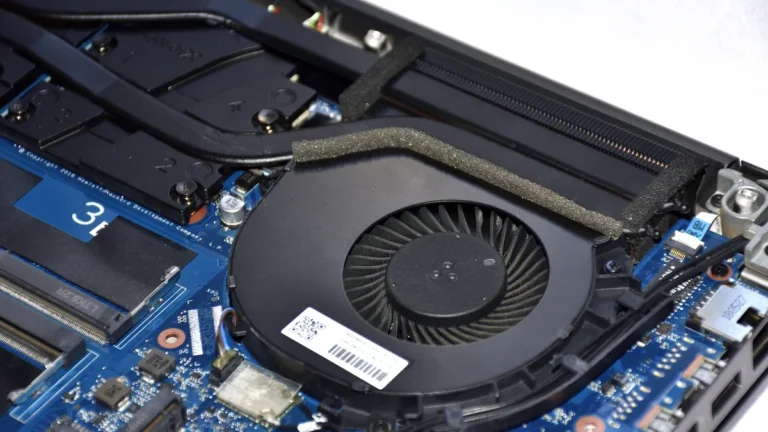
The honest costs are age and battery. These machines are five to seven years old, their batteries have lived a life, and gaming happens plugged in. Fans on a used unit may be dusty, so a clean and fresh thermal paste is a sensible first weekend job.
Accept those terms and nothing else at this price plays games like it. Keeping the fans clear also helps, and our guide to keeping a gaming laptop cool covers the simple habits that stop an older machine throttling in the middle of a game.
Pros
- ✓ Real GTX 1650 4GB discrete graphics, the strongest GPU in this guide by a wide margin
- ✓ Proper gaming cooling and a 15.6 inch Full HD IPS screen, often 120Hz or higher
- ✓ Two memory slots and room for storage upgrades, so it can grow with you
- ✓ Sold through recertified and certified refurbished channels with warranties
Cons
- ✗ Five to seven years old, so battery health varies and gaming is a plugged in activity
- ✗ Listings mix GTX 1050 and hard drive only units under the same name; check carefully
- ✗ Heavier and louder than every other pick here
Check the latest price on Amazon
Best for: players who want to run modern games locally at 1080p and accept a used machine to get there. Not for: anyone who needs long battery life, a light bag, or a brand new warranty longer than the refurbished term.
2. Refurbished HP EliteBook 845 G8: The Premium Build Route
The EliteBook 845 G8 is the refurbished business route done properly. In certified refurbished listings in the US it appears with a Ryzen 7 PRO 5850U, an eight core processor with Radeon Vega 8 integrated graphics, 16GB of DDR4 memory and a 256GB or 512GB NVMe SSD,
a specification that cost well over $1,000 new and has been documented in certified refurbished sales at under $300 with a multi year third party warranty. HP built this machine for corporate fleets, which means an aluminium chassis, a good keyboard, and parts that were designed to be serviced.
Gaming here means integrated graphics gaming, and Vega 8 sets a clear, honest level.
It is the strongest of the older Vega integrated chips, with eight graphics cores, and independent testing of the 845 G8 class of hardware puts esports titles like Counter-Strike, League of Legends and Rocket League at smooth frame rates at 1080p on low to medium settings,
with older story games playable at reduced settings and resolution. It will not run the newest big releases well, and this guide will not pretend otherwise.
What it does better than any gaming branded rival is everything else: 16GB of memory in two slots as standard in most listings, a bright enough 14 inch Full HD IPS screen, and a weight of about 1.37 kg that makes it a real daily laptop.
Buy it the refurbished way, from a certified program with the battery health and warranty stated in writing.
If you are new to this market, our explainer on what a refurbished laptop means walks through the grades, the warranty differences, and the checks to run in the first week, and every one of them applies to this pick.
The limits are the screen and the ceiling. The common panel is a 250 nit unit, fine indoors and unremarkable outside, and Vega 8 is a fixed ceiling: no upgrade changes the graphics, so the games it plays on day one are the games it will always play.
As a laptop first and a gaming machine second, though, it is the best built thing in this guide.
Pros
- ✓ Eight core Ryzen 7 PRO 5850U with Vega 8, the strongest integrated graphics in an older refurb
- ✓ 16GB of memory in two slots in most listings, with an NVMe SSD
- ✓ Premium aluminium business build at about 1.37 kg, with certified refurbished warranties available
- ✓ Documented certified refurbished pricing under $300 in the US
Cons
- ✗ Integrated graphics ceiling: esports and older games, not new big releases
- ✗ Common 250 nit screen is an indoor panel
- ✗ Refurbished stock and exact configurations vary by seller and week
Check the latest price on Amazon
Best for: students and everyday users who game on the side and want a premium, upgradeable laptop that happens to play esports well. Not for: anyone whose game list is mostly new AAA releases.
3. Refurbished Lenovo ThinkPad T480 with MX150: The Cheapest Discrete GPU
The ThinkPad T480 is the budget floor of the discrete graphics route, and it earns its place on one condition that has to be checked in every listing: it must be the version with the NVIDIA GeForce MX150.
Lenovo’s own specification history for the T480, confirmed in Notebookcheck’s review of the MX150 model, pairs an eighth generation Core i5 or i7 with the MX150 and 2GB of GDDR5 memory. Most T480s in the refurbished market have integrated graphics only, and those are office laptops, not picks for this guide.
The MX150 units are the minority, they are the ones to hunt, and they typically sell for well under $300, often far under.
Set expectations precisely. The MX150 is a small discrete chip, roughly in the class of a desktop GT 1030, and its home ground is esports and older games: League of Legends, CS2 on low settings, Rocket League, Minecraft and the back catalog of the 2010s at 720p to 1080p on low settings.
It beats the integrated graphics of its own generation clearly, which is the whole point, but it sits well behind the GTX 1650 in the Nitro above and roughly level with the newer Vega integrated chips in this guide.
What you are really buying is the T480 itself: two memory slots up to 32GB, a swappable external battery on many units, a standard M.2 SSD slot plus a 2.5 inch bay in some configurations, and the best keyboard in this guide.
That upgradeability is the strategy. A cheap MX150 unit with 8GB of memory and a small SSD becomes a genuinely pleasant machine with one memory stick and a bigger drive, both standard parts, both cheap, and the total can still land under $300. Few laptops at any price are as easy to open and improve.
The risks are condition and confusion. Batteries on a 2018 machine are wear items, screens vary from dim TN panels to good Full HD IPS units, and the MX150 check is non negotiable. Confirm the graphics line in the listing in writing before you pay, and prefer sellers who state the exact model code.
Pros
- ✓ A genuine discrete GPU, the MX150 with 2GB GDDR5, at the lowest prices in this guide
- ✓ Two memory slots to 32GB, standard SSD options, and a famously repairable design
- ✓ Excellent keyboard and business grade build that shrugs off daily use
- ✓ Often far under $300, leaving budget for a memory or storage upgrade
Cons
- ✗ Only a minority of T480 listings have the MX150; most are integrated only
- ✗ MX150 gaming means esports and older titles at low settings
- ✗ 2018 hardware: battery wear and dim base screens are common
Check the latest price on Amazon
Best for: tinkerers and bargain hunters who will verify the MX150, then upgrade memory and storage themselves. Not for: buyers who want to unbox and play modern games with no checks and no upgrades.
4. New Lenovo IdeaPad Slim 3 15ABR8: The Warranty Route
The IdeaPad Slim 3 15ABR8 is what the new route looks like when it is done honestly.
Lenovo’s PSREF specification for this model lists a Ryzen 5 7530U with six cores and integrated Radeon graphics, a 15.6 inch Full HD IPS panel at up to 300 nits, and SSD storage, and in US sales this class of machine regularly lands under $300 brand new with a full manufacturer warranty.
That warranty is the argument: no previous owner, no worn battery, and a returns process that works.
The graphics are the Vega generation integrated Radeon built into the 7530U, seven graphics cores sharing system memory.
Notebookcheck’s testing of this Vega 7 class of graphics puts it close to a GeForce MX250 in older benchmarks, and in real games that means esports titles at 1080p on low settings, lighter games like Minecraft, Roblox and Rocket League running well, and big modern releases only at 720p with everything turned down,
if at all. Treat it as a school and work laptop that games in the evening, and it will not disappoint you. Treat it as a gaming laptop and it will.
One specification decides whether this machine ages well, and Lenovo’s own sheet states it plainly: memory on the 15ABR8 is soldered and not upgradeable.
Buy the 16GB version if it is the one on sale under budget, because the 8GB version is the specification you will live with forever, and integrated graphics borrow from that same memory pool.
Our guide to how much RAM you need for gaming covers why that shared pool makes 16GB worth hunting for on an integrated graphics machine.
Against the refurbished picks, the Slim 3 gives up raw gaming power and upgrade slots. In return it gives you a new battery, a modern processor that sips power, quiet fans, and the peace of mind of a warranty.
For a lot of buyers at this budget, especially parents buying for a student, that is the right trade.
Pros
- ✓ Brand new with a full manufacturer warranty and a fresh battery
- ✓ Modern six core Ryzen 5 7530U, fast in everyday work and study tasks
- ✓ 15.6 inch Full HD IPS screen at up to 300 nits per Lenovo PSREF
- ✓ Vega 7 integrated graphics handle esports and light games at low settings
Cons
- ✗ Memory is soldered and not upgradeable; buy 16GB or accept 8GB forever
- ✗ Integrated graphics only: no modern AAA gaming at native settings
- ✗ 60Hz screen, where the refurbished Nitro often offers a fast panel
Check the latest price on Amazon
Best for: buyers who want new, warrantied and worry free, with gaming as a bonus rather than the mission. Not for: players who measure a laptop by its frame rates in new releases.
5. Acer Chromebook Plus 514 Plus Cloud Gaming: The Route Around the Hardware
The last route removes the graphics card from the argument entirely. Cloud gaming runs the game on a remote server and streams the picture to your laptop, so a modest machine with a good screen and a good connection plays games its own hardware never could.
The Acer Chromebook Plus 514 is the natural vehicle for it under $300 on sale: Acer’s specification lists a 14 inch 1920 x 1200 display, a Ryzen 3 7320C or Ryzen 5 7520C processor, 8GB of memory and up to 12 hours of rated battery life,
in a machine that was built for browser work and does it beautifully.
The service that makes it work is NVIDIA GeForce NOW. NVIDIA’s own requirements for Chromebook play are light, at least 4GB of memory and a current Chrome browser, with a recommended 25 Mbps connection for a 1080p 60 frame per second stream and latency under 80 milliseconds to its data center.
Its free membership streams games you already own on supported stores plus a large free to play library, with queues and one hour sessions, and paid tiers remove the queues and raise the quality.
On a Chromebook Plus with a decent connection, the result is modern games at settings no $300 laptop GPU can touch, because the GPU is in a data center.
The conditions are real and they are the whole review. You need fast, stable internet every time you play, wired or strong 5 GHz Wi-Fi, and the experience degrades exactly when your connection does.
You own no local performance at all: the Chromebook’s own Radeon 610M class graphics are for desktop work, not games, and offline gaming barely exists on ChromeOS. Data caps, where they apply, also notice a streaming habit quickly.
Judged as a cloud terminal with a sharp 1200p screen and all day battery, though, this is the only pick that plays current releases at high settings under $300, and it doubles as a superb school and browsing machine.
If your internet is strong and your games are on the supported list, it is the smartest cheat in this guide. Buyers who later step up to local hardware can compare the next tier in our best gaming laptop around 1000 guide, where high refresh local gaming becomes normal rather than streamed.
Pros
- ✓ Plays modern games at high settings through GeForce NOW, beyond any local GPU here
- ✓ Sharp 14 inch 1920 x 1200 screen and up to 12 hour rated battery life
- ✓ Light, quiet and cool, with no fans working hard during play
- ✓ A superb everyday Chromebook for school, browsing and documents
Cons
- ✗ Needs a fast, stable connection, about 25 Mbps for 1080p streaming, every session
- ✗ Free GeForce NOW tier has queues and one hour sessions; best experience is a paid tier
- ✗ Almost no local or offline gaming; ChromeOS is not Windows
Check the latest price on Amazon
Best for: players with strong home internet whose games are on GeForce NOW, and who want battery life and a great screen. Not for: anyone with slow or capped internet, or who needs Windows games installed locally.
What $300 Cannot Buy: The Honest List
This section exists because the rest of the internet will not write it. At $300 in 2026 you cannot buy a new laptop with a discrete graphics card, from any major brand, at any major US retailer. You cannot buy ray tracing, DLSS, or high settings in current releases on local hardware.
You cannot buy a high refresh screen, a discrete GPU and a warranty in the same new machine. And you cannot buy future proofing: every local pick in this guide is already at the start of its gaming life playing older and lighter games, not new ones.
What the money does buy, chosen well, is a real and enjoyable gaming life in the games most people actually play for the most hours: esports titles, Minecraft, Roblox, Rocket League, and a decade of excellent older games that a GTX 1650 or a Vega 8 runs happily.
The refurbished Nitro in this guide plays that library properly. The mistake is not buying at $300. The mistake is believing a listing that promises $800 performance for $300, because that listing is selling a Celeron with a gaming sticker on it.

How to Choose a Gaming Laptop Under $300
Should you buy refurbished or new under $300?
For gaming, refurbished, and it is not close. A certified refurbished gaming laptop like the Nitro 5 brings a discrete GPU that no new $300 machine offers, and a certified program adds testing, a warranty and returns.
New wins on battery freshness, warranty length and peace of mind, and for a student who games lightly that can be the right call. The unsafe middle is the uncertified used listing with no warranty and no returns: the savings are real, and so is the risk.
If you buy there, buy a model you can open and repair, like the ThinkPads and EliteBooks in this guide.
What graphics should you look for under $300?
Learn four names and ignore everything else. The GTX 1650 is the prize: a real discrete card that plays modern games at low to medium settings.
Below it, the MX150 and the Radeon Vega 8 and Vega 7 integrated chips form the playable tier for esports and older games, with the RDNA2 Radeon 660M and 680M integrated chips, found in Ryzen 6600 and 6800 class processors,
a genuine step above Vega when a refurbished or sale unit with one lands under budget. Notebookcheck’s database rates the 680M far ahead of the 660M and both ahead of Vega, so a 680M unit at this price is the best integrated graphics find there is.
Anything advertised without one of these names, such as generic Intel UHD graphics or a Radeon 610M, is a desktop chip being sold as a gaming chip.
How much RAM and storage do you need at this budget?
Sixteen gigabytes is the comfortable target and eight is the workable floor, and at this budget the upgrade path matters more than the starting figure. A refurbished machine with a free memory slot turns 8GB into 16GB for the price of one stick, while a new machine with soldered memory is frozen as bought.
For storage, 256GB is the realistic minimum and 512GB is comfortable, because one modern game can pass 100GB. Prefer any listing with an SSD over any listing with a hard drive, whatever the capacity claims, because a hard drive makes even a fast GPU feel slow.
If you are unsure how much space your game library will actually take, our guide to how much storage you need on a laptop works through the 256GB versus 512GB choice.
Is cloud gaming worth it on a cheap laptop?
If your connection clears about 25 Mbps with low latency and no tight data cap, yes: cloud gaming through GeForce NOW is the only way a $300 budget plays current games at high settings, and its free tier costs nothing to test with games you already own.
It is worth it as a main route if your games are supported and you play at home. It is not worth it on rural or unstable internet, for competitive play where every millisecond counts, or as your only option for offline time.
The practical answer for many buyers is both: a refurbished local machine for the library it runs well, and the free cloud tier for the releases it does not.
Frequently Asked Questions
Can you buy a real gaming laptop for under $300?
Not a new one. In 2026 no major brand sells a new laptop with a discrete graphics card under $300 in the US. What you can buy is a certified refurbished gaming laptop from a few years ago, most often with a GTX 1650, which plays modern games at 1080p on low to medium settings, or a new laptop with integrated graphics that handles esports and light games. Any new laptop advertised as a gaming laptop at this price is using the word as decoration.
What games can a laptop under $300 actually play?
Esports and popular lighter titles play well on every route in this guide: Fortnite, League of Legends, Counter-Strike 2, Valorant, Rocket League, Minecraft and Roblox, at low to medium settings. A refurbished GTX 1650 machine adds most modern releases at 1080p on low to medium settings. The newest and heaviest AAA games at high settings are beyond every local pick here, and belong to cloud gaming or a bigger budget.
Is a refurbished gaming laptop safe to buy?
Yes, if you buy certified refurbished or seller refurbished with a written warranty and a returns window, from a program that tests the machine and states the battery condition. That is the channel this guide’s refurbished picks are written for. The risk lives in private used listings with no warranty and no returns. Whichever channel you use, run the checks in the first week: battery health, temperatures under load, every port and key, and the exact graphics card named in the listing.
GTX 1650 or integrated graphics under $300?
The GTX 1650, whenever a trustworthy refurbished unit is available. It is a discrete card with its own 4GB of memory, and independent benchmarks put it far ahead of any integrated chip in this guide, including the strong Vega 8 and the newer Radeon 660M. Integrated graphics win on battery life, weight, noise and warranty when bought new or in a premium business refurb, which is why both routes are in this guide. For pure gaming per dollar, the discrete card wins.
How long will a $300 gaming laptop last?
Plan on two to three years of happy service in the games it plays well today, with esports titles staying smooth the longest. A refurbished machine’s battery and fans are its wear items, and a machine with upgradeable memory and storage lasts longer than a sealed one. The honest limit is new releases: each year’s biggest games will ask for settings a step lower, and by the end of that window cloud gaming or a step up in budget is the upgrade path.
Should I just save up for a $500 gaming laptop instead?
If you can, it is the better buy, and this guide’s own top pick is the proof: the refurbished route exists because $300 cannot reach a new gaming laptop, while the $500 bracket buys current models with RTX graphics on sale, new warranties and years more headroom. Save if your current machine still works and your game list is mostly new releases. Buy at $300 if you need a laptop now, your games are esports and older titles, or a certified refurbished GTX 1650 unit is in front of you at the right price.
The Verdict
Under $300, honesty is the whole guide. Buy the refurbished Acer Nitro 5 with a GTX 1650 if gaming is the mission, because it is the only machine here with a discrete GPU strong enough for modern games.
Buy the refurbished HP EliteBook 845 G8 if you want the best built everyday laptop that also plays esports well, and hunt the ThinkPad T480 with MX150 if your budget is tighter still and you are happy to verify and upgrade.
Buy the Lenovo IdeaPad Slim 3 if new with a warranty matters most, and take the Chromebook Plus 514 with GeForce NOW if your internet is strong and you want high settings without local hardware.
Whichever route you choose, confirm the exact graphics chip in writing before you pay, because at this budget the graphics chip is the laptop.