What Is a 2-in-1 Laptop? Meaning, Pros and Cons
Quick Answer: A 2-in-1 laptop is a portable computer that works as both a laptop and a tablet in one device. It has a touchscreen and a design that lets you fold the screen all the way back or detach it from the keyboard entirely. You type on a real keyboard in laptop mode, then switch to touch only when you want to read, draw or watch something handheld. There are two kinds: convertibles, where the keyboard stays attached on a 360-degree hinge, and detachables, where the screen pops off and becomes a tablet on its own.
You have probably seen one in a shop or on a train: a laptop whose screen bends right back until the keyboard is underneath, or a tablet with a keyboard clipped on that looks too thin to be a real computer. That is a 2-in-1, and the name means exactly what it says. Two devices, one purchase, one thing to carry.
The idea is simple, but the buying decision is not. A 2-in-1 can be the perfect machine for a student or a presenter, and a frustrating compromise for a gamer or a video editor. The difference is in the details: which of the two designs it uses, how good the hinge is, whether the pen costs extra, and how much performance was given up to make the screen fold. This guide explains the meaning in plain words, shows the two types side by side, weighs the real pros and cons, and ends with who should buy one and what to check first.
What does 2-in-1 mean, exactly?
A 2-in-1 laptop is a portable computer with the features of both a laptop and a tablet. It runs a full desktop operating system, usually Windows 11, so it can run the same software as any other laptop: Word, Chrome, Photoshop, Zoom, and whatever your work or school needs. That is the part that separates it from a tablet. A tablet usually runs a mobile operating system built around touch apps, while a 2-in-1 runs the desktop software you already know.
It also has the ports you expect from a laptop. Most 2-in-1s carry USB-C, often Thunderbolt or USB4, and sometimes a full-size USB-A or HDMI port, plus Wi-Fi and Bluetooth. Tablets often get by with a single port and a dongle. A 2-in-1 is built to be a laptop first, and a tablet second, which is why it keeps the keyboard, the trackpad and the ports.
The touchscreen is standard, not an optional extra. Every 2-in-1 has one, and most also support a stylus pen for handwriting, sketching and marking up documents. The pen is sometimes in the box and sometimes sold separately, which matters more than it sounds, because a good pen can add a real amount to the price. Check that before you buy, not after.
The name itself is a category term, not a mechanism. 2-in-1 describes any laptop that works in both roles, and manufacturers use it for two very different designs. Knowing which design you are looking at is the first buying decision, because the two types feel different in daily use.
The two types of 2-in-1 laptop
Every 2-in-1 on sale today is either a convertible or a detachable. The difference is mechanical: what happens to the keyboard when you switch to tablet mode.
Convertible 2-in-1: the screen folds back on a 360-degree hinge
A convertible looks like a normal laptop until you push the screen back. The hinge rotates a full 360 degrees, so the screen folds flat behind the keyboard and the machine becomes a thick tablet. The keyboard stays attached the whole time, which means it is always there when you need to type, and there is nothing to lose or leave behind.
When the screen is folded back, the keyboard and trackpad switch themselves off, so you do not press keys by accident while you hold it. The best-known examples are the Lenovo Yoga line, which gave the design its name, and the HP OmniBook X Flip 14. The Lenovo Yoga 9i 2-in-1 is the premium version of this idea, with a metal body, a sharp OLED screen and a pen in the box.
Convertibles are the safer choice if you type a lot. The keyboard is always attached, the balance is better on your lap, and the hinge feels solid in normal use. The trade-off is weight in tablet mode: you are holding the whole machine, keyboard included, so a convertible feels heavier in your hands than a tablet of the same screen size.
Detachable 2-in-1: the screen pops off and becomes a tablet
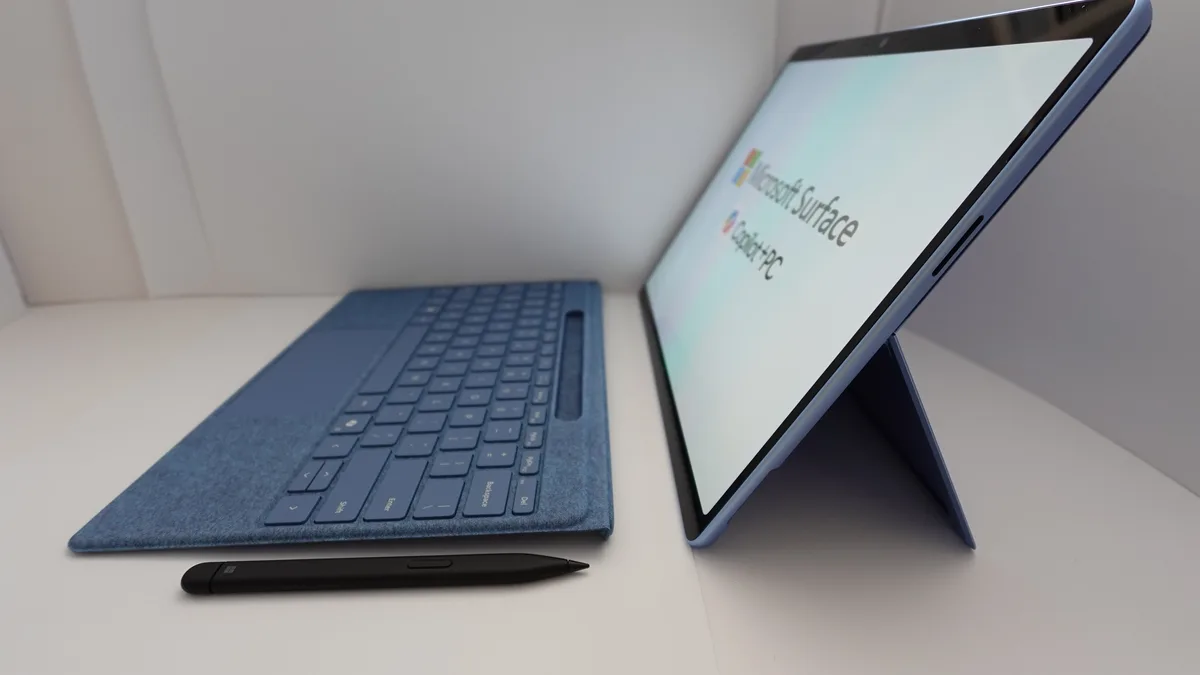
A detachable splits into two parts. The screen holds the whole computer: the processor, the memory, the storage and the battery. The keyboard is a separate piece that clicks on with magnets or a connector when you want to type, and comes off when you want a pure tablet. The Microsoft Surface Pro 11 is the classic example, with a kickstand built into the back of the screen and a keyboard cover that doubles as a screen protector.
Detachables are the lighter tablet and the more flexible traveller. The screen alone weighs under two pounds on the Surface Pro 11, so it feels like a real tablet in your hands, not a laptop folded in half. Many detachable keyboards also add extra ports or a second battery, which helps on long days away from a socket.
The trade-off is stability and cost. A detachable keyboard on a kickstand is less steady on your lap than a laptop with a fixed hinge, so long typing sessions on a sofa or a train seat can feel wobbly. And the keyboard and pen are often sold separately, so the price on the box is not always the price you end up paying. Always add the keyboard and pen to the budget before you compare prices.
| Convertible 2-in-1 | Detachable 2-in-1 | |
|---|---|---|
| How it changes shape | 360-degree hinge folds the screen back | Screen pops off the keyboard |
| Keyboard | Always attached, never lost | Separate piece, often sold apart |
| Tablet feel | Heavier, keyboard on the back | Light, feels like a real tablet |
| Typing on your lap | Stable, like a normal laptop | Wobbly on a kickstand |
| Typical examples | Lenovo Yoga 9i, HP OmniBook X Flip 14 | Microsoft Surface Pro 11 |
| Best for | Typing often, one device for everything | Reading, drawing, travelling light |
The four modes, and when each one actually helps
A 2-in-1 is not just two devices. In practice it has four positions, and each one suits a different moment. Knowing them helps you judge whether you would actually use the flexibility or just pay for it.
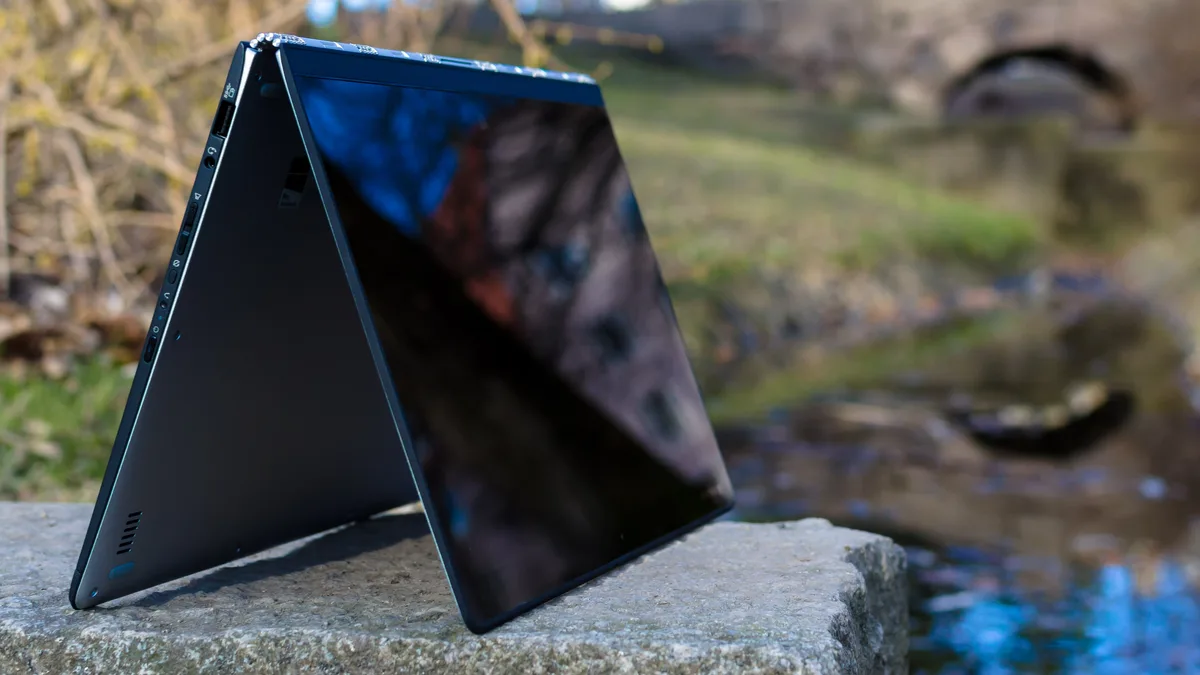
Laptop mode is the normal position, screen up, keyboard in front, and it is where you will spend most of your time. Tablet mode is the screen folded back or detached, held in your hands for reading, annotating a PDF or sketching with a pen. Tent mode stands the machine upside down like a tent, screen facing out, which is ideal for watching a film in a hotel room or showing a video to someone across a table. Stand mode pushes the screen back and uses the keyboard as a base, so the screen faces you at a comfortable angle for a video call or a presentation.
The modes are genuinely useful, but be honest with yourself about which ones you would use. If you mostly type at a desk, you will live in laptop mode and the other three are a bonus you rarely touch. If you read a lot, take handwritten notes, or present to people face to face, the modes are the whole reason to buy one.
2-in-1 laptop vs a regular laptop
A regular laptop does one thing: it sits open on a desk or a lap and you type on it. A 2-in-1 does that too, and then folds or splits into a tablet. The question is what you give up for the extra trick.
The main trade-offs are weight, thickness and cooling. A touchscreen layer and a stronger hinge add weight, and a slim body leaves less room for fans and a big battery. That is why the fastest gaming and workstation laptops are almost never 2-in-1s: they need the space and the cooling that a folding design cannot spare. Our comparison of a gaming laptop vs a regular laptop shows the same logic at work, because the machine built for one job usually does that job better than a machine built for two.
On the other side, a 2-in-1 is usually lighter and more portable than a regular laptop of the same screen size, because the whole category is built around thin and light designs. If your work is writing, browsing, video calls and light creative work, a 2-in-1 does all of it, and the tablet mode is a real bonus rather than a gimmick. If your work is gaming, heavy video editing or 3D rendering, a regular laptop with a discrete graphics card will serve you better for the same money.
| 2-in-1 laptop | Regular laptop | |
|---|---|---|
| Modes | Laptop, tablet, tent, stand | Laptop only |
| Touchscreen | Always, with pen support on most models | Usually no touch at all |
| Weight | Light, built for carrying | Varies, often heavier at the same price |
| Performance ceiling | Mid-range, thin body limits cooling | Higher, including gaming and workstation models |
| Ports | Fewer, mostly USB-C | Often more, including full-size ports |
| Price for the same specs | Higher, you pay for the hinge and touch | Lower, you pay for the hardware only |
2-in-1 laptop vs a tablet
A tablet and a 2-in-1 look similar in tablet mode, but they start from opposite places. A 2-in-1 is a laptop that can behave like a tablet. A tablet is a tablet first, and a keyboard is an optional extra you clip on.
The operating system is the biggest difference. A 2-in-1 runs a full desktop system, so it runs desktop software, manages files like a computer, and connects to printers, external monitors and work networks without workarounds. A tablet runs a mobile system built around apps from an app store, which is fine for browsing, streaming and light work, but can be limiting when your school or employer expects a specific desktop program.
The keyboard is the second difference. A 2-in-1 always has a hardware keyboard option, either attached or detachable, with a trackpad. A tablet may have a keyboard case, but it is often an extra purchase, and typing on it for hours is rarely as comfortable. If you write essays, reports or long emails every day, the 2-in-1 is the better tool. If you mostly read, watch and scroll, a tablet is lighter, cheaper and lasts longer on a charge.
There is one case where the line blurs: a tablet with a good keyboard and a desktop-class system, such as an iPad Pro with a Magic Keyboard. That combination can replace a laptop for light work, but it still runs a mobile system, and the keyboard and the tablet together often cost as much as a 2-in-1. For most buyers, the rule is simple. Buy the tablet if touch-first media is your whole use. Buy the 2-in-1 if you also need to type and run desktop software every day.
The real pros of a 2-in-1 laptop
One device instead of two is the headline benefit, and it is a real one. A 2-in-1 replaces a laptop and a tablet in your bag, which means one charger, one set of files, and nothing to sync between devices. For a student moving between lectures or a traveller working from hotel rooms, that simplicity is worth a lot.
Touch and pen support change how you work with a screen. Handwritten notes stick better than typed ones for many students, and a pen makes annotating a PDF, sketching an idea or signing a document feel natural instead of fiddly. That is why the best laptops for note taking are so often 2-in-1s: our guide to the best laptops for note taking is full of convertibles and detachables, and the pen is the reason. The same applies to creative work: a laptop for Silhouette Cameo craft work benefits from a touchscreen and a pen when you are tracing and editing designs.
Flexibility in how you hold it is the third benefit. Tent mode turns a small hotel desk into a cinema. Stand mode makes video calls comfortable without a laptop stand. Tablet mode lets you read in bed or on a plane without a keyboard digging into your knees. None of these is life changing on its own, but together they mean the machine adapts to the moment instead of forcing you to adapt to it.
Portability rounds out the list. The whole category is built thin and light, with efficient processors and all-day battery ambitions. A sensible target is eight hours of real mixed use, which is enough for a working day away from a socket, though you should treat the manufacturer’s headline battery number with care, because it is measured under ideal conditions. Our guide on how to check battery health is worth reading once you own one, because a battery that holds its charge is what keeps a portable machine portable.
The honest cons of a 2-in-1 laptop
The first con is that it is a compromise as both a laptop and a tablet. A convertible in tablet mode is heavier than a real tablet, because you are holding the keyboard too. A detachable on your lap is less stable than a real laptop, because a kickstand is not a hinge. If you only ever type, or only ever read, a dedicated device does its one job better.
The second con is the moving parts. A 360-degree hinge or a detachable connector is a mechanical weak point that a normal laptop does not have. Good ones last for years, but cheap ones develop wobble, and a hinge repair is not a cheap fix. Read long-term reviews of the exact model before you buy, and look for hinge complaints specifically.
The third con is performance for the price. Slim bodies limit cooling, so most 2-in-1s use efficient mid-range processors and integrated graphics rather than powerful discrete GPUs. They handle office work, study, browsing and light photo editing comfortably, but they are not gaming machines. If you play demanding games, a dedicated gaming laptop with a real graphics card is a better buy, and our guide to how to increase FPS on a gaming laptop shows how much headroom a proper gaming machine has. If you are unsure how much graphics power a game needs, our guide on how to check VRAM explains the number that decides it.
The fourth con is cost. You pay extra for the hinge, the touchscreen and the pen, so a 2-in-1 usually costs more than a regular laptop with the same processor and memory. The pen and the keyboard on a detachable are often sold separately, which pushes the real price higher than the headline price. Add every accessory to the budget before you compare models, or the comparison will mislead you.
The fifth con is repairability. Thin, glued-together designs with soldered memory are harder to open and fix than a chunky traditional laptop. If you plan to keep the machine for five years, that matters: a laptop you cannot repair is a laptop you replace sooner.
Who should buy a 2-in-1 laptop?
Students are the clearest match. Lectures need a keyboard for typing and a pen for diagrams, and a single light device that does both is easier to carry than a laptop plus a tablet. Psychology students, who juggle readings, statistics software and long essays, get the same benefit, and our guide to the best laptops for psychology students shows what that workload needs. If your course involves a lot of handwritten notes, a 2-in-1 with a good pen is the most practical choice you can make.
People who present or teach are the second match. Tent and stand modes let you face a room while the screen faces you, and annotating a slide with a pen during a talk feels natural. Hybrid workers who move between a desk, a meeting room and home get the same benefit: one device that changes shape instead of three devices that need syncing.
Creative hobbyists are the third match. Sketching, photo markup, and light design work are all better with a pen on a touchscreen than with a mouse. You do not need a workstation for that, and a mid-range convertible is usually enough.
Travellers are the fourth match. One light device, one charger, and a tablet for the flight home is a combination that is hard to beat when bag space is limited.
Who should skip a 2-in-1 laptop?
Gamers should skip it. A 2-in-1 cannot cool a powerful graphics card, and the touchscreen adds cost without adding frames. A dedicated gaming laptop is a better buy at the same price, and our roundup of the best gaming laptops under $1,500 shows what that money buys when every dollar goes to performance.
Video editors and 3D artists should usually skip it too, for the same reason: the work needs sustained power and cooling, and a thin folding body is the wrong shape for that. The same applies to anyone who runs heavy simulations, compiles large codebases or renders all day.
Desk-only typists should also think twice. If the laptop never leaves your desk, and you never draw, present or read handheld, you are paying for flexibility you will never use. A regular laptop with the same money buys you a better screen, more storage or a faster processor.
Finally, anyone on a tight budget should compare carefully. The cheapest 2-in-1s often cut corners on the hinge, the screen or the pen, and a cheap folding laptop with a wobbly hinge is worse than a solid regular laptop at the same price.
What to check before you buy a 2-in-1 laptop
Start with the design, because it decides everything else. If you type for hours every day, pick a convertible: the keyboard is always there and the machine is stable on your lap. If you read, draw and travel more than you type, pick a detachable: the tablet alone is light enough to hold for a long session. Try both in a shop if you can, because the difference is something you feel in your hands, not something a spec sheet can show you.
Next, check the screen. Size matters more than resolution here: 13 to 14 inches is the sweet spot for carrying, while 15 to 16 inches suits a machine that mostly sits on a desk. Our guide to laptop screen sizes shows the real dimensions of every common size, and our comparison of 14 vs 15.6 inch laptops helps you choose between the two most common options. Look for a bright panel if you work near windows, and an OLED panel if colour accuracy matters to you, because the best 2-in-1 screens in 2026 are OLED.
Then check the pen. Ask three questions: is it included, does it charge in the machine or need a separate charger, and does the screen reject your palm while you write. A pen that costs extra, needs its own battery, or fights with your palm will end up in a drawer. The Lenovo Yoga 9i 2-in-1 includes its pen in the box, which is one reason it keeps topping recommendation lists, while the Surface Pro 11 sells its Slim Pen separately, so add it to the price before you decide.
Performance is simpler than it looks. For writing, study and office work, a current mid-range processor with 16 GB of RAM and a 512 GB SSD is enough, and it is the same target our guide on what to consider when buying a laptop recommends for most buyers. Step up to a faster processor only if you edit photos, run virtual machines or keep the machine for five years. If you want a concrete example of a mid-range convertible to compare against, the Lenovo Yoga 7 2-in-1 is the model most buyers end up measuring the rest against, and it is a useful baseline for screen quality, weight and pen support.
Battery and weight come next. Aim for eight hours of real mixed use, and check the weight with the keyboard attached, not just the tablet alone, because that is the weight you will actually carry. A convertible that weighs under 1.5 kg is comfortable in a bag all day. A detachable tablet under 1 kg is comfortable in your hands.
Finally, check the price honestly. Add the pen, the keyboard if it is separate, and a case, then compare that total against a regular laptop with the same specs. Our guide on how much a laptop costs shows what each price band buys, and our comparison of the best laptop brands shows how Dell, HP, Lenovo, Apple and ASUS stack up in 2026. If the 2-in-1 still looks worth it after the honest total, it probably is.
Mistakes buyers keep making
The most common mistake is buying for the idea of a 2-in-1 instead of the reality of your day. If you never draw, never present, and never read handheld, the folding screen is a feature you paid for and never use. Before you buy, count how many times in a normal week you would actually switch modes. If the answer is once or never, buy a regular laptop and spend the difference on a better screen or more storage.
The second mistake is forgetting the accessories in the budget. A detachable without its keyboard is a tablet with a desktop operating system, and a pen bought separately can cost as much as a budget tablet. Add everything to the total before you compare prices.
The third mistake is choosing the wrong size. A 16-inch convertible sounds generous until you try to hold it in tablet mode, and a 13-inch detachable sounds portable until you try to type a long essay on a small keyboard. Size is the decision you live with every day, so try the exact model in a shop when you can.
The fourth mistake is ignoring the hinge in reviews. A 2-in-1 lives or dies by its hinge, so search reviews of the exact model for words like wobble, creak and loose. A hinge problem that shows up in the first month will only get worse, and it is the one repair you cannot do yourself.
One last check if you are replacing an old machine rather than buying your first: make sure the old one is actually finished. If it is only slow or only the battery is tired, a new battery or a clean install can give it another year. Our guide on how to tell how old your laptop is helps you judge where it stands before you spend money on a replacement.
A 2-in-1 laptop means one device that works as a laptop and a tablet, and for the right buyer it is the most practical computer you can own. For the wrong buyer it is a compromise that costs extra. The test is simple: if you can name three moments in a normal week when you would fold it, detach it or draw on it, buy one. If you cannot, buy a regular laptop instead.
What is the point of a 2-in-1 laptop?
The point of a 2-in-1 laptop is to give you a full Windows laptop and a touchscreen tablet in one device. You get a proper keyboard and trackpad for work, plus touch, pen support and modes like tablet or tent for drawing, reading and watching video. That means you carry one device to lectures, meetings or on a trip instead of juggling a separate laptop and tablet.
What is the difference between a 2-in-1 laptop and a normal laptop?
A 2-in-1 laptop has a touchscreen and a hinge or detachable keyboard that lets it switch between laptop, tablet, tent and stand modes, while a normal laptop stays in a standard clamshell shape and usually has no touch at all. A 2-in-1 focuses on versatility and portability, sometimes with slightly lower performance for the price, while a normal laptop usually offers more power, better cooling and more ports for the same money.
What is the difference between a convertible and a detachable 2-in-1?
A convertible 2-in-1 uses a 360-degree hinge, so the screen folds back behind the keyboard and the keyboard stays attached in every mode. A detachable 2-in-1 splits into two parts: the screen holds the whole computer and pops off to become a tablet on its own, while the keyboard clicks on only when you want to type. Convertibles are more stable for typing on your lap, while detachables feel lighter and more like a real tablet.
Are 2-in-1 laptops worth buying in 2026?
Yes, a 2-in-1 laptop is worth buying in 2026 if you value touch, pen input and flexibility. Current models include powerful convertibles and detachables with OLED screens, long battery life and modern processors, and they suit students, hybrid workers and creatives well. If you only type at a desk, or you need serious gaming or workstation power, a traditional laptop will suit you better for the same money.
Is a 2-in-1 laptop or a laptop and tablet better?
Neither option is universally better, and it depends on how you use your tech. A 2-in-1 laptop is better if you want one device that handles typing, touch and light tablet tasks, because it reduces clutter and costs less than buying two devices. A separate laptop and tablet is better if you want the best typing experience and the lightest tablet, and you are happy to carry and charge two devices.
Can a 2-in-1 laptop replace a tablet?
Yes, a 2-in-1 laptop can replace a tablet for most people, especially a detachable like the Surface Pro 11, whose screen alone feels like a real tablet. It runs full desktop software, has a keyboard when you need one, and handles reading, drawing and video just as well as a tablet. The only people who should keep a separate tablet are those who want the lightest possible device for reading, or who prefer a mobile operating system and its apps.