Why Are ThinkPads So Expensive?
Quick Answer: ThinkPads cost more than most consumer laptops with the same chip, and most of the premium pays for real engineering, not the brand name. A ThinkPad is built for business buyers who type all day, travel constantly and keep a laptop for five years. You pay for MIL-STD-810H durability testing, a spill-resistant keyboard with the red TrackPoint, carbon fiber and magnesium build, business security such as ThinkShield and vPro, and three-year onsite support options. The cheapest ThinkPad E series starts at about $1,015, while the flagship X1 Carbon Gen 13 starts at about $2,000. Whether the premium is worth it depends on how you use the laptop, and there are smart ways to pay less for one.
ThinkPad prices at a glance
| Line | Built for | Starting price | What the money buys |
|---|---|---|---|
| E series | First business laptop, small offices | About $1,015 | A real ThinkPad keyboard and durability testing at the lowest price |
| T series | All-day business use | About $1,610 | Brighter 400-nit screen, two memory slots, 5G option, 3-year warranty |
| X1 Carbon | Executives and frequent flyers | About $2,000 | Under 1 kg carbon fiber body, 2.8K OLED option, premium everything |
| P series | Workstations, CAD and 3D work | About $2,500 | Top processors, professional graphics, up to 128 GB of memory |
That table is the short version. The cheapest ThinkPad is a genuine business laptop, and the dearest ones are built for people whose laptop earns their living. Our comparison of ThinkPad E vs T series shows what the $500 gap between the two main business lines actually buys, and our guide to ThinkPad vs IdeaPad vs Yoga explains where the ThinkPad family sits inside Lenovo’s whole range. The rest of this guide breaks down the seven reasons ThinkPads cost more, one by one.
1. They are built for business buyers, not bargain hunters
The first reason is who buys them. Lenovo sells most ThinkPads to companies, schools and government offices, buyers who order hundreds of laptops at a time and care about support contracts, security and parts availability for years. Those buyers do not shop by the sale price on a retail shelf, so Lenovo does not design ThinkPads to win a spec-sheet fight at $699.
Business laptops also ship with Windows 11 Pro instead of Home. Pro adds BitLocker drive encryption, domain joining and remote management, which offices need and which costs more per license. Many ThinkPad configurations add Intel vPro or AMD Ryzen PRO processors, which let an IT department manage and secure the laptop remotely. You will never use those features at home, but the company buying 500 laptops will, and the price reflects that.
That business focus also explains the sales pattern. Consumer laptops live and die by holiday discounts, while ThinkPads hold a steadier price because companies buy on contract cycles. If you are a home buyer, the E series is Lenovo’s answer to that gap: a real ThinkPad at a consumer-ish price, with the same keyboard and the same durability testing as the dearer lines.
2. The durability testing is real, and it costs money
Every ThinkPad is tested against the US Department of Defense MIL-STD-810H standard. Lenovo describes its testing as meeting or exceeding 12 standards, 26 procedures and more than 200 quality checks, covering drops, vibration, dust, humidity, extreme temperatures and low pressure at altitude. That is not a sticker on the box. It means the chassis, the hinges, the keyboard and the ports are designed and then proven to survive conditions that would kill a normal consumer laptop.
The keyboard is spill resistant, with channels that guide liquid away from the electronics, and the chassis uses an internal roll cage design that spreads the force of a knock instead of letting it reach the screen or the motherboard. The T series uses magnesium and aluminium alloys, while the E series uses an aluminium body that is solid for the price. All of that material and design time costs money, and a plastic consumer laptop skips most of it.
One honest limit: a ThinkPad is tough, not rugged. It will survive a knock in a bag, a coffee spill and years of daily travel, but it is not built to be dropped on concrete or used in heavy rain. If your work really is that rough, read our comparison of fully rugged vs semi-rugged laptops and our picks for the best rugged laptops before you buy, because that is a different class of machine with a different price.
3. Premium materials: carbon fiber and magnesium
The flagship X1 Carbon shows where the money goes most clearly. Its lid is carbon fiber and its base is magnesium, and the whole laptop weighs from 986 grams, under 1 kg for a full 14-inch business machine. Most 14-inch consumer laptops weigh 1.4 to 1.6 kg, so the X1 Carbon is about a third lighter while still passing the same MIL-STD-810H tests. Light and strong at the same time is expensive. Heavy and strong is cheap, and light and flimsy is cheap, but a laptop that is both light and tough needs costly materials and careful engineering.
The current model is the Lenovo ThinkPad X1 Carbon Gen 13, which starts at about $2,000 at Lenovo and around $2,500 for higher configurations, with a 2.8K OLED 120 Hz display option, 32 GB of fast memory and a 57 Wh battery in a body under 1 kg. You pay for the materials, the screen and the engineering that fits a full workday laptop into that weight.
The T series gets the same idea at a lower price. Magnesium alloys keep the T14 at 1.27 kg, slightly lighter than the cheaper E14, even though the T14 is the dearer machine. That is the pattern across the whole range: you pay more, and the laptop gets lighter, tougher and better equipped at the same time.
4. The keyboard and the TrackPoint
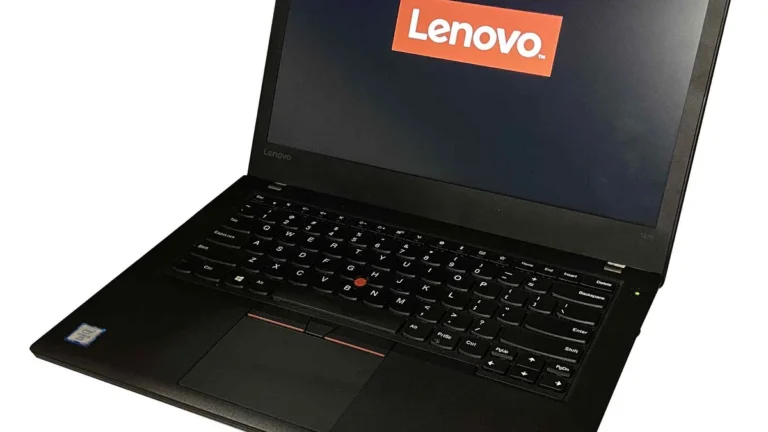
Ask anyone who types for a living why they like a ThinkPad and the answer is the keyboard. ThinkPad keyboards have deep key travel, well-shaped keys and a firm, consistent feel, and reviewers have rated them the best laptop keyboards for years. The red TrackPoint in the middle lets you move the cursor without lifting your hands from the home row, which sounds small until you have used it for a full working day.
That keyboard is also spill resistant and backlit on most models, and it is built to survive millions of keystrokes across years of daily use. A cheap consumer keyboard feels fine in a shop and tired after a year. A ThinkPad keyboard is designed for eight hours a day, five days a week, for five years, and the parts and the testing behind that cost money.
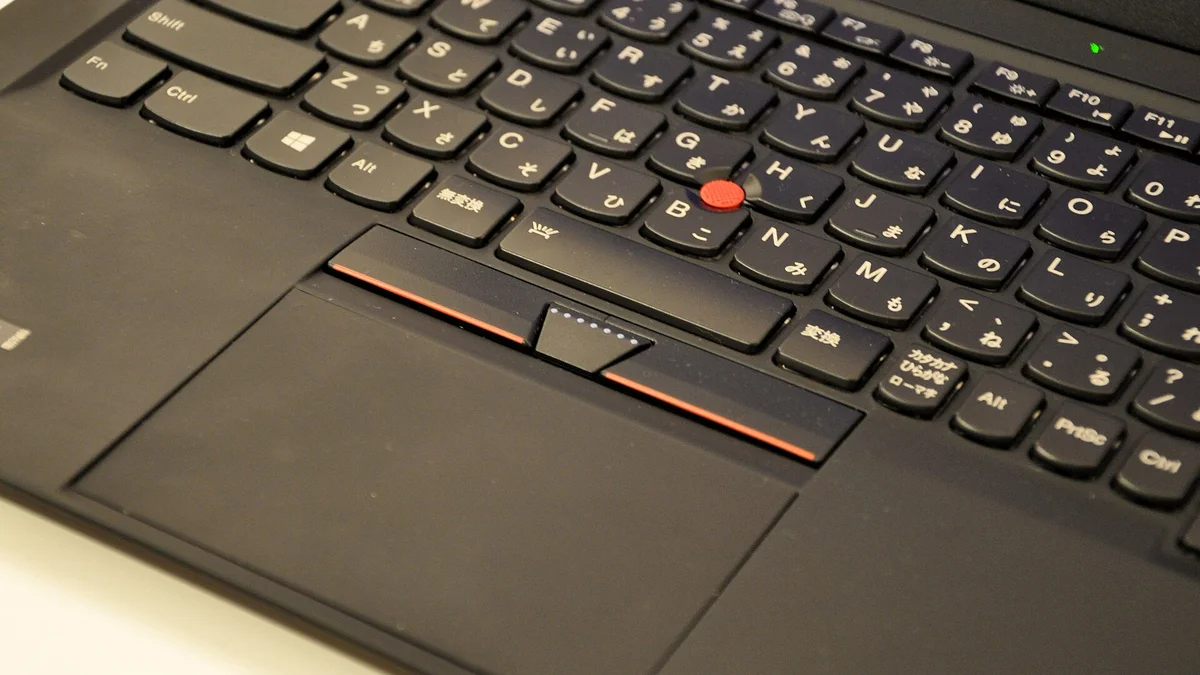
This is also the feature that explains why ThinkPads keep their fans. The screen, the chip and the battery all get better every year, but the keyboard is the part you touch all day, and Lenovo has protected it for more than 30 years. Our guide to the best laptop brands puts Lenovo first for work overall, and the keyboard is a large part of that ranking.
5. Business security and manageability
ThinkPads carry a security stack that consumer laptops mostly skip. The ThinkShield suite covers the BIOS, the firmware and the operating system, a TPM 2.0 security chip stores encryption keys in hardware, and most models add a fingerprint reader, an infrared camera for Windows Hello face login and a physical webcam privacy shutter. Higher configurations add a PrivacyGuard screen that blocks shoulder surfers and self-healing BIOS protection.
On top of that, vPro and Ryzen PRO processors give IT departments remote management, remote wiping and hardware-level security features. None of this shows up in a benchmark, and none of it matters to a home user watching videos. But for a company laptop that holds client data and travels through airports, it is the difference between a manageable fleet and a security risk, and Lenovo charges for it.
The support behind the security matters too. ThinkPads get BIOS and driver updates for years, and Lenovo keeps spare parts available long after consumer models are forgotten. That long support tail is part of what you pay for, and it is why a five-year-old ThinkPad can still be a sensible buy.
6. Support, warranty and repairability
A consumer laptop usually comes with a one-year mail-in warranty: you post it away and wait. ThinkPads offer three-year onsite warranty options, with a technician who comes to you, and Premier Support with faster response times. For a company, a dead laptop is a dead employee for a day, so onsite repair is worth real money. For a home buyer, the same warranty is peace of mind that the laptop is your livelihood.
Repairability is part of the same story. iFixit scores the E14 Gen 7, the E16 Gen 3 and the T14 Gen 6 at 9 out of 10 for repairability, and the newer T14 Gen 7 at a provisional 10 out of 10. The T14 battery is listed as customer-replaceable, and most models use standard memory slots and M.2 drives you can swap yourself. A laptop you can repair is a laptop you can keep, and that feeds straight into the next reason.
If you buy a ThinkPad second hand, check the battery before you pay. Our guide on how to check battery health on Windows 11 shows the built-in report that reveals the real capacity, and our guide on how to limit laptop battery charge to 80 percent shows how to stretch whatever life is left.
7. They last longer and hold their value
The last reason is the one that makes the maths work. ThinkPad owners commonly report five to seven years of daily service from one machine, where a cheap consumer laptop often feels slow or falls apart after two or three. Run the numbers: a T14 at about $1,610 kept for five years costs about $320 a year, while an $800 consumer laptop replaced after two and a half years costs the same per year, plus the hassle of moving your files and settings twice as often.
That long life also shows up in resale value. Used ThinkPads hold their price better than most consumer laptops, because buyers know the keyboard, the build and the parts support. When your old machine finally retires, our guide on how to sell your used laptop shows where to sell it and what it is worth, and our guide on how to tell how old a laptop is helps you check the generation on any used ThinkPad before you buy it.
Generation matters more than the badge. A current E14 Gen 7 will beat a three-year-old T14 in most jobs, because the newer chip, faster memory and better efficiency count for more than the letter on the lid. That is why the smartest check before you buy is the generation number, not the series.
Are ThinkPads worth the extra money?
For the right buyer, yes. Buy a ThinkPad if the laptop earns your living, if you type for hours every day, if you travel with it constantly, if you plan to keep it for four or five years, or if you need Windows 11 Pro, vPro management or a three-year onsite warranty. In those cases the keyboard, the build, the security and the support pay for themselves.
Skip the premium if your laptop mainly browses, streams and handles documents, if you replace your laptop every two years anyway, or if you need graphics power for games. A gaming laptop gives you far more graphics performance per dollar, and our picks for the best gaming laptops under $700 show what that money buys on the gaming side. A ThinkPad is a work machine first, and paying for business durability you never use is wasted money.
The middle ground is the E series. It is a genuine ThinkPad with the same keyboard, the same TrackPoint and the same MIL-STD-810H testing, at about $1,015 to start. If your budget is tighter still, our picks for the best business laptops under $800 narrow the ThinkPad and Dell business ranges to the models worth buying.
How to buy a ThinkPad without overpaying
ThinkPads are rarely worth full list price, because Lenovo runs sales and e-coupons that regularly cut $200 to $400 off configured prices. These five habits save the most money.
- Buy the previous generation. A T14 Gen 6 or an X1 Carbon Gen 12 does the same office work as the new model for hundreds less, and Lenovo’s own outlet often carries them.
- Wait for a sale or an e-coupon. Lenovo discounts ThinkPads often, and a configured-to-order model on sale beats a base model at full price.
- Pick the E series when the T adds nothing you need. If the laptop lives on a desk, never leaves Wi-Fi and gets replaced every two or three years, the E14 does the same work for about $500 less.
- Buy memory and storage at purchase on soldered models. The X1 Carbon and some Copilot+ models have soldered memory you cannot upgrade later, so 16 GB is the minimum and 32 GB is the safe pick. Our guide on how much RAM you need uses the same logic, and our comparison of DDR4 vs DDR5 in laptops explains what the newer memory standard actually changes.
- Check the generation before you pay. A deal that looks too good may be last year’s chassis sold as new, so confirm the processor and the generation number in the specification, and walk away from any listing that hides them.
The premium is real, but so is the value behind it. A ThinkPad costs more because it is designed to be typed on all day, carried everywhere, secured by an IT department and kept for five years. If that is your laptop, it is money well spent. If it is not, the E series or a good consumer laptop will serve you better, and you will have saved the difference.
Frequently Asked Questions
Why are ThinkPads more expensive than IdeaPads?
Because they are built for different buyers. ThinkPads are business laptops with MIL-STD-810H durability testing, a spill-resistant keyboard, carbon fiber or magnesium build, ThinkShield security, vPro or Ryzen PRO management and three-year onsite warranty options. IdeaPads are consumer laptops built to a price, with cheaper materials, simpler testing and a one-year warranty. The same chip in both machines does not make them the same laptop.
Is a ThinkPad worth it for a student?
Yes, if you buy the right one. The E14 is the best value for most students: it handles documents, browsing, video classes and light creative work, and it costs about $500 less than a T14. Buy it with 16 GB of memory and a 512 GB drive, and check the memory is SODIMM so you can upgrade it later. Students who carry the laptop all day and can stretch the budget should look at the lighter T14 instead, and the X1 Carbon is overkill for school.
Do ThinkPads last longer than other laptops?
Yes, in normal use. ThinkPad owners commonly report five to seven years of daily service, against two to three years for many cheap consumer laptops. The reasons are the MIL-STD-810H tested build, the spill-resistant keyboard, the repairable design with standard memory and storage slots, and Lenovo’s long driver and parts support. The battery is the part that wears out first, so check its health on any used ThinkPad.
Why is the X1 Carbon so expensive?
The X1 Carbon is the flagship, and its price comes from its materials and its screen. The lid is carbon fiber and the base is magnesium, which keeps the whole laptop under 1 kg while still passing MIL-STD-810H testing, and the top configuration adds a 2.8K OLED 120 Hz display. It starts at about $2,000 at Lenovo and around $2,500 for higher configurations. You pay for a laptop that is both lighter and tougher than almost anything else at 14 inches.
Are ThinkPads overpriced for normal use?
For basic browsing, streaming and documents, yes, the premium buys durability and security you may never use. A good consumer laptop or an IdeaPad does that work for far less money. ThinkPads earn their price when the laptop is used all day for work, travels constantly, needs business security or has to last four or five years. If none of that applies to you, save the money.
What is the cheapest ThinkPad worth buying?
The E14 Gen 7 is the cheapest ThinkPad worth buying. It starts at about $1,015, and it is a genuine ThinkPad with the same keyboard, TrackPoint and MIL-STD-810H testing as the dearer lines. Buy it with 16 GB of memory and a 512 GB drive, and check the specification says SODIMM so the memory can be upgraded later. Avoid 8 GB configurations and any listing that hides the generation number.