DDR4 vs DDR5 RAM in Laptops: Does It Matter in 2026?
Quick Answer: DDR5 is faster than DDR4 in a laptop, but the difference is smaller than the headline numbers suggest. DDR5 starts at 4800 MT/s against a 3200 MT/s ceiling for standard DDR4, so it moves roughly 50 percent more data per second, yet with a dedicated graphics card most games gain only 3 to 10 percent. DDR5 matters most in thin laptops that rely on integrated graphics, where it can add 30 to 50 percent more frames. You cannot swap one for the other, so the choice is made when you buy the laptop, not later.
DDR4 vs DDR5 at a glance
The table covers the specs that actually affect a laptop buyer. Speeds are the standard JEDEC figures, not overclocked kits.
| Spec | DDR4 | DDR5 | Why it matters |
|---|---|---|---|
| Speed | 2133 to 3200 MT/s | 4800 to 6400 MT/s and higher | About 50 percent faster at the entry level |
| Bandwidth per module | About 25.6 GB/s | About 38.4 GB/s | Faster in heavy work |
| Voltage | 1.2 V | 1.1 V | Slightly lower power draw and heat |
| True latency | About 10 ns (3200 CL16) | About 10 to 17 ns | Modern DDR5 matches DDR4 |
| Channels per module | One 64-bit channel | Two 32-bit sub-channels | Better with several tasks |
| Largest stick | 32 GB | 64 GB | More room for heavy multitasking |
| Power control | On the motherboard | On the module (PMIC) | Cleaner power |
| Laptop pins (SODIMM) | 260 | 262 | Different notch, so they do not fit each other’s slots |
What changed inside DDR5
DDR5 is not just DDR4 running faster. Four design changes matter.
First, each DDR5 module is split into two independent 32-bit sub-channels instead of one 64-bit channel, so several small requests can be served in parallel instead of queuing behind one another.
Second, power regulation moved onto the module. DDR5 sticks carry their own power management chip, called a PMIC, while DDR4 relies on the motherboard.
Third, DDR5 doubles the memory banks from 16 to 32 and lengthens the burst length from 8 to 16.
Fourth, every DDR5 chip carries on-die error correction, which catches and fixes small errors inside the chip itself. It is not full ECC memory.
Speed and bandwidth: the headline difference
The headline number is the data rate, measured in MT/s, or mega transfers per second. Standard DDR4 tops out at 3200 MT/s, while DDR5 starts at 4800 MT/s and common laptop kits run at 5200 or 5600 MT/s. A single DDR4-3200 module moves about 25.6 GB/s, and a single DDR5-4800 module moves about 38.4 GB/s.
That extra bandwidth shows up most in work that constantly moves large amounts of data: video editing, virtual machines and memory-hungry work such as machine learning. For office work, browsing and streaming, it mostly sits unused.
Capacity matters more than speed. A laptop with 16GB of DDR4 feels faster in daily use than one with 8GB of DDR5, because running out of memory forces the system onto the much slower SSD.
Latency: the one number where DDR4 still competes
Latency is the delay between asking the memory for data and getting it. It is easy to misread, because the CAS latency number printed on a stick is counted in clock cycles, not in time. DDR5 runs at a much higher frequency, so more cycles can still equal the same amount of real time.
True latency in nanoseconds comes from a simple formula: CAS latency divided by speed, multiplied by 2000. DDR4-3200 CL16 works out to 10 nanoseconds, and a modern DDR5-6000 CL30 kit works out to 10 nanoseconds too. Early DDR5-4800 CL40 was genuinely slower at about 16.7 nanoseconds, but that penalty is gone in current kits.
For everyday use this barely registers.
Power use and battery life
DDR5 runs at 1.1 volts against 1.2 volts for DDR4, and its on-module power chip manages idle states more precisely. In practice the gain is small: published laptop tests put it at roughly 3 to 5 percent, about 15 to 25 minutes on a laptop that lasts eight hours.
The bigger battery factor is the type of DDR5. Many thin laptops use LPDDR5 or LPDDR5X, a low power variant soldered to the board. It is more efficient, but it cannot be upgraded later. Screen brightness, the processor and battery size move battery life far more than the RAM generation, and limiting the charge to 80 percent does more for long-term battery health than any memory choice.
RAM produces very little heat next to the processor and graphics chip, so if heat is your problem, look at the cooling system, not the RAM.
Gaming: how much faster is DDR5 really?
Most games are limited by the graphics card, not by memory speed. Independent testing by Digital Trends found rarely more than a 10 percent difference between DDR4 and DDR5 in real games. TechPowerUp and AnandTech recorded about 7 percent in Cyberpunk 2077 and about 6 percent in Shadow of the Tomb Raider.
The gap is wider at 1080p and almost invisible at 4K, where the graphics card does the heavy lifting. Faster memory also steadies frame times in asset-heavy open world games.
None of this makes DDR5 a must-have for a gaming laptop. The graphics card decides your frame rate far more than the memory does, and the power limit of that card matters just as much as its name, so check the TGP figure for the exact model before you buy. Our RTX 4050 vs RTX 4060 laptop comparison shows how much the card choice matters on its own. Given a choice between a faster graphics card with DDR4 and a slower card with DDR5, take the faster card every time.
What matters for gaming is capacity: 16GB is the sweet spot, and two matched sticks in dual channel mode beat a single faster stick.
Integrated graphics: where DDR5 makes the biggest difference
There is one situation where DDR5 is not a small upgrade but a large one: laptops without a dedicated graphics card. Integrated graphics have no memory of their own. They borrow system RAM, so the speed of that RAM is directly the speed of the graphics memory.
Published tests by LapTestPro on AMD Radeon 780M integrated graphics show the scale. Moving from DDR4-3200 to DDR5-6400 lifted GTA V from 52 to 78 FPS, Fortnite from 48 to 68 FPS, Valorant from 95 to 125 FPS and Cyberpunk 2077 from 22 to 32 FPS at 1080p. That is 30 to 50 percent from memory alone.
That makes DDR5, or better still LPDDR5X, the most important spec on a thin laptop used for light gaming. Prioritize fast memory over a slightly faster processor.
Can you upgrade a DDR4 laptop to DDR5?
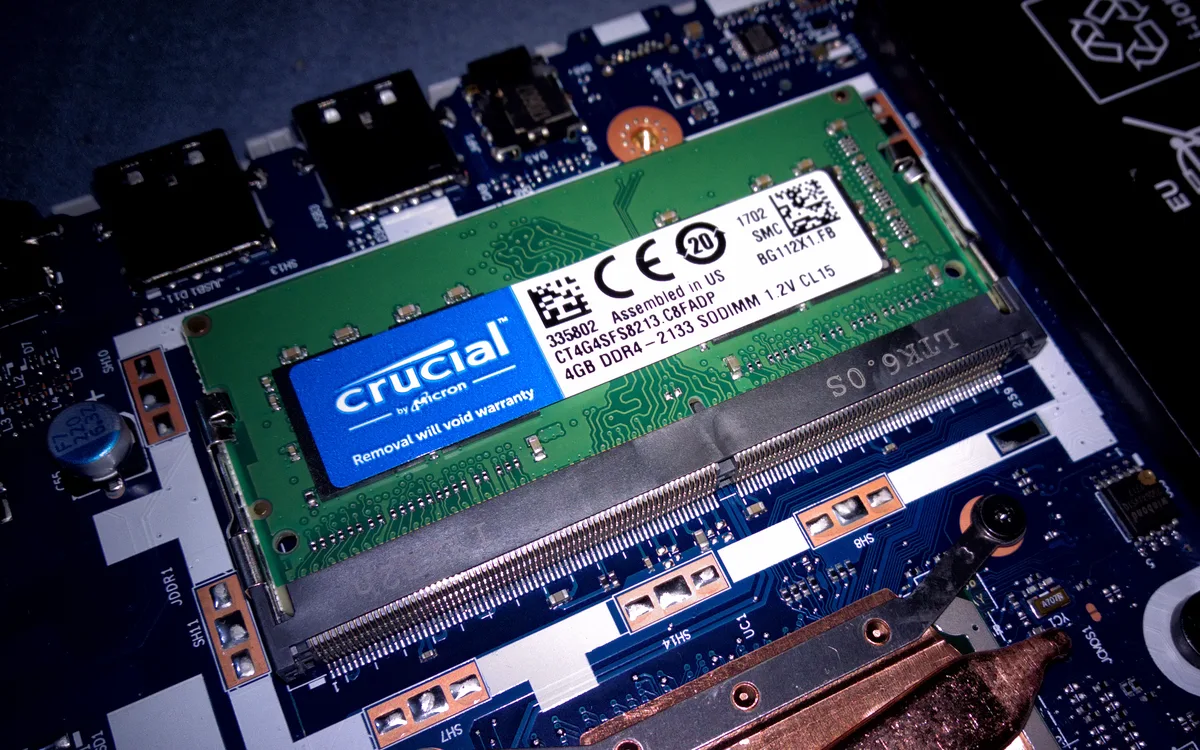
No. DDR4 and DDR5 are physically incompatible. A DDR4 laptop SODIMM has 260 pins and a DDR5 SODIMM has 262, the notch sits in a different place, they run at different voltages, and the processor’s memory controller only speaks one generation. A DDR5 stick will not fit in a DDR4 slot, and even if it did, the laptop could not use it.
Upgrading would mean a new processor and a new motherboard, which in a laptop means a new laptop.
What you can do is add more memory of the same generation. If your laptop has SODIMM slots and runs 8GB of DDR4, moving to 16GB or 32GB of DDR4 is a real upgrade, and one of the best value improvements for an older machine. A 16GB DDR5-5600 SODIMM from a known brand such as Crucial is the usual upgrade stick for a DDR5 laptop with a spare slot. The same upgrade helps when you convert a normal laptop into a gaming laptop.
Thin laptops often solder the memory to the board instead, using LPDDR5 or LPDDR5X, and those machines cannot be upgraded at all.
How to check which RAM your laptop has
Before you buy an upgrade, check what is inside yours. On Windows 11, press Ctrl, Shift and Esc to open Task Manager, open the Performance tab and click Memory. The panel shows the type, DDR4 or DDR5, the speed in MT/s, how many slots are used, and the form factor. If it says SODIMM, the memory is in slots and can usually be replaced. If the form factor field is blank, the memory is probably soldered.
For more detail, the free tool CPU-Z shows the exact memory type, timings and slot population. The laptop maker’s support page for your exact model number lists the maximum memory and the supported speeds.
Which should you buy in 2026?
If you are buying a new laptop, buy DDR5. It is the standard now: Intel laptops from 12th generation Core processors onward and AMD laptops from Ryzen 6000 onward support it, and almost every new mid-range and gaming laptop ships with DDR5 or LPDDR5X.
If you already own a DDR4 laptop, keep it. DDR4 is still fast enough for office work, study, streaming and most gaming with a dedicated graphics card. Budget DDR4 laptops are still fair value for esports titles, and our best gaming laptops under 500 roundup lists several of them.
The buying order that matters is simple. First, the graphics card and processor for the work you actually do. Second, 16GB of memory as a minimum, 32GB if you edit video or run heavy multitasking. Third, the memory generation. And fourth, storage, because a laptop that is constantly full is slow whatever RAM it has. A mid-range machine around 1000 dollars with DDR5, 16GB and a current graphics card is the sensible default for most buyers in 2026. If you are still weighing a dedicated gaming machine against a general purpose one, our gaming laptop vs regular laptop guide walks through that choice.
Frequently Asked Questions
Is DDR5 RAM better than DDR4 for laptops?
Yes, but the advantage is smaller than the spec sheet suggests. Most games with a dedicated graphics card gain only 3 to 10 percent. The clear win is integrated graphics.
Can I replace DDR4 RAM with DDR5 in my laptop?
No. DDR4 and DDR5 modules have different pin counts, notch positions and voltages, and the processor only supports one generation. Moving to DDR5 means buying a new laptop.
How much faster is DDR5 than DDR4 in gaming?
With a dedicated graphics card, typically 3 to 10 percent at 1080p and almost nothing at 4K. With integrated graphics, tests show 30 to 50 percent higher frame rates.
Does DDR5 use less battery than DDR4?
Slightly. DDR5 runs at 1.1 volts instead of 1.2 volts, but tests show only about 3 to 5 percent longer battery life.
Is 16GB of DDR5 better than 32GB of DDR4?
It depends on the work. For gaming and general use, 16GB of DDR5 is usually enough. For video editing, virtual machines or heavy multitasking, 32GB of DDR4 is better.
How do I check if my laptop has DDR4 or DDR5?
Open Task Manager with Ctrl, Shift and Esc, go to the Performance tab and click Memory. It shows the type and speed.
The bottom line
DDR5 is the better memory and the right choice for any new laptop, but not a reason to replace a DDR4 laptop that still does its job. The generation matters most in thin laptops with integrated graphics. Everywhere else, capacity, dual channel mode and the graphics card decide how fast a laptop feels.
Sources
LapTestPro, DDR5 vs DDR4 RAM 2026. Hone, DDR4 vs. DDR5. Semiconductor Room, DDR4 vs DDR5. TechPowerUp and AnandTech figures as reported by KingSpec. Digital Trends findings as reported by Technwz.