ThinkPad vs IdeaPad vs Yoga: Lenovo’s Laptop Lines Explained
Quick Answer: There is no single best Lenovo line, because ThinkPad, IdeaPad and Yoga are built for different buyers. ThinkPad is the business line: tougher build, the best laptop keyboard, the red TrackPoint, MIL-STD-810H testing and business support. IdeaPad is the everyday value line: the cheapest way into a new Lenovo, aimed at students and home use. Yoga is the premium flexible line: 2-in-1 convertibles with touchscreens, bright OLED displays and a stylus, plus slim creator machines. Pick the line that matches your work, then judge the exact model, because a budget IdeaPad and a top ThinkPad have almost nothing in common except the name on the lid.
The three Lenovo lines at a glance
| Line | Built for | What you get | Watch out for |
|---|---|---|---|
| ThinkPad | Business and professional work | MIL-STD-810H build, best-in-class keyboard, TrackPoint, business security | Costs more for the same chip |
| IdeaPad | Students and everyday home use | Lowest prices, wide choice, light designs | Soldered RAM on many models, screen quality varies |
| Yoga | Creators and flexible working | 360-degree hinge, touchscreen, OLED, stylus | You pay for the hinge even if you never fold it |
| ThinkBook | Small business buyers | Business features in a normal-looking laptop | Sits between two lines, so compare it against both |
Lenovo sells more laptops than any other brand, and the range is the reason. It has a sensible machine at almost every price, from cheap IdeaPads to ThinkPads that offices buy by the thousand. That range is also the trap. The family name tells you who the laptop was designed for, not how good the exact machine in front of you is. A ThinkPad and a budget IdeaPad both say Lenovo on the lid, and they are not the same laptop. Our guide to the best laptop brands puts Lenovo first for work overall, and this guide explains which Lenovo line earns that reputation and which ones are simply cheap.
ThinkPad: the business workhorse
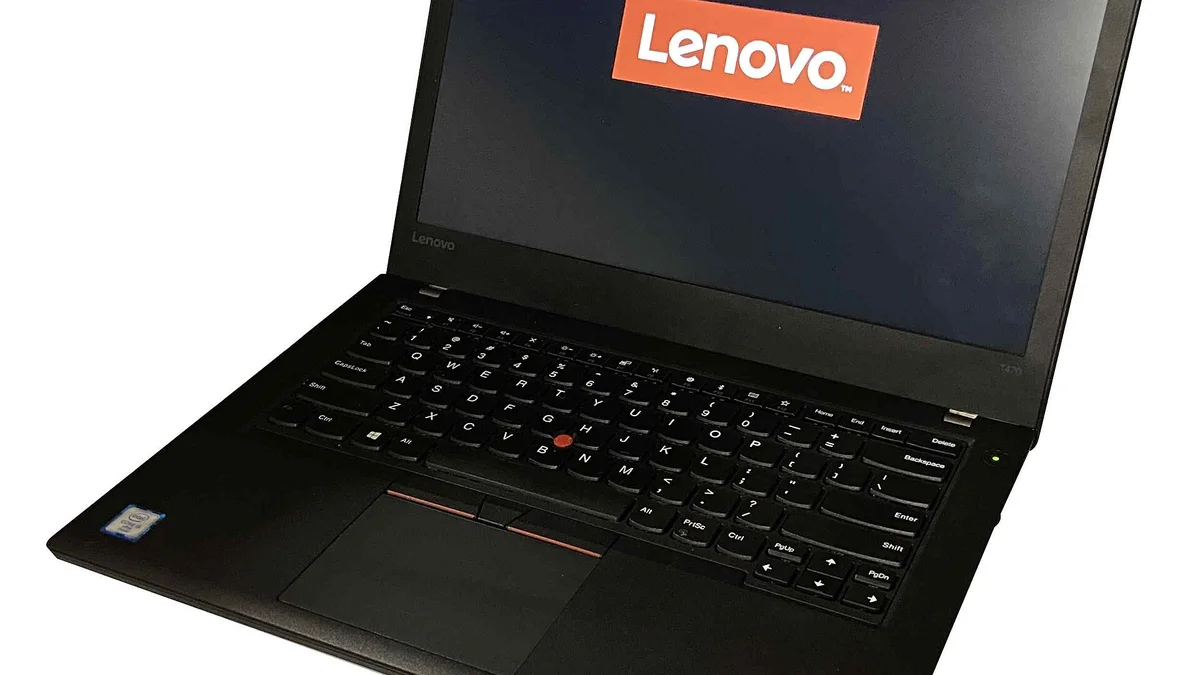
ThinkPad is the oldest name here. The line dates back to 1992, and it has been Lenovo’s business laptop family ever since Lenovo bought IBM’s PC business. Everything about a ThinkPad is built around one idea: a machine that survives years of daily work and is easy for an IT department to manage. ThinkPads are tested against MIL-STD-810H conditions for drops, dust, humidity and vibration, they carry spill-resistant keyboards, and their keyboards are still the ones other brands are measured against.
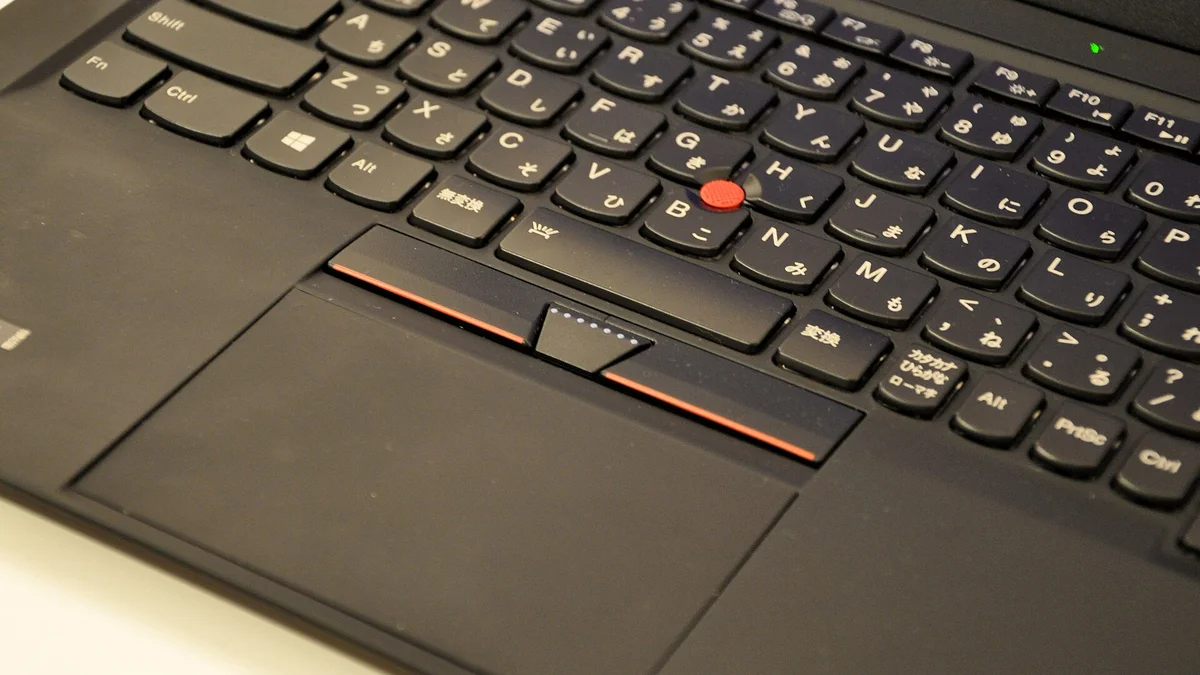
The red TrackPoint nub in the middle of the keyboard is the ThinkPad signature. It lets you move the cursor without lifting your hands from the home row, and people who type all day either love it or ignore it. The keyboard itself is the real selling point: on the current ThinkPad X1 Carbon Gen 13 the keys have 1.5 mm of travel, which is deep for a thin laptop, and the layout is full size with proper spacing. If you write, code or live in spreadsheets, this is the keyboard to beat.
The current flagship shows what the line is about. The Lenovo ThinkPad X1 Carbon Gen 13 starts at 986 g, which is under 2.2 lbs, and it still passes MIL-STD-810H testing. It runs Intel Core Ultra 7 chips, comes with up to 32 GB of memory, and the top screen option is a 14-inch 2.8K OLED panel running at 120 Hz. That combination of light weight and tough build is what business buyers pay for.
ThinkPad itself splits into tiers, and the tier matters as much as the name. The X1 series is the premium thin-and-light range, led by the X1 Carbon. The T series is the mainstream business range and the one most offices buy. The E series is the entry business range, cheaper and a little heavier. If your choice is between those two tiers, our ThinkPad E vs T series comparison breaks down the price, screen, memory and warranty differences. The P series is the workstation range for CAD, engineering and 3D work. If you only remember one thing, remember this: a ThinkPad E costs far less than an X1 Carbon for a reason, and that reason is build, screen and support, not the logo.
Security and support are the other half of the ThinkPad case. Most ThinkPads ship with a fingerprint reader, a TPM security chip, an IR camera for Windows Hello and Windows 11 Pro, and Lenovo sells them with business warranties that include on-site repair. IT departments also get tools to manage fleets of them, and the BIOS on a ThinkPad exposes the boot order and security settings those teams need. If you ever need to change a boot setting yourself, our guide on how to access the BIOS on a Lenovo laptop covers the key presses that work across the range. And when a Lenovo refuses to start at all, the fault is usually simple: our Lenovo laptop won’t turn on guide walks through the nine fixes that solve most cases.
One honest limit: a ThinkPad is tough, but it is not a rugged laptop. It will survive a knock in a bag and a coffee spill on the keyboard. It is not built to be dropped on concrete on a building site or used in heavy rain. If your work really is that rough, read our comparison of fully rugged vs semi-rugged laptops before you buy, because that is a different class of machine with a different price.
IdeaPad: the everyday value pick
IdeaPad is Lenovo’s general consumer lineup. Lenovo launched the line in 2008 for home and budget buyers who wanted a multimedia laptop, and that is still its job. If ThinkPad is the office machine, IdeaPad is the laptop for school, browsing, streaming and light work at home. It is also the cheapest way into a new Lenovo, and the range is huge, from basic machines for web browsing to much nicer ones that can handle photo editing and creative work.
The current range splits into three branches worth knowing. IdeaPad Slim is the thin-and-light branch, and it covers the widest price range, so check the exact specification rather than assuming every Slim is the same class. IdeaPad Pro is the step up, with stronger hardware and better displays for people who want to edit photos or video without paying Yoga prices. IdeaPad 2-in-1 is the convertible branch, with touchscreens and 360-degree hinges at a lower price than a Yoga.
The value is real, but so are the compromises, and they hide in the specification sheet. Many IdeaPads have soldered RAM, which means you cannot add more memory later, so buy the 16 GB version now if you can. Our guide on how much RAM you need covers the same logic for general use: 8 GB is enough for documents and browsing, 16 GB is the safe pick for anything heavier. The screens vary a lot too. A cheap IdeaPad can ship with a dim panel that washes out outdoors, while a Pro model can have a bright, sharp display. Check the brightness and resolution before you buy, not after, and our guide to laptop screen sizes shows what each size actually measures on a desk.
One more thing to check is the chip generation. Lenovo also sells Snapdragon-based IdeaPads that are marketed for very long battery life, and the efficiency is genuinely good, but some older Windows apps still run through emulation on those chips. If you buy one, confirm the programs you need run well on it first. The same warning applies to any laptop sold at a deep discount: it may be last year’s chassis, so read our guide on how to tell how old a laptop is before you pay.
Yoga: the premium flexible line
Yoga is the line people picture when they think of a laptop that folds backwards. The classic Yoga is a 2-in-1 convertible: a touchscreen on a 360-degree hinge that turns the laptop into a tablet, props it up in tent mode for watching video, or folds flat for drawing. That flexibility is the whole point, and it is why Yoga costs more than a similar IdeaPad with the same processor.
The current flagship is the Yoga 9i 2-in-1. The Gen 10 model pairs a 14-inch 2.8K OLED touchscreen running at 120 Hz with Dolby Vision support, Intel Core Ultra 7 chips, Wi-Fi 7 and a 75 Wh battery, and many regions bundle an active stylus with it. The screen is the star: OLED gives deep blacks and vivid colour that an IPS panel cannot match, and the 120 Hz refresh makes scrolling and pen input feel smooth. If you draw, annotate or present from your laptop, this is the Lenovo to look at first.
Yoga is no longer just the foldy one, though, and the name now covers four different kinds of machine. Yoga 2-in-1 is the traditional convertible. Yoga Slim is a normal clamshell laptop, thin and premium, with no hinge trick at all. Yoga Pro is the creator branch, with stronger processors and graphics for video editing and design work. And Yoga Book is Lenovo’s dual-screen experiment: the Gen 10 model has two 14-inch OLED touchscreens, each 2880 by 1800 at 120 Hz, with an 88 Wh battery and an Intel Core Ultra 7 chip. It is clever, but it is a specialist machine, not a safe first pick.
So who should buy a Yoga? Buy one if you will genuinely use the touch and tablet modes: note-taking with a stylus, sketching, presenting to a client, or watching video in tent mode on a plane. Do not pay for the hinge if you will only ever use the laptop open on a desk, because a ThinkPad or an IdeaPad Pro gives you more for the same money. Two practical notes: a touchscreen uses more battery than a plain screen, so check the battery health on any Yoga you buy second hand with our guide on how to check battery health on Windows 11, and treat the hinge gently, because it is the one part a normal laptop does not have to worry about.
ThinkBook: the one in between
ThinkBook is the line most buyers miss, and it exists for people who want business features without the ThinkPad look. You still get a lot of the things that make sense for work, like security features, business support options and plenty of ports, but the laptops look like normal silver consumer machines instead of traditional black ThinkPads.
The right way to judge a ThinkBook is to compare it against both neighbours. Against an IdeaPad, it usually brings a sturdier build, better support terms and a cleaner software load. Against a ThinkPad, it usually costs less but gives up some durability testing, the TrackPoint and the best keyboards. If you run a small business or you buy your own work laptop and you do not want to look like you borrowed it from the office, a ThinkBook is often the sensible middle ground. If you type all day for a living, the ThinkPad keyboard is still worth the extra money.
Head to head: ThinkPad vs IdeaPad vs Yoga
| Feature | ThinkPad | IdeaPad | Yoga |
|---|---|---|---|
| Build and durability | MIL-STD-810H tested, spill-resistant keyboard | Varies: metal on Pro, plastic on budget models | Premium metal, but glass screens are fragile |
| Keyboard | Best in the business, TrackPoint included | Good enough, varies by model | Good, but thinner keys on Slim models |
| Screen | Sharp IPS or OLED, often matte | Budget panels can be dim, Pro models are good | Bright OLED touchscreens, 120 Hz on flagships |
| Battery | Strong, with business power management | Good on Slim models, check the watt-hour rating | Shorter, touchscreens use more power |
| Price band | Highest for the same chip | Lowest, the value pick | Mid to high, you pay for the hinge and screen |
| Support | Business warranties, on-site repair | Standard consumer warranty | Standard consumer warranty, premium support extra |
The table hides one important truth: the chip does not decide the laptop. A Core Ultra 7 in an IdeaPad and the same chip in a ThinkPad will run the same programs at the same speed. What changes is the screen you stare at, the keyboard you type on, the battery that gets you through the day and the support you get when something breaks. That is what the price difference buys, and whether it is worth it depends entirely on how you use the machine.
Which Lenovo line should you buy?
Match the line to the job, then pick the model. Students on a tight budget should start with an IdeaPad Slim or IdeaPad Pro with 16 GB of RAM, and only pay for a Yoga if they will actually take notes with a stylus. Office workers who type all day should buy a ThinkPad, starting with the T series for the best balance of build and price, or the E series if the budget is tight. If your employer buys in bulk, the ThinkPad is the default for a reason, and our picks for the best business laptops under $800 narrow the ThinkPad and Dell business ranges to the models worth buying.
Creators, designers and anyone who presents from their laptop should look at Yoga first, with the Yoga 9i for the best screen and the Yoga Pro if the work involves video editing or 3D. Small business owners who buy their own machine should compare the ThinkBook against the ThinkPad E series before deciding, because the ThinkBook often wins on looks and price while the ThinkPad wins on keyboard and durability. And if you are choosing between Lenovo and another brand entirely, our best laptop brands comparison puts the whole market in context, with Lenovo the safest all-round pick for work.
Mistakes to avoid when buying a Lenovo
The most common mistake is judging by the family name alone. Two models with the same IdeaPad or Yoga label can use different processors, screens, memory arrangements and operating systems, so compare the exact configuration, not the badge. The second mistake is buying old stock sold as new. Lenovo refreshes these lines every year, and a laptop sold as a deal can be a 2023 or 2024 chassis. Check the generation before you pay, using our guide on how to tell how old a laptop is.
The third mistake is paying for a 2-in-1 hinge you never use. If the laptop will live open on a desk, a ThinkPad or IdeaPad Pro is the better buy. The fourth is ignoring soldered memory. On many IdeaPad and Yoga models the RAM cannot be upgraded, so the 8 GB version that looks cheap today becomes the slow machine in two years. Check whether the memory is soldered, and if it is, buy 16 GB. The same logic applies to the memory type: our guide to DDR4 vs DDR5 in laptops explains what the newer standard actually changes.
Finally, look after the battery once you own the machine. Lenovo’s Vantage software lets you limit the charge to extend battery lifespan, and our guide on how to limit laptop battery charge to 80 percent shows how to set it up on Lenovo, Dell, HP and ASUS machines. A laptop you keep for five years will thank you for it.
Frequently Asked Questions
Is ThinkPad better than IdeaPad?
For business work, yes. ThinkPads have tougher MIL-STD-810H tested builds, better keyboards with the TrackPoint, spill resistance and business support. For everyday home use and school, an IdeaPad is the better buy, because it costs far less for the same processor and the extra durability is not needed.
Is Yoga better than ThinkPad?
It depends on the job. Yoga is better for creators and anyone who uses touch, a stylus or tablet mode, thanks to its bright OLED touchscreens and 360-degree hinge. ThinkPad is better for typing all day, business security and long-term durability. If you never fold the screen back, a ThinkPad is the better buy.
Which Lenovo laptop is best for students?
An IdeaPad Slim or IdeaPad Pro with 16 GB of RAM is the best value for most students. It handles documents, browsing, video classes and light creative work at the lowest price. Students who take handwritten notes should look at a Yoga 2-in-1 or an IdeaPad 2-in-1 with a stylus instead.
Are ThinkPads worth the extra money?
Yes, if you type all day or your laptop earns your living. The keyboard, MIL-STD-810H build, spill resistance and business support are things you notice every day for years. If the laptop is mainly for browsing and streaming, the extra money buys durability you will never use, and an IdeaPad is the smarter spend.
What is the difference between ThinkBook and ThinkPad?
ThinkBook is Lenovo’s business line for small businesses, with business features in a normal-looking silver laptop. ThinkPad is the full business line, with tougher MIL-STD-810H testing, the TrackPoint, the best keyboards and deeper IT management tools. ThinkBook usually costs less; ThinkPad is tougher and better supported.
Is Yoga good for business use?
Yes, for the right kind of business use. A Yoga works well for presenting, note-taking and creative work, and the premium build suits client-facing roles. But it is a consumer line, so it lacks the ThinkPad’s MIL-STD-810H testing, TrackPoint and business warranty options. For heavy typing and fleet buying, a ThinkPad is still the safer choice.