What Is VRAM and How Much Does a Laptop Need?
Quick Answer: VRAM is the fast memory built onto your laptop graphics chip, and it holds the textures, frame data and geometry the GPU needs to draw every frame. For a new laptop in 2026, 8GB is enough for 1080p gaming, 12GB is the sweet spot for 1440p, and 16GB is what 4K gaming, heavy video editing and local AI work need. VRAM is soldered on and fixed at purchase, so buy the amount you will need for the whole life of the laptop, not just the games you play today. You can check what your current laptop has in a minute through Task Manager.
What is VRAM?
VRAM stands for video random access memory. NVIDIA describes it plainly: VRAM is high speed memory located on your graphics card, and it is one component of a larger memory subsystem that makes sure your GPU has access to the data it needs to smoothly process and display images. It is the graphics chip own private workspace, sitting right next to the GPU cores on the same package.
Every frame your screen shows is built from data held in VRAM. The GPU reads it, works on it and writes the finished frame back to it, dozens of times per second. Because the memory sits millimetres from the cores and runs on a very wide bus, it moves data far faster than system RAM ever could. Current laptop VRAM runs at roughly 320 to 900 GB/s of bandwidth, while dual channel DDR5 system RAM delivers around 96 GB/s.
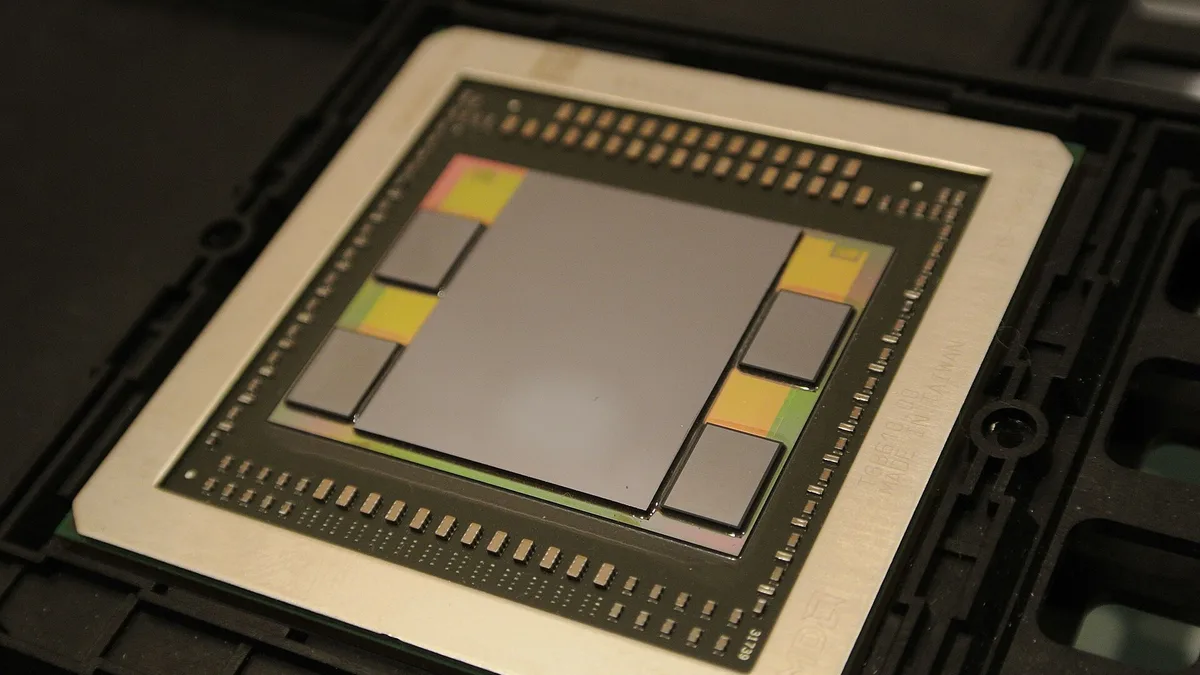
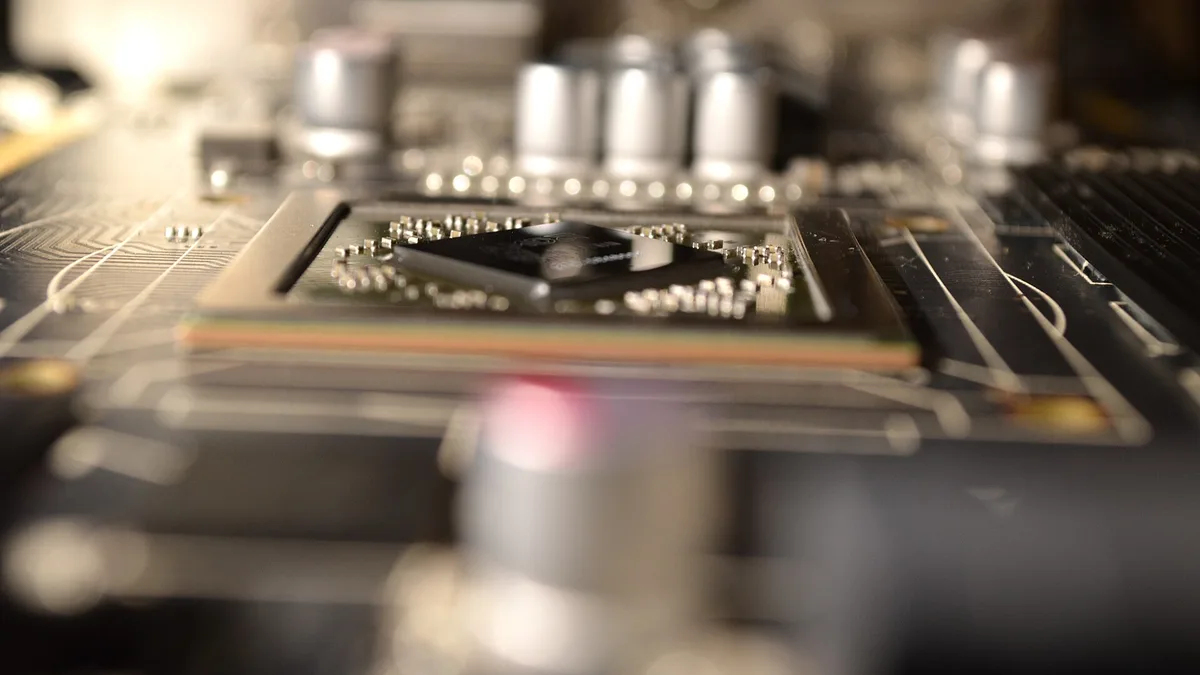
The AMD Fiji GPU package: the large die in the middle is the GPU, and the four smaller stacks beside it are HBM memory. Photo: C. Spille/pcgameshardware.de, CC BY-SA 4.0, via Wikimedia Commons.
On a laptop the VRAM chips are soldered onto the graphics board, and on some designs the memory is stacked right beside the GPU die, as in the photo above. Either way, you cannot add more later. That single fact is what makes the buying decision matter: the VRAM amount you choose is the VRAM amount you keep.
What does VRAM actually store?
Five kinds of data live in VRAM while you play or work:
- Textures: the surface images wrapped onto every 3D object, from a brick wall to a character face. High resolution texture packs are the single biggest VRAM user in modern games.
- Frame buffers: the finished frames waiting to be sent to the screen, plus the intermediate buffers used for effects. A 4K frame holds four times the pixels of a 1080p frame, so the buffer grows with resolution.
- Geometry: the 3D models of the scene, the positions of objects and the data that describes them.
- Shaders and effects data: the small programs that decide how light, shadow and reflections look, plus the acceleration structures ray tracing uses to trace light paths.
- AI model weights: when you run upscaling such as DLSS, or a local AI model, the model itself sits in VRAM while it works.
That list explains why VRAM demand keeps climbing. Resolutions go up, texture packs get bigger, ray tracing adds new data, and upscalers and AI tools add their own load on top.
VRAM vs RAM: what is the difference?
VRAM and system RAM are both memory, but they serve different masters and they are not interchangeable. VRAM belongs to the GPU alone. System RAM belongs to the CPU, Windows and your apps. A laptop with 32GB of system RAM and 6GB of VRAM still has only 6GB of graphics memory, and no setting moves system RAM into the VRAM pool on a dedicated graphics card.
| VRAM | System RAM | |
|---|---|---|
| Serves | The GPU only | The CPU, Windows and apps |
| Location | Soldered onto the graphics board | Memory sticks or soldered chips on the main board |
| Can you upgrade it? | No, fixed at purchase on a laptop | Often yes, on laptops with RAM slots |
| Typical bandwidth | 320 to 900 GB/s on current laptop GPUs | About 96 GB/s for dual channel DDR5-6000 |
| When it runs out | Stuttering and texture pop-in | Long loads, hitching and apps closing |
Our guide to how much RAM you need for gaming covers the system side, and our DDR4 vs DDR5 RAM in laptops comparison explains the memory types. Get both numbers right when you buy: enough system RAM for your apps, and enough VRAM for your games.
How much VRAM do I need?
This is the table most buyers need. The amounts below are the consensus across the top guides ranking for this question in 2026, matched against the official requirements of current games.
| What you do | VRAM to aim for |
|---|---|
| Everyday use, office, streaming video | 2 to 4GB shared graphics memory is enough |
| Esports and older games at 1080p | 6 to 8GB |
| Modern AAA games at 1080p, high settings | 8GB |
| 1440p, high or ultra settings | 12GB |
| 1440p with ray tracing | 12 to 16GB |
| 4K, high or ultra settings | 16GB |
| 4K with heavy ray tracing or path tracing | 16 to 24GB |
| Video editing, 1080p and 4K projects | 8GB for most projects, 12 to 16GB for heavy effects |
| 3D rendering and large scenes | 12 to 16GB or more |
| Local AI, small models | 8 to 12GB |
| Local AI, large models and training | 24GB or more |
Resolution is the biggest driver of VRAM use, because the frame buffer and the textures both grow with it. Texture quality is second: dropping from Ultra to High textures is the single biggest VRAM saving in almost every game. Ray tracing comes third, because the acceleration structures it builds take extra memory on top of the textures.
Official game requirements back these numbers up. Indiana Jones and the Great Circle lists 8GB of VRAM as its minimum, 12GB in its recommended setup for 1440p, and 16GB for native 4K, according to Bethesda. Microsoft Flight Simulator 2024 lists 4GB as its minimum, 8GB as recommended and 12GB in its ideal tier. CD PROJEKT RED lists 8GB for Cyberpunk 2077 at 1080p High. These are the numbers the games themselves ask for, not guesses.
One more thing to weigh: many current gaming laptops now ship with 1440p or 1600p screens, even in the mid range. A laptop with a 1440p screen needs the 12GB tier to play at its native resolution, so check the screen resolution before you settle on 8GB. Our G-Sync vs FreeSync on a laptop screen guide explains the display side of that choice.
Is 8GB of VRAM enough in 2026?
Yes, for 1080p gaming, and no, as a floor for a laptop you plan to keep for years. Both answers are true, and the difference is settings and time.
At 1080p, 8GB still handles nearly every current game at medium to high settings. The official requirements above prove it: the biggest recent releases still list 8GB as their minimum or their 1080p recommendation. Esports titles such as Valorant, Fortnite and Rocket League use far less, and our best laptops for Fortnite and best laptops for Minecraft guides show how little memory those games need.
The problem is what happens next. The newest releases at high texture settings are already pushing past 8GB at 1440p, and the guides ranking for this question agree that 8GB increasingly forces lower texture quality in new games at high textures, 1440p or ray tracing. The 6GB cards from the last generation are now the clearest warning: 6GB was fine in 2023, and in 2026 it is a trap for anyone buying new. Buyers who choose 8GB today should expect to lower texture settings within a couple of years on the newest titles, while 12GB buys real headroom.
So the rule is simple. If you play at 1080p and you replace laptops every two or three years, 8GB is fine. If you play at 1440p, or you keep a laptop for four or five years, 12GB is the sensible floor. If you play at 4K, 16GB is the starting point.
What happens when VRAM runs out?
When a game needs more VRAM than the card holds, the GPU spills the overflow into system RAM over the PCIe bus. System RAM is far slower than VRAM, and the trip across the bus adds delay on top. On laptops the penalty is worse than on desktops, because mainstream mobile GPUs use a PCIe x8 link rather than x16, so the spillover path is narrower.
What you see on screen is stuttering and frame time spikes, especially in the 1% lows that make a game feel rough even when the average frame rate looks fine. Textures pop in late or load slowly as you turn a corner, scenes hitch while data reloads into memory, and in some games the game crashes outright. Lowering texture quality one step is the fix that frees the most memory, because textures are the biggest VRAM user. Turning on upscaling also helps, because DLSS renders at a lower resolution and then rebuilds the image, which needs less VRAM than native rendering.
Two details people get wrong here. First, the VRAM usage number in an on-screen display shows allocation, not true need: games request more memory when more is available, so a game showing 11GB used on a 16GB card may run fine on 12GB. A full VRAM meter alone does not prove the card is struggling. Second, a fast SSD helps when textures stream in from storage, so the drive matters at the edges of VRAM. Our SSD vs HDD in a laptop comparison explains why a modern NVMe drive streams game data far faster than an old hard drive.
If your games stutter, check the VRAM meter before blaming anything else. Our guide to how to increase FPS on a gaming laptop walks through the settings that help, in order from the biggest gain to the smallest.
How much VRAM do laptop GPUs have in 2026?
Current laptop GPUs fall into a clear ladder. NVIDIA RTX 50 series laptop GPUs all use GDDR7 memory, while the previous RTX 40 series used GDDR6. The laptop RTX 5050 uses GDDR7; the desktop RTX 5050 is a different card and uses GDDR6, so do not mix the two up.
| Laptop GPU | VRAM | Memory type | Bus | Bandwidth |
|---|---|---|---|---|
| RTX 5090 Laptop | 24GB | GDDR7 | 256-bit | 896 GB/s |
| RTX 5080 Laptop | 16GB | GDDR7 | 256-bit | 896 GB/s |
| RTX 5070 Ti Laptop | 12GB | GDDR7 | 192-bit | 672 GB/s |
| RTX 5070 Laptop | 12GB or 8GB | GDDR7 | 128-bit | 384 GB/s |
| RTX 5060 Laptop | 8GB | GDDR7 | 128-bit | 384 GB/s |
| RTX 5050 Laptop | 8GB | GDDR7 | 128-bit | 384 GB/s |
The RTX 5070 laptop deserves a warning of its own: it ships in both 8GB and 12GB configurations on the same 128-bit bus, under the same GPU name. Two laptops advertised with an RTX 5070 can carry different amounts of VRAM, and the 12GB version holds up far better at 1440p. Always check the exact laptop spec sheet for the memory size, not just the GPU name. Our RTX 5050 vs RTX 4050 laptop comparison shows how the entry level of this generation compares with the last one.
The previous generation is still widely sold, and its ladder is simple: the RTX 4050 laptop carries 6GB, the RTX 4060 and RTX 4070 carry 8GB, the RTX 4080 carries 12GB, and the RTX 4090 carries 16GB. A discounted RTX 4060 laptop at 8GB is still a good 1080p machine, but it is a shorter-lived buy than a 12GB RTX 5070 Ti at the same resolution.
GDDR7 is faster per pin than GDDR6: GDDR6 runs at about 14 to 24 Gb/s per pin, while GDDR7 uses three-level PAM3 signalling and reaches up to 32 Gb/s per pin, with the JEDEC standard published in March 2024. Bandwidth equals data rate times bus width divided by eight, so a narrow GDDR7 bus can match a wider GDDR6 bus. That is why a 128-bit GDDR7 card can keep up with older 256-bit GDDR6 designs. Generation alone does not guarantee speed, though: capacity, bus width and the size of the GPU on-chip cache all matter too. NVIDIA notes that the much larger L2 cache on its Ada Lovelace architecture cut memory bus traffic by just over 50% on average in its tests, which is why bus width alone does not decide performance.
One more trap: a laptop GPU and a desktop GPU with the same name are different chips. The desktop RTX 5090 carries 32GB of GDDR7 against 24GB in the laptop version, and the desktop RTX 5080 has 10,752 CUDA cores against 7,680 in the laptop version. Laptop GPUs also run at lower power limits than their desktop namesakes. Our gaming laptop vs desktop comparison covers the full trade-off, and our explainer on what TGP means in a gaming laptop shows how the power limit shapes the speed you actually get.
What if my laptop has no dedicated graphics card?
Most thin and light laptops have no dedicated graphics card at all. Their integrated graphics borrow system RAM as video memory, which Windows calls shared GPU memory. There is no VRAM chip to run out of, and no VRAM amount to choose: the graphics simply use part of the system RAM.
That is fine for everyday use, office work, streaming video and light games, but it comes with two limits. First, shared memory runs at system RAM bandwidth, far below discrete VRAM, so the same game runs slower than on a dedicated card. Second, the memory the GPU borrows is memory the CPU cannot use at the same time. Dual channel RAM matters a lot here: a single stick of RAM can cut integrated graphics performance sharply, so two matched sticks are worth having.
Two things catch people out on these laptops. Windows often reports a dedicated figure of 128MB on Intel integrated graphics, which is only a reserved minimum, not the real limit; judge the graphics by the shared memory figure and your total system RAM instead. And Intel driver version 32.0.101.6974 and later adds a Shared GPU Memory Override control that raises the ceiling on how much system RAM the graphics can borrow, with a default limit of 57% of system RAM and an adjustable maximum near 87%. It raises the ceiling only. It does not add dedicated VRAM or GDDR memory, and over-allocating can hurt CPU performance.
The newest integrated graphics blur the line further. The AMD Ryzen AI 9 HX 370 carries Radeon 890M integrated graphics with 16 compute units and no dedicated VRAM, sharing system memory that the BIOS can allocate up to roughly 16GB on large RAM configs. The AMD Ryzen AI Max+ 395 goes further, with Radeon 8060S integrated graphics and up to 128GB of LPDDR5X unified memory shared between the CPU and the GPU, which AMD positions for local AI models. That shared pool can load models that would not fit on an 8GB discrete GPU, but at far lower bandwidth than discrete GDDR7, so it is a capacity win, not a speed win.
Does more VRAM make games faster?
Not by itself. VRAM is capacity, not speed. The GPU core, its power limit and its memory bandwidth decide how fast a game runs. Extra VRAM only helps when the game actually needs it. Below the limit, the same GPU with 8GB and with 16GB runs the same game at the same frame rate. Above the limit, the smaller card stutters while the bigger one stays smooth. That is the whole effect: VRAM removes a bottleneck, it does not add speed.
This is why choosing a laptop on VRAM alone is a mistake. A fast GPU with 8GB beats a slow GPU with 16GB in every game that fits in 8GB. Check the GPU model first, then the power limit, then the VRAM amount, and treat a big VRAM number on a weak chip as marketing. Our guide to how to increase FPS on a gaming laptop lists the settings that raise frame rates once the hardware is fixed.
How much VRAM do I need for video editing, 3D and AI?
Games are not the only workload that fills VRAM. Creative and AI work load their own data into graphics memory, and the amounts are easy to state.
For video editing, 8GB handles most 1080p and 4K projects in Premiere Pro, DaVinci Resolve or Final Cut. Step up to 12GB or 16GB for 6K or 8K footage, heavy colour grading, effects stacks or RAW video, where the timeline and the preview frames both compete for memory.
For 3D rendering, the Blender Foundation lists 8GB as its recommended figure and 2GB as the minimum. Large scenes with high resolution textures need 12GB to 16GB or more, and a scene that does not fit simply fails to render on the GPU and falls back to the much slower CPU.
For local AI, the model has to fit in VRAM whole. Image generation with Stable Diffusion fits in 8GB at standard resolutions. A 7B to 8B language model needs about 16GB in FP16 or BF16 precision, and a 13B model needs about 28GB, according to NVIDIA NIM estimates. Larger models and any training work need 24GB or more. That is why our guide to the best laptops for machine learning treats VRAM as a first-class spec rather than a footnote.
How to check how much VRAM your laptop has
Press Ctrl + Shift + Esc to open Task Manager, click Performance, then GPU, and read Dedicated GPU memory. That number is your laptop VRAM. On integrated graphics, read Shared GPU memory instead. Our full guide to how to check VRAM on your laptop covers the other methods, including Windows Settings, dxdiag and GPU-Z, and explains the three different memory figures that people mix up.
Which laptop should you buy?
Match the VRAM to the resolution you will play at and the years you will keep the machine:
- 1080p gaming on a budget: 8GB is enough. A current RTX 5060 laptop is the sweet spot here, and the Lenovo LOQ 15 RTX 5060 on Amazon is a typical example of the class: 8GB of GDDR7, a 1080p or 1440p screen depending on the config, and a price that suits a first gaming laptop.
- 1440p gaming, or a laptop you will keep four or five years: 12GB. The ASUS TUF Gaming A16 RTX 5070 on Amazon is a typical 12GB example, but check the exact listing before you buy: the RTX 5070 also ships in an 8GB version, so confirm the config in the spec sheet, not just the GPU name.
- 4K gaming, heavy video editing or local AI: 16GB with an RTX 5080 laptop, or 24GB with an RTX 5090 laptop if the budget stretches that far.
- Under $700: 6GB RTX 4050 laptops are still playable at 1080p, but buy them knowing the memory is already tight. Our best gaming laptops under $700 picks show what 6GB and 8GB buy at that price.
- No dedicated graphics card at all: fine for everyday use and light games, but get 16GB of system RAM in dual channel so the shared graphics have room to work.
Whatever you buy, check the VRAM amount on the spec sheet before you pay, because it is the one spec you cannot change later. A laptop with too little VRAM will feel old long before its processor does.
Frequently asked questions
How much VRAM do I need for a gaming laptop?
8GB for 1080p gaming, 12GB for 1440p, and 16GB for 4K. Those are the amounts the top guides and the official game requirements agree on in 2026. Add ray tracing or ultra textures and you need the next tier up: 12 to 16GB at 1440p, and 16 to 24GB at 4K. Buy the amount you will need for the whole life of the laptop, because VRAM is soldered on and cannot be upgraded later.
Is 8GB of VRAM enough for gaming in 2026?
Yes at 1080p, where 8GB still handles nearly every current game at medium to high settings, and the biggest recent releases still list 8GB as their minimum or their 1080p recommendation. No as a floor for a laptop you plan to keep for years: the newest games at high texture settings already push past 8GB at 1440p, and 8GB buyers should expect to lower texture settings within a couple of years. For 1440p or a four to five year laptop, 12GB is the sensible floor.
Can I add more VRAM to my laptop?
No. VRAM is soldered onto the graphics board and fixed at purchase, so no setting or upgrade adds more. On integrated graphics you can raise the shared memory ceiling through the BIOS or, on recent Intel drivers, a Shared GPU Memory Override control, but that borrows system RAM, it does not add dedicated VRAM. The only real upgrade path for a laptop is an external GPU enclosure over Thunderbolt or USB4, which adds a desktop graphics card with its own VRAM. Our Thunderbolt 4 vs USB4 guide explains the connection that makes that possible.
Is VRAM the same as RAM?
No. VRAM is fast memory on the graphics card that serves only the GPU, while system RAM is general purpose memory that serves the CPU, Windows and apps. VRAM runs at roughly 320 to 900 GB/s on current laptop GPUs, against about 96 GB/s for dual channel DDR5 system RAM. A laptop with 32GB of system RAM and 6GB of VRAM still has only 6GB of graphics memory, and system RAM cannot cover for short VRAM.
Does VRAM affect FPS?
Only when the game needs more than the card holds. Below the limit, the same GPU with 8GB and 16GB runs the same game at the same frame rate, because VRAM is capacity, not speed. Above the limit, the smaller card spills data to system RAM and stutters, with frame time spikes and texture pop-in, while the bigger card stays smooth. The GPU core, its power limit and its memory bandwidth decide speed; VRAM only removes a bottleneck.
How much VRAM does the RTX 5060 laptop have?
The RTX 5060 laptop has 8GB of GDDR7 memory on a 128-bit bus, with 384 GB/s of bandwidth. That makes it a 1080p card first and a 1440p card second: it plays most games well at 1440p, but the newest titles at high textures will push against the 8GB limit. Its bigger sibling, the RTX 5070 laptop, ships in both 8GB and 12GB versions, so check the exact spec sheet if you are choosing between the two.