Best Gaming Laptops Under 1500 in 2026
The $1500 mark is where gaming laptops stop being exercises in compromise. In 2026, this budget buys you a current generation NVIDIA RTX 5060 or RTX 5070 graphics card, a fast 165Hz screen as standard, 16GB or more of memory, and a terabyte of storage on most models.
Step down to half this money and you are shopping sale prices on entry level cards, as our guide shows. At $1500, the question is no longer whether a laptop can play modern games well. It is which corners, if any, each maker chose to cut to hit the price.
That is why the fine print matters more than the headline specs here. Two laptops can carry the same RTX 5070 badge and perform noticeably differently because one maker feeds the chip 115 watts and the other caps it near 85 watts.
Screens range from dull budget panels to a genuine OLED, and memory is slotted and upgradeable on every machine here. Every pick below is a current 2025 or 2026 model sold in the US, with specifications checked against the manufacturer’s own product pages or a major retailer’s listing.
Where a maker does not publish a figure, most often graphics wattage, we say so rather than guess.
Quick Answer: The Lenovo Legion 5 is the best gaming laptop under $1500 for most people. It pairs a full power RTX 5060 with the best screen in this guide, a 15.1 inch OLED panel at 2560 x 1600 and 165Hz, then wraps it in the lightest chassis here at 4.19 pounds with an 80Wh battery. If you want the stronger RTX 5070 instead, the MSI Katana 15 HX runs that chip at full power behind a sharp QHD screen, and the Gigabyte GAMING A16 is the cheapest way to get a 5070 badge, as long as you accept its lower graphics wattage.
How we picked: We compared current 2025 and 2026 models sold in the US, checking specifications against manufacturer sources such as the Lenovo PSREF and the official ASUS and MSI specification pages, and cross-checking graphics wattage and battery claims against independent reviews and testing from Notebookcheck and LaptopMedia, plus US retailer listings for street pricing.
Where a maker did not publish a figure, most often graphics wattage, we say so rather than guess, and picks that only qualify on sale pricing are flagged as such.

The Best Gaming Laptops Under $1500 at a Glance
| Model | GPU | Display | Best For |
|---|---|---|---|
| Lenovo Legion 5 | RTX 5060 8GB (115W) | 15.1 inch WQXGA OLED 165Hz | Best overall |
| ASUS ROG Strix G16 | RTX 5060 8GB (115W) | 16 inch FHD+ 165Hz, 3ms | Best cooling |
| MSI Katana 15 HX | RTX 5070 8GB (115W) | 15.6 inch QHD 165Hz | Best QHD pick |
| ASUS TUF Gaming A16 | RTX 5070 8GB (115W) | 16 inch FHD+ 165Hz, 3ms | Best battery and build |
| Gigabyte GAMING A16 | RTX 5070 8GB (about 85W) | 16 inch FHD+ 165Hz | Best value |
| HP OMEN 16 | RTX 5060 8GB | 16 inch FHD+ 144Hz | Best for school and work |
1. Lenovo Legion 5: Best Overall Gaming Laptop Under $1500
The Legion 5 gets the top spot because it makes the fewest bad trades. Start with the graphics card. Lenovo’s own specification sheet for this model lists the RTX 5060 at a 115 watt TGP, which is the maximum this chip is built to draw in a laptop.
Plenty of thinner or cheaper machines run the same badge at far less power and quietly lose performance because of it.
Here the chip gets everything it can use, backed by an AMD Ryzen 7 260 processor with eight cores boosting to 5.1GHz, 16GB of DDR5 memory, and a 512GB SSD in the common US configuration.
Then look at the screen, because it is the best one in this guide by a clear margin. The 15.1 inch panel is an OLED with a 2560 x 1600 resolution, a 165Hz refresh rate, 500 nits of typical brightness, and full DCI-P3 color coverage, with HDR True Black 600 certification.
On paper, that is a display a price class up: games look rich, text is sharp at this size, and the high resolution gives you the option of playing at native 1600p in lighter titles or leaning on DLSS in heavy ones.
The trade-off is a glossy finish, which reflects lights and windows more than the matte panels on the other picks here.
The chassis is the other surprise. At 1.9 kg, or 4.19 pounds, the Legion 5 is the lightest laptop in this guide, and it still fits an 80Wh battery, Wi-Fi 7, a 5MP webcam, and a proper port set that includes USB4 and HDMI 2.1.
Both memory slots are standard SO-DIMM sockets, so the single 16GB stick can be joined by a second stick later, and a second M.2 slot waits for another SSD. That matters, because the 512GB base drive is half what most rivals here include, and modern games will fill it quickly.
Two honest cautions before you buy. The Ryzen 7 260 is a refreshed Zen 4 design rather than AMD’s newest architecture, so it is not the efficiency leader here.
And the Legion 5 name also covers cheaper configurations with lesser panels, so confirm the OLED screen and the RTX 5060 are in the exact listing you are buying. Get those two details right and this is the most complete package under $1500.
Pros
- ✓ Full power 115W RTX 5060, confirmed in Lenovo’s own specifications
- ✓ Superb 15.1 inch OLED screen, 2560 x 1600, 165Hz, 500 nits, full DCI-P3 color
- ✓ Lightest laptop here at 4.19 pounds, with a large 80Wh battery
- ✓ Two memory slots and two SSD slots for easy upgrades
Cons
- ✗ Base US configuration ships with only 512GB of storage
- ✗ Glossy OLED reflects light more than matte rival screens
- ✗ Single 16GB memory stick as sold, so dual channel waits for an upgrade
Check the latest price: Lenovo Legion 5 on Amazon
Best for: buyers who want the best screen and the lightest package under $1500. Not for: buyers who need 1TB of storage out of the box or a matte screen for bright rooms.
2. ASUS ROG Strix G16: The Best Cooling Under $1500
If your games run for hours at a time, cooling is the spec that decides whether the performance you paid for is still there in the third hour. The Strix G16 is built around that problem.
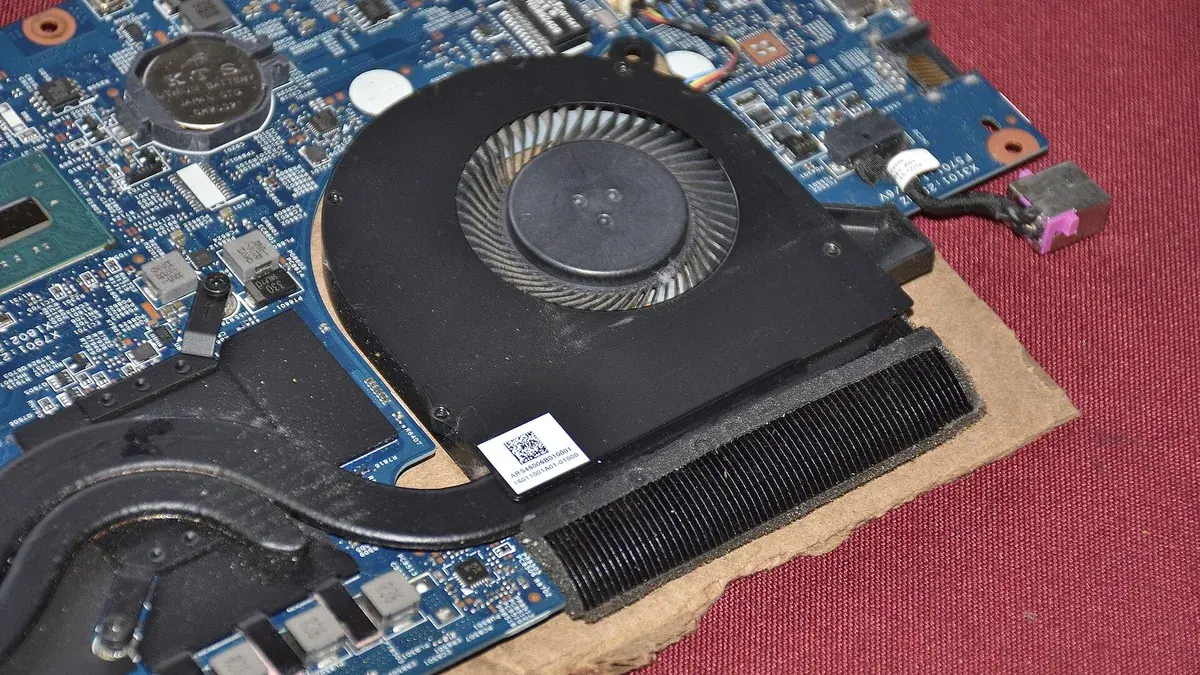
ASUS gives this chassis an end to end vapor chamber, three fans, and liquid metal thermal compound on the processor, a combination normally reserved for machines well above this budget.
We go deeper on why designs like this matter for sustained performance, but the short version is simple: a cooler laptop holds its clock speeds longer, and the Strix has the most serious thermal hardware in this roundup.
The rest of the specification is built to match. An Intel Core i7-14650HX with 16 cores pairs with an RTX 5060 that ASUS rates at 115 watts with Dynamic Boost, so the graphics card is not power limited either.
The 16 inch screen runs at 1920 x 1200 with a 165Hz refresh rate, a fast 3ms response time, full sRGB color coverage, and G-SYNC, and a MUX switch with Advanced Optimus lets the graphics card drive the display directly without a manual reboot.
Memory is 16GB of DDR5 in two slots, storage is a 1TB SSD with a second M.2 slot free, and the battery is a large 90Wh unit.
What you give up is portability and pixels. At 2.65 kg, or 5.84 pounds, this is the heaviest laptop in the guide.
The screen, while fast and accurate, is a 1920 x 1200 panel at a price where the Legion above gives you an OLED at 2560 x 1600 and the MSI below gives you QHD.
If you mostly play fast paced games at 1080p or 1200p, that trade is easy to accept, and the Strix rewards you with the steadiest sustained frame rates here.
Price is the final watch item. This configuration sits right at the top of the $1500 line at list price on Amazon, and through 2026 it has repeatedly dropped several hundred dollars in sales. Buy it when the price dips and it is one of the strongest deals in this guide.
Pros
- ✓ Vapor chamber, triple fan cooling with liquid metal, the strongest thermal design here
- ✓ Full power 115W RTX 5060 and a 16 core HX processor
- ✓ Fast 165Hz screen with 3ms response, full sRGB coverage and G-SYNC
- ✓ Big 90Wh battery, second SSD slot, and a full port set with Ethernet
Cons
- ✗ Heaviest laptop in this guide at 5.84 pounds
- ✗ 1920 x 1200 screen while rivals offer OLED or QHD at similar money
- ✗ List price sits at the very top of the budget, so timing a sale matters
Check the latest price: ASUS ROG Strix G16 on Amazon
Best for: long gaming sessions where sustained cooling matters most. Not for: buyers who need a light laptop to carry daily or a sharper QHD or OLED screen.
3. MSI Katana 15 HX: Full Power RTX 5070 With a QHD Screen
The Katana 15 HX is the pick for buyers who shop by frame rates first. It is the only laptop here that pairs a full power RTX 5070, listed at 115 watts, with a QHD screen as standard.
That pairing matters, because the 5070’s extra performance over the 5060 is best spent exactly there: playing at 2560 x 1440 instead of 1920 x 1080.
The 15.6 inch panel runs at 165Hz and covers the full DCI-P3 color range according to MSI, which also makes it the most color capable IPS screen in this guide.
The supporting hardware is just as serious. The Core i7-14650HX is the same 16 core processor ASUS uses in the Strix above, memory is 16GB of DDR5 across two slots that MSI rates for up to 96GB, and storage is a 1TB Gen 4 SSD.
On paper, it handles competitive titles at high frame rates, big releases at QHD with sensible settings and DLSS help, and heavier side work like streaming or local AI experiments. Readers curious about that second life should see how this class of GPU is the entry point for running models locally.
MSI’s Katana line is the company’s value range, and you can see where the money was saved once you look past the headline parts.
The chassis is plastic, the webcam is a basic 720p unit, and there is only one M.2 slot, so when the 1TB drive fills up you are replacing it rather than adding a second drive.
The 75Wh battery is small relative to the hardware it feeds, so plan on short unplugged sessions, and fan noise under full load is a recurring theme in owner feedback on this line.
Price needs the same honesty. This configuration lists at the very top of the budget at Walmart and has repeatedly sold for hundreds less in promotions there, while other retailers list it higher. Treat $1500 as its ceiling, shop around before paying it, and it becomes the strongest pure performance play in this guide.
Pros
- ✓ RTX 5070 at full 115W power, the strongest graphics setup here
- ✓ Sharp QHD 165Hz screen with full DCI-P3 color coverage
- ✓ 16 core Core i7-14650HX processor and a 1TB SSD as standard
- ✓ Memory expandable to 96GB across two slots
Cons
- ✗ Only one SSD slot, so storage upgrades mean replacing the drive
- ✗ 75Wh battery is small for HX class hardware
- ✗ Plastic build, 720p webcam, and loud fans under load
Check the latest price: MSI Katana 15 HX on Amazon
Best for: buyers chasing maximum frame rates at QHD. Not for: buyers who need a second SSD slot or long unplugged sessions.
4. ASUS TUF Gaming A16: Full Power RTX 5070, Built Like a Tool
The TUF Gaming A16 is the durability and battery pick. ASUS tests the TUF range against MIL-STD-810H military standards for drops, vibration, humidity and temperature extremes, and while that does not make any laptop indestructible, it does mean this chassis is built for years of being carried, docked, and carried again.
Underneath the tough shell, the FA608UP configuration is seriously specified: an AMD Ryzen 9 270 processor, an RTX 5070 running at the full 115 watts, and 32GB of DDR5 memory as standard, double what most of this guide includes, in two slots that can grow to 64GB.
The screen is a 16 inch 1920 x 1200 panel at 165Hz with a 3ms response time, G-SYNC, and a MUX switch with Advanced Optimus, so frames go straight from the graphics card to the display. Storage is a 1TB SSD with a second M.2 slot free for expansion.
The battery is a 90Wh unit, tied for the largest in this guide, and paired with the efficient Ryzen processor it gives the TUF the best unplugged endurance of the RTX 5070 machines here.
Now the honest part, because this pick needs it. At its main US retailer, this configuration carries a list price above this guide’s budget.
It earns its place anyway because that retailer discounts it heavily and often: through 2026 it has regularly sold for several hundred dollars below list, which puts a full power RTX 5070 with 32GB of memory comfortably under the $1500 line. Our advice is blunt.
Buy it on sale, or do not buy it for this budget at all. Also check the storage on the exact variant in front of you, because a sibling configuration with a Ryzen 9 8940HX ships with a smaller 512GB drive.
Choose the TUF if you want the strongest graphics card here in a chassis that shrugs off daily abuse and a battery that lasts through a workday of light use. Just let the sale calendar make the decision with you.
Pros
- ✓ RTX 5070 at full 115W power with 32GB of memory as standard
- ✓ 90Wh battery, the joint largest here, with efficient Ryzen power
- ✓ MIL-STD-810H tested build and a second SSD slot
- ✓ MUX switch with Advanced Optimus and a fast 165Hz G-SYNC screen
Cons
- ✗ List price breaks the $1500 budget, so it only qualifies on its frequent sales
- ✗ 1920 x 1200 screen resolution, behind the QHD and OLED rivals
- ✗ Some variants ship with 512GB of storage, so check the exact configuration
Check the latest price: ASUS TUF Gaming A16 on Amazon
Best for: buyers who want a tough laptop with a long battery life and a full power RTX 5070 on sale. Not for: buyers paying full list price or wanting a QHD or OLED screen.
5. Gigabyte GAMING A16: The Cheapest Route to an RTX 5070
The GAMING A16 exists to answer one question: how little can you pay for a laptop with an RTX 5070 inside? Gigabyte’s answer undercuts every other 5070 machine in this guide, and the rest of the specification is better than the price suggests.
The AMD configuration pairs a Ryzen 7 260 with 16GB of DDR5 memory in two slots, a 1TB SSD with a second M.2 slot free, and a 16 inch 1920 x 1200 screen running at 165Hz and 300 nits.
An Intel version with a Core i7-13620H is also sold, and the two are easy to confuse in listings, so check which processor a given price actually buys.
Here is the catch, and it is the most important paragraph in this section. Gigabyte caps the RTX 5070’s graphics power at roughly 85 watts in this chassis, well below the 115 watts the same chip receives in the MSI and ASUS picks above.
Independent testing of this model measured average GPU power right around that cap. In practice, the GAMING A16’s 5070 performs much closer to a full power RTX 5060 than to the full power 5070s.
The 5070 name still brings real advantages, including the newest DLSS features, but the wattage gap is exactly the kind of fine print this guide exists to surface.
What you get in return for that cap is efficiency and value. The 76Wh battery delivered around seven and a half hours in one reviewer’s Wi-Fi test, excellent for a 16 inch gaming laptop, and the slim 19.45mm chassis with its 180 degree hinge weighs a reasonable 2.2 kg.
For players whose games are esports titles and slightly older releases, where even a capped 5070 is far more than enough, this is the smartest money in the guide. For players chasing maximum settings in the newest games, the Katana above is the better spend.
One more check before buying: some US listings for this model ship with a basic 45% NTSC screen instead of the better panel. Confirm the panel details on the exact SKU, and the GAMING A16 is a genuinely good value.
Pros
- ✓ Lowest street prices of any RTX 5070 laptop in this guide
- ✓ Strong battery life for the class, around 7.5 hours in Wi-Fi testing
- ✓ Two memory slots and two SSD slots, rare at this price
- ✓ Slim chassis with a 180 degree hinge at 2.2 kg
Cons
- ✗ RTX 5070 capped at roughly 85W, so it performs close to a full power 5060
- ✗ Some US listings ship a dull 45% NTSC screen, so verify the exact SKU
- ✗ CPU options include an older Core i7-13620H on some configurations
Check the latest price: Gigabyte GAMING A16 on Amazon
Best for: buyers who want the lowest price on an RTX 5070 badge for esports and older titles. Not for: buyers chasing maximum settings in the newest games at full 5070 power.
6. HP OMEN 16: Best for School and Work as Well as Play
The OMEN 16 is the pick for people whose laptop has to be a respectable everyday machine first and a gaming rig second.
Its Intel Core Ultra 7 255H processor comes from Intel’s efficiency focused Arrow Lake H line rather than the power hungry HX family, so the OMEN runs cooler and quieter in lectures, offices, and libraries than the HX machines above, while still offering 16 cores and a boost clock of 5.1GHz.
Paired with an 83Wh battery in the common RTX 5060 configuration and fast charging that refills about half the battery in roughly 30 minutes, it is the easiest laptop here to live with away from a desk.

Gaming credentials are real, if a step behind the top picks. The RTX 5060 has 8GB of GDDR7 memory, and memory and storage start at 16GB of DDR5 in two slots and a 1TB Gen 4 SSD.
One frustration: HP does not publish a graphics wattage figure for this model, so we cannot confirm whether its 5060 runs at full power the way Lenovo’s and ASUS’s do, and that silence is worth knowing about before you spend.
The screen is the clearest compromise. The common US configuration uses a 16 inch 1920 x 1200 panel at 144Hz and 300 nits, but with only about 62.5% sRGB color coverage, so colors look noticeably flatter than on the Legion’s OLED or the Strix’s full sRGB panel.
For photo or design work, it is the weakest display in this guide. The upside of the package is the presentation: the shadow black chassis is understated, the webcam is a proper 1080p unit for classes and calls, and the keyboard includes a number pad.
Students who mostly take notes and write essays on their laptop may also want to compare lighter machines built for taking notes, then come back here for the gaming power those cannot match.
Pricing seals the case. This OMEN lists near the top of the budget at its main retailer and was discounted by several hundred dollars during our research. At that kind of price, its compromises stop looking like flaws and start looking like the best value trade in the guide.
Pros
- ✓ Efficient Core Ultra 7 255H runs cool and quiet for classes and offices
- ✓ Large 83Wh battery with fast charging, about 50% in 30 minutes
- ✓ Understated design, 1080p webcam, and a full keyboard with number pad
- ✓ Frequently discounted far below its list price
Cons
- ✗ Screen covers only about 62.5% of sRGB, the dullest colors in this guide
- ✗ HP does not publish the graphics card’s wattage
- ✗ Heavier than the Legion 5 at 2.43 kg, and battery size varies by configuration
Check the latest price: HP OMEN 16 on Amazon
Best for: students and office workers who also game. Not for: photo or design work where accurate color matters, or buyers who need a confirmed graphics wattage figure.
How to Choose a Gaming Laptop Under $1500
RTX 5060 or RTX 5070 at this budget?
The RTX 5070 is the stronger card, but the badge alone does not settle the question, because wattage matters almost as much as the model name. A full power RTX 5060 at 115 watts will outrun a heavily capped RTX 5070 in some games, and this guide contains both.
As a rule, choose a 5070 when it runs at or near 115 watts, as in the MSI Katana and ASUS TUF A16, and expect it to hold higher settings and last longer into future releases.
Choose a full power 5060 when it buys you a better screen, like the Legion’s OLED, because at 1080p and 1440p both cards play modern games well, and the display is what you look at the whole time.
Both cards share the same 8GB of memory and DLSS feature set, so the decision is about sustained power and price, not features.
How much RAM and storage for gaming in 2026?
Treat 16GB of RAM as the standard and 32GB as the comfort zone. Every pick here starts at 16GB, and the TUF A16 includes 32GB, which helps if you stream, keep a browser full of tabs open while gaming, or plan to keep the laptop for years.
Because almost every machine in this guide uses two standard memory slots, upgrading later is cheap insurance rather than a day one necessity.
Storage fills faster than memory runs out: a single modern game can take 100GB or more, so 1TB is the sensible size, and the Legion 5’s 512GB base drive is its weakest number. A free second SSD slot, which most picks here have, is worth real money later.
The MSI Katana is the exception to remember, with a single slot.
QHD or FHD display at under $1500?
Match the screen to the graphics card. At 1920 x 1080 or 1920 x 1200, every laptop in this guide runs modern games at high settings, and the 165Hz refresh rates keep fast games feeling responsive.
QHD at 2560 x 1440 looks visibly sharper, especially on a 16 inch screen, and the RTX 5070 machines here can drive it in most titles with DLSS helping in the heaviest ones.
The Legion 5’s 2560 x 1600 OLED goes further, adding perfect blacks and rich color that no IPS panel matches, at the cost of a glossy finish.
Our honest ordering for most buyers: OLED first if you play a mix of games and watch a lot of video, QHD IPS if you play competitive titles and want sharpness with a matte finish, and FHD+ if the money saved buys the stronger graphics card instead.
Whatever you choose, avoid any panel limited to 60Hz at this price. None of our picks are.
Is a gaming laptop under $1500 good for school and work too?
Yes, with battery expectations set correctly. These are full power computers that happen to game: the processors here match or beat most business laptops, 16GB of memory handles heavy coursework and multitasking, and the same graphics cards that run games also accelerate video editing, CAD, and programming workloads.
The OMEN 16 is the easiest to recommend for campus life, thanks to its efficient processor, big battery, and quiet manners, while the Legion 5’s light weight makes it the least painful to carry. What none of them do is game for long unplugged, because the graphics card drains any battery quickly at full tilt.
Plan to game at a desk near an outlet, use battery power for notes and documents, and a laptop from this guide will serve as your only machine without complaint.
Gaming Laptop Terms That Actually Matter
Spec sheets hide the differences that matter behind single numbers. These are the terms behind them, in plain language.
GPU wattage (TGP)
Total Graphics Power is the watt budget the maker gives the graphics card, and at this price it is the single most important number most listings leave out.
More watts let the chip hold higher clock speeds, so a 115W RTX 5070 like the ones in the MSI Katana and ASUS TUF A16 pulls well ahead of the roughly 85W version in the Gigabyte GAMING A16, even though the badge on the box is identical.
This guide states wattage wherever the maker or a reliable listing publishes it, and says so plainly when a brand, like HP here, does not.
DLSS and frame generation
DLSS is NVIDIA’s upscaling system. The game renders at a lower resolution and AI reconstructs a sharper image, buying frame rate for a small quality cost, and on the RTX 50 series cards in this guide DLSS 4 also adds Multi Frame Generation, which inserts up to three AI built frames between rendered ones.
That technology is what makes QHD gaming comfortable on a 5070 in heavy titles and keeps 5060 machines smooth at high settings. It needs support inside each game, but in supported titles the difference is large enough to change which settings you can use.
MUX switch
A MUX switch lets the dedicated graphics card drive the laptop screen directly. Without one, every frame passes through the processor’s integrated graphics on its way to the display, which costs a small slice of performance, worst in high frame rate esports titles where every frame counts.
Most picks in this guide include a MUX switch, and the better implementations, sold as NVIDIA Advanced Optimus on the ASUS models, flip between graphics paths automatically so you get the performance while gaming and the battery saving integrated graphics the rest of the time.
Refresh rate vs response time
Refresh rate is how many times per second the screen can show a new frame, so a 165Hz panel can display up to 165 frames per second. Response time is how fast each pixel changes color, and a slow panel smears fast motion into ghosting even when the frame rate is high.
The two numbers are independent, and makers advertise the flattering one. Every screen in this guide runs at 144Hz or more, and the ASUS models publish a fast 3ms response time, which is the combination to look for.
A high refresh rate with a slow panel still looks blurry in motion, so treat the pair as one feature, not two.
Dual channel slotted RAM
RAM works in channels, and two matched memory sticks running in dual channel give the processor more bandwidth than a single stick of the same total size.
Slotted memory is the other half of the story: every laptop in this guide uses standard SO-DIMM slots rather than soldered chips, so the 16GB configurations can become 32GB later for the price of one stick.
That matters twice over on the Legion 5, which ships with a single 16GB stick, because adding the second stick brings both more memory and the dual channel speedup in one cheap upgrade.
Frequently Asked Questions
What is the best gaming laptop under $1500 right now?
For most buyers, the Lenovo Legion 5. Its full power RTX 5060, OLED screen, light chassis, and upgrade options make it the most complete package at the price. If raw graphics performance matters more than the screen, the MSI Katana 15 HX and ASUS TUF Gaming A16 bring a full power RTX 5070 instead.
Is the RTX 5070 worth it over the RTX 5060 at this price?
At full 115 watt power, yes, if the price gap is small. The 5070 holds higher settings at QHD and will stay capable longer. But a wattage capped 5070, like the one in the Gigabyte GAMING A16, performs close to a full power 5060, so check the wattage before paying extra for the badge.
Can a gaming laptop under $1500 play games at 1440p?
Yes. The RTX 5070 picks here are built for it, especially with DLSS enabled, and the Legion 5’s 2560 x 1600 OLED shows how good it can look. Expect high settings in most games rather than ultra settings in the heaviest releases, and use DLSS Quality mode as your default at this resolution.
How long will a $1500 gaming laptop stay relevant?
Four to five years of comfortable gaming is a fair expectation. The RTX 50 series cards support the current DLSS features, every pick here has upgradeable memory and storage, and 16GB of RAM with an 8GB graphics card is a solid base. Esports titles will stay fast far longer than new blockbuster releases, which will gradually ask for lower settings.
Do gaming laptops under $1500 have good battery life?
For everyday work, the best of them do. The TUF Gaming A16 and OMEN 16 pair large batteries with reasonably efficient hardware, and the Gigabyte managed around 7.5 hours in Wi-Fi testing. For gaming itself, no: expect one to two hours unplugged at full performance from any laptop in this class, and game plugged in whenever you can.
The Verdict
Under $1500 in 2026 buys a genuinely capable gaming laptop, and the differences come down to which strength you value most.
Buy the Lenovo Legion 5 for the best all round package and the finest screen, the ASUS ROG Strix G16 if long sessions and cooling come first, and the MSI Katana 15 HX for full power RTX 5070 performance behind a QHD display.
Take the ASUS TUF Gaming A16 when it is on sale for its battery and build, the Gigabyte GAMING A16 for the lowest price on a 5070 badge with eyes open about its wattage, and the HP OMEN 16 if the laptop also has to behave itself in class and at work. And if you want the same kind of machine with a bigger screen, our best 17-inch laptops roundup covers the 17-inch Katana, OMEN and gram models with their real weights and battery results.
Whichever you choose, confirm the exact configuration and graphics wattage in the listing, and check the latest price before you buy. If your budget stretches to $2,000, our best gaming laptops under $2,000 roundup compares six RTX 5070 and RTX 5060 machines that sit above this guide’s price ladder.