How Much Does It Cost to Replace a Laptop Battery?
A laptop that once lasted a full working day and now dies after an hour is frustrating, but it does not always mean the laptop itself is finished. In most cases the battery has simply worn out, and a battery is a replaceable part. The question that matters before you book anything is what that replacement will actually cost, because the answer changes a lot with the brand, the model, and whether you fit the battery yourself or pay a service centre to do it.
The short version is that most people pay somewhere between a modest battery only price and a full service price, and the gap between those two figures is where most of the confusion lives. A battery for a common Windows laptop can be surprisingly cheap on its own, while a sealed MacBook battery fitted by Apple can cost several times as much. Both figures can be correct at the same time, because they describe different laptops, different parts, and different kinds of labour.
This guide gives you a realistic price range for each route, explains what drives the price up or down, shows you how to check whether the battery is really the problem before you spend anything, and helps you decide when a new battery is good value and when the money is better kept towards a replacement laptop.
Quick Answer: Replacing a laptop battery usually costs $50 to $250 in total. A battery alone for a common Windows laptop often costs $30 to $130, and professional fitting typically adds $30 to $100 in labour. Apple MacBook battery service costs $149 to $249 in the United States when out of warranty, and it is free under AppleCare+ when the battery holds less than 80 percent of its original capacity. Check battery health first, match the exact battery part number to your model, and get a written quote that separates the part price from labour before you agree to the work.
How Much Does It Cost to Replace a Laptop Battery?
For a typical Windows laptop, a sensible planning range is $50 to $200 in total. That covers a compatible or genuine battery plus fitting, where fitting is needed. For a MacBook, plan on $149 to $249 for Apple’s own out of warranty battery service in the United States, with tax and any shipping fee on top where they apply. Prices in other countries differ, and they are usually higher once local taxes, import costs, and service pricing are included, so treat any dollar figure in this guide as a planning range, not a quote for your exact model.
The cheapest end of the range applies to older laptops with a removable battery that you can swap yourself in a minute. You buy the battery, release two clips, slide the old one out, and slide the new one in. There is no labour charge, no opening of the case, and no special tools. The most expensive end applies to modern sealed laptops where the battery is glued inside, the case must be opened carefully, and the maker replaces a larger assembly rather than the battery cells alone. On some MacBook models, for example, Apple’s service can involve the top case assembly, which is part of why the price sits well above a bare battery.
There is also a middle route that many people miss. You can buy a genuine battery from the maker and fit it yourself, where the maker provides a service manual for your model, or you can buy the battery and pay an independent repair shop to fit it. That route often lands between the cheapest DIY price and the full maker service price, and it is a good option for a laptop that is out of warranty but still worth keeping.
Do not judge a quote by the battery price alone. A quote that looks cheap because it only lists the battery, and then adds a diagnostic fee, a fitting fee, and a disposal fee at the counter, can end up costing more than a slightly higher quote that included everything from the start. Always ask for the total, in writing, before the work begins.
What Decides the Price of a Laptop Battery Replacement?
Five factors decide almost all of the price difference, and understanding them helps you spot a fair quote and a padded one.
First, the model matters more than the brand name alone. Two laptops from the same maker can take completely different batteries, with different capacities, cell counts, and connectors. A small 3 cell battery for a basic 14 inch laptop costs less to make than a large 6 cell or high capacity battery for a gaming laptop or a workstation. Gaming laptops and workstations also tend to have larger batteries that draw more current, and their replacements cost more for that reason alone.
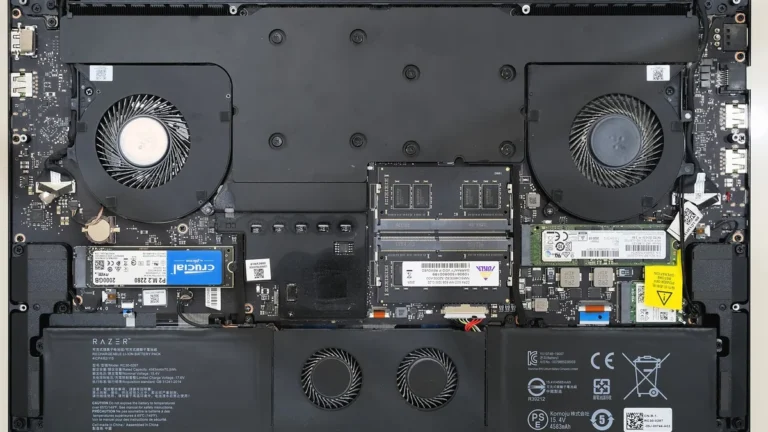
Second, the design of the laptop matters. A laptop with a removable battery is the cheapest to service, because fitting takes minutes and carries almost no risk. A laptop with a screwed in internal battery takes longer, because the base must be removed, cables must be disconnected in the right order, and the machine must be tested after reassembly. A laptop with a glued in battery takes longer still, because the old battery must be released carefully without bending it or damaging the case, keyboard, or trackpad that sit nearby. Labour time follows that order, and labour is what pushes a service quote up.
Third, genuine versus compatible parts matter. A genuine battery comes from the laptop maker or its authorised parts channel, matches the original specification exactly, and usually carries a maker warranty. A compatible battery comes from a third party maker, costs less, and varies more in quality. Some compatible batteries are excellent and use good cells. Others are cheap for a reason, with lower real capacity, weaker quality control, and a shorter life. The price gap between genuine and compatible is real, but it is not the only quality signal, and the cheapest compatible battery is rarely the best value if it needs replacing again in a year.
Fourth, who does the work matters. Maker service centres charge maker rates, use genuine parts, and protect any remaining warranty, but they are usually the most expensive route. Independent repair shops are often cheaper, faster, and more flexible, especially for older models, but part quality and warranty terms vary by shop, so check both before you commit. Doing it yourself removes labour entirely, but it only saves money if you can do it safely and without damaging the laptop.
Fifth, your location and warranty status matter. Labour rates differ by city and country, and a battery still covered by warranty or by a care plan can cost nothing at all. AppleCare+ covers a MacBook battery that holds less than 80 percent of its original capacity, and other makers have similar warranty terms for a battery that fails early, as opposed to one that has simply worn out through normal use. Check warranty first, because it is the only route that can turn a $200 job into a free one.
How Much Does a Laptop Battery Cost by Brand?
Brand prices are useful as a starting point, but they are ranges, not fixed prices, because each brand sells many models with different batteries. The figures below reflect current maker and retail pricing patterns for common models, and you should confirm the price for your exact model before you buy.
Apple is the most predictable, because Apple publishes per model battery service prices for Mac laptops in the United States. Out of warranty battery service currently sits at $149 to $249 depending on the model, with MacBook Air models at the lower end and MacBook Pro models at the upper end. That fee includes the battery and labour at Apple or an Apple Authorised Service Provider, and Apple notes that tax and a shipping fee may apply and that the final fee is set after inspection. If the Mac is covered by AppleCare+ and the battery holds less than 80 percent of its original capacity, the service is covered at no additional charge. Apple rates most MacBook batteries for around 1,000 full charge cycles, which gives you a useful sense of when wear becomes normal rather than a fault.
Dell is a good example of how much model matters within one brand. Dell sells genuine replacement batteries through its own shop, and common examples sit around $90 to $125, such as a 3 cell 53 Wh battery at $89.99, a 4 cell 56 Wh battery at $99.99, a 4 cell 68 Wh battery at $109.99, and a 6 cell 95 Wh battery at $119.99. Smaller and older Dell batteries can cost less, and larger workstation batteries can cost more. The battery price is only part of the job if the laptop needs opening, so add labour for a fitted service, or fit it yourself where Dell provides a service manual for your model.
HP batteries follow a similar pattern. Common Pavilion and ProBook batteries often sit in the $30 to $150 range as parts, with genuine HP batteries at the higher end and compatible batteries at the lower end. Premium models such as Spectre and EliteBook tend to cost more, because their batteries are larger, more tightly integrated, or both. HP service centre labour typically adds $30 to $100 depending on the model and the market, so a fitted HP battery job often lands in the $80 to $250 range in total.
Lenovo batteries also vary widely by line. IdeaPad batteries for common consumer models are usually among the cheapest, ThinkPad batteries sit in the middle and are widely available because ThinkPads are common business machines, and Yoga and Legion batteries can cost more because of their slim or high capacity designs. As a planning range, a Lenovo battery part often costs $30 to $130, with fitted service pushing the total towards $100 to $200 for sealed models. Lenovo Vantage, the maker’s own support tool, can check battery health on many Lenovo laptops before you spend anything, which is worth doing first.
Acer, Asus, and other Windows makers sit broadly in the same Windows range. A common battery part often costs $20 to $100, with fitted service bringing the total to roughly $50 to $180 for standard models. Gaming laptops from any maker, including Asus ROG and Lenovo Legion models, tend to sit above that range, because their batteries are larger and their cases take longer to open safely. If your laptop is a gaming model, budget at the top of the Windows range rather than the middle.
The table below pulls these ranges together so you can compare routes at a glance. Use it for planning, then confirm your exact model price, because a single model can sit outside its brand range.
| Route | Typical part price | Typical labour | Typical total |
|---|---|---|---|
| Windows laptop, DIY battery swap | $30 to $130 | $0 | $30 to $130 |
| Windows laptop, independent shop fitted | $30 to $130 | $30 to $100 | $60 to $230 |
| Windows laptop, maker service centre fitted | $50 to $150 | $50 to $100 | $100 to $250 |
| MacBook, Apple out of warranty service | Included in service fee | Included in service fee | $149 to $249 |
Should You Replace the Battery Yourself or Pay a Professional?
Doing it yourself is the cheapest route, and for some laptops it is also the easiest. If your laptop has a removable battery with clips on the base, you need no tools and no technical skill. Slide the clips, remove the old battery, fit the new one, and charge it fully before you judge its life. That job is genuinely a one minute task, and paying a shop to do it would be a waste of money.
For a laptop with an internal battery held in by screws, DIY is possible but it is a real repair, not a swap. You need the correct screwdrivers, a plastic opening tool, a clean workspace, and the service manual for your exact model. You must disconnect the battery connector before you touch anything else inside, keep track of screws of different lengths, and avoid puncturing or bending the old battery. If that description sounds comfortable, and the maker provides a manual, DIY can save you $30 to $100 in labour. If it sounds stressful, that labour fee is money well spent, because a damaged connector, a stripped screw, or a punctured battery costs far more to fix than the fitting ever would.
For a laptop with a glued in battery, professional fitting is usually the sensible choice. Removing a glued battery safely takes patience, the right adhesive release method for that model, and care around the keyboard, trackpad, and case. A professional who does this work every day will also test the new battery, check that the laptop charges and reports health correctly, and take responsibility if something goes wrong during the job. That accountability is part of what you are paying for, not just the minutes of labour.
There is one exception to the DIY caution, and it is an important safety one. Never try to repair, open, or keep using a swollen battery yourself. A swollen battery has a bulging case, a trackpad or keyboard that has lifted, or a base that no longer sits flat, and it needs careful handling by a professional. Do not puncture it, bend it, press on it, or charge it while you wait for service. Take the laptop to a maker service centre or a reputable repair shop, explain that the battery is swollen, and let them handle removal and disposal. Swollen batteries are also a reason to stop using the laptop until it is checked, because continued charging and heat make the problem worse. If your laptop is running hot as well as losing battery life, read our guide on how to stop your laptop from overheating before you keep pushing it, since heat and battery wear feed each other.
Warranty is the other deciding factor. If the laptop is still under warranty, or covered by a care plan, contact the maker before you open anything or buy a third party battery. Opening a sealed laptop or fitting a non genuine part can affect warranty coverage on some models, and a battery that has failed early may be covered anyway. A five minute warranty check can save the whole cost of the job.
How to Check Battery Health Before You Pay for a Replacement
A new battery will not fix a laptop that is losing charge for another reason, so check battery health before you order anything. The tools are free, they take a few minutes, and they tell you whether the battery is worn, faulty, or actually fine.
On Windows, the built in battery report is the most useful check. Open a terminal or command prompt and run the battery report command, then open the report it creates and look for two numbers: design capacity and full charge capacity. Design capacity is what the battery held when new. Full charge capacity is what it holds now. Divide the second by the first to get a rough health percentage. A battery at 80 percent or above is usually still serviceable, even if it no longer lasts as long as it did when new. A battery below 80 percent, or one that drops suddenly from a high percentage to a low one, is a strong candidate for replacement. Windows also shows cycle count in the same report on many machines, which helps you judge whether the wear matches the age of the laptop.
On a Mac, open System Settings, then Battery, then Battery Health, where macOS shows maximum capacity compared with new and, on current versions, the cycle count. Apple considers a battery that holds less than 80 percent of its original capacity to be at the point where service is worth considering, and that same 80 percent threshold is the one AppleCare+ uses for covered battery service. A “Service Recommended” message in the same panel means macOS has detected that the battery is no longer holding charge predictably, and it is time to plan a replacement rather than keep troubleshooting software.
Maker tools add model specific detail on Windows laptops. Lenovo Vantage reports battery health and charge thresholds on many Lenovo models. HP Support Assistant and Dell SupportAssist offer similar battery checks for their own machines, and they can also flag a battery that the maker has listed for a service program. Use the tool for your maker where one exists, because it reads the battery firmware directly rather than estimating from usage alone.
Also check the simple things that mimic a dead battery. A charger that cannot deliver full power, a cable that only charges at certain angles, and a power setting that keeps the processor at full speed can all make battery life look worse than it is. If the laptop runs normally on mains power but dies quickly on battery, the battery is the likely cause. If it also misbehaves on mains power, or if the charger runs unusually hot, check the charger first. Our guide on why does my laptop charger get hot explains how to tell normal charger warmth from a charger fault, and it is worth reading before you blame the battery alone.
Finally, check age against value. A battery at 70 percent health in a two year old laptop that you use every day is a clear replacement case. The same battery in a seven year old laptop that also has a slow hard drive, a dim screen, and a worn keyboard may not be, because the battery is only one of several ageing parts. The section later in this guide on when replacement is not worth it helps you make that call honestly.

How to Get an Exact Battery Replacement Quote, Step by Step
Guessing from brand ranges is fine for planning, but a real quote needs your exact model and battery part number. Work through these steps in order and you will get comparable quotes instead of vague estimates.
- Find your exact laptop model. On Windows, check Settings, then System, then About, or look at the label on the base of the laptop. On a Mac, check the Apple menu, then About This Mac. Write down the full model name and year where it is shown, not just the brand and screen size, because makers reuse screen sizes across many different batteries.
- Find the battery part number. On a removable battery it is printed on the battery label. On a sealed laptop, check the maker support page for your exact model, or use the maker support tool, which usually lists the compatible battery part number. The part number matters more than the model name when you order, because two variants of the same model can take different batteries.
- Check warranty and care coverage. Enter the serial number on the maker support site and check warranty status, care plan coverage, and any battery service program for your model. If coverage applies, follow the maker route first, even if it takes a little longer, because it can reduce the cost to nothing.
- Get three quotes where possible: the maker service price, one independent repair shop price, and the price of the battery alone from a reputable parts seller. Ask each one for the total including labour, diagnostic fees, tax, and any shipping, and ask what warranty the new battery and the fitting carry. A battery warranty of 90 days is common for maker service, while some independent shops and parts sellers offer six to twelve months. Longer is better, but only if the seller is easy to reach when you need it.
- Confirm what the quote includes. Ask whether the price is for a genuine battery or a compatible one, whether the old battery disposal is included, and how long the job takes. A same day job is common for removable and screwed in batteries. A glued battery, or a model where the part must be ordered, can take a few days, and a mail in maker service can take longer still, so plan around that downtime.
- Before you hand the laptop over, back up your files and sign out of anything sensitive if the shop asks for the laptop for more than a day. Battery replacement should not touch your files, but any repair that opens a laptop carries a small risk, and a backup removes that worry entirely. Also note the battery health percentage and cycle count before the job, so you can compare them with the new battery afterwards and confirm the improvement.
- After fitting, test the new battery properly. Charge it fully, then use the laptop on battery for a normal session and check the reported health and runtime. A new battery should report close to 100 percent of design capacity. If it reports far below that, or if runtime is barely better than the old battery, take it back promptly while the warranty and the shop record are fresh.
This process takes a little longer than ordering the first battery you find, but it prevents the two most common expensive mistakes: buying the wrong battery for your model, and paying a fitted price for a battery only job.
What Else Can Add to the Total Cost?
The battery and labour are the main costs, but a few extras can appear on a bill, and it helps to know about them before they do.
Diagnostic fees are the most common extra. Some shops charge a fee to inspect the laptop, which is then waived if you go ahead with the repair. Others charge it separately. Ask before the inspection, not after, and get the answer in writing if the fee is more than a small amount.
Shipping and mail in costs apply if you use a maker mail in service or order a battery from a distant seller. Apple notes that a shipping fee may apply to its battery service, and the same applies to other mail in routes. Local fitting avoids shipping entirely, which is one reason a slightly higher local labour rate can still work out cheaper overall.
Disposal of the old battery should be included, but check. Laptop batteries are lithium ion batteries and must not go in household waste. Reputable shops and maker services recycle them through proper channels. If you fit the battery yourself, take the old battery to a local electronic waste collection point rather than storing it at home or throwing it away.
Extra parts are rare but possible. A shop may find a damaged battery connector, a swollen battery that has bent a bracket, or screws that must be replaced during opening. A good shop will call you before adding such a part, rather than adding it silently to the bill. If a quote grows during the job without a call, ask for an explanation before you pay.
Finally, consider the cost of downtime. A laptop that is away for a week for a mail in service costs you in lost work even if the repair itself is fairly priced. For a laptop you need every day, a local same day job at a slightly higher price can be the cheaper option overall, and it is worth weighing that when you compare quotes.
When Is a Battery Replacement Not Worth the Money?
A new battery is usually good value, but not always, and being honest about the exceptions saves money.
The clearest case against replacement is a laptop that has several other serious problems at the same time. If the screen is failing, the keyboard is unreliable, the storage is full and slow, and the processor struggles with the work you actually do, a new battery only fixes one problem out of several. In that case, put the $100 to $250 towards a replacement laptop, and use the old machine plugged in as a desk machine until you move on, rather than sinking money into a machine you are about to replace anyway.
Age alone is not a reason to skip replacement. A five year old laptop that still runs your work well, has enough storage and memory, and only suffers from short battery life is an excellent candidate for a new battery, because $150 can buy it another two or three years of useful life. Compare that with the cost of a new laptop, which is several times higher, and the battery wins easily.
Swollen batteries are a special case in the other direction. Even on an old laptop, a swollen battery should be removed safely, because it is a safety issue, not just a performance one. Removal alone may be worth paying for even if you then retire the laptop, because leaving a swollen battery in a drawer or in a laptop you keep charging is a risk you do not need to take.
Also weigh replacement against how you actually use the laptop. If the laptop almost never leaves a desk and is almost always plugged in, short battery life may not matter much, and you can postpone replacement until the battery swells, the laptop shuts down unexpectedly, or you start travelling with it again. On the other hand, if you work away from power every day, even a battery at 85 percent health can be frustrating enough to justify replacement sooner, because the value is in the working day it restores, not just the percentage it recovers.
A useful rule is to compare the total replacement cost with the cost of a comparable replacement laptop. If the battery job costs less than a quarter of a decent replacement, and the laptop still meets your needs in every other way, replace the battery. If it costs close to half the price of a replacement, and the laptop is already struggling, start shopping instead. That rule keeps the decision about value, not about squeezing one more year out of a machine that is holding you back.
How to Make a New Laptop Battery Last Longer
A new battery will still wear out, because lithium ion batteries lose capacity with every charge cycle and with time, but a few habits slow that wear noticeably without making the laptop awkward to use.
Avoid heat, because heat is the fastest way to age a battery. Do not leave a laptop charging on a bed, a sofa, or in a hot car, and keep vents clear so the machine can cool itself. Our guide on how to clean a laptop fan without opening its case shows how to clear blocked vents safely, and it matters for battery life as well as performance, because a hot laptop ages its battery faster than a cool one.
Avoid sitting at 100 percent or at zero for long periods where you can help it. Many makers offer a charge limit setting, such as stopping at 80 percent for a laptop that stays plugged in most of the time, and using it is one of the simplest ways to extend battery life. Equally, do not leave a laptop fully flat for weeks, because a deeply discharged lithium battery can become difficult or unsafe to recharge. If you store a laptop, leave it around half charged and check it every few months.
Use the right charger. A charger with the wrong voltage or a wattage far below the maker requirement can strain both the charger and the battery, and it can charge slowly or unreliably. Check the wattage on your original charger and match it when you buy a replacement, and be wary of unbranded chargers with no safety marks, however cheap they look.
Keep software and firmware up to date. Makers release power management and BIOS updates that can improve charging behaviour and battery reporting, and a laptop that never sleeps properly because of a driver problem will drain a new battery just as fast as it drained the old one. If battery life is still poor after a replacement, check power settings and background apps before you assume the new battery is faulty, because a single app keeping the processor awake can undo the benefit of a new battery in a day.
Finally, calibrate expectations, not just the battery. A new battery restores the laptop to its original runtime, not to a better runtime than it ever had. If the original runtime was four hours, a new battery gives you four hours again, not eight. That is still a large improvement over a worn battery giving you one hour, but it is worth knowing before you pay, so the result feels like the success it is.
Frequently Asked Questions
How much does it cost to replace a laptop battery on average?
Most people pay $50 to $250 in total. A battery alone for a common Windows laptop often costs $30 to $130, with professional fitting adding $30 to $100. Apple MacBook battery service costs $149 to $249 in the United States when out of warranty, and it is free under AppleCare+ when the battery holds less than 80 percent of its original capacity.
Is it cheaper to replace a laptop battery yourself?
Yes, if your laptop allows it safely. A removable battery swap costs only the battery itself, and a screwed in battery fitted yourself saves the labour fee. A glued in battery is usually better left to a professional, because the labour fee is small compared with the cost of damaging the case, keyboard, or trackpad during removal.
How do I know if my laptop battery needs replacing?
Check battery health first. On Windows, run a battery report and compare full charge capacity with design capacity. On a Mac, check Battery Health in System Settings. A battery below 80 percent of its original capacity, one that drops suddenly, one that swells, or one that shuts the laptop down without warning is a strong candidate for replacement.
Does a laptop battery replacement come with a warranty?
Maker service usually includes a 90 day warranty on the repair, while independent shops and parts sellers often offer six to twelve months on the battery itself. Ask what the warranty covers and how to claim it before you pay, and keep the receipt and the battery part number with the laptop records.
Is it worth replacing the battery on an old laptop?
It is worth it if the laptop still meets your needs in every other way and the battery job costs well under a quarter of a decent replacement laptop. It is usually not worth it if the laptop also has a failing screen, unreliable keyboard, or a processor that struggles with your work, because the battery only fixes one problem out of several.
The Verdict
Replacing a laptop battery is one of the best value repairs you can make, provided you check health first, match the exact part to your model, and compare total quotes rather than battery prices alone. For most Windows laptops, budget $50 to $200 in total, and for a MacBook, budget $149 to $249 for Apple’s out of warranty service, or nothing at all if AppleCare+ covers a battery below 80 percent health.
Start with a battery health check, then a warranty check, then three comparable quotes. Choose DIY only where the design allows it safely, choose a professional for glued in or swollen batteries, and never keep using a swollen battery while you decide. Done that way, a single battery replacement can give a good laptop another few years of working days away from the wall, which is a far better return than the same money spent on almost any other single upgrade.