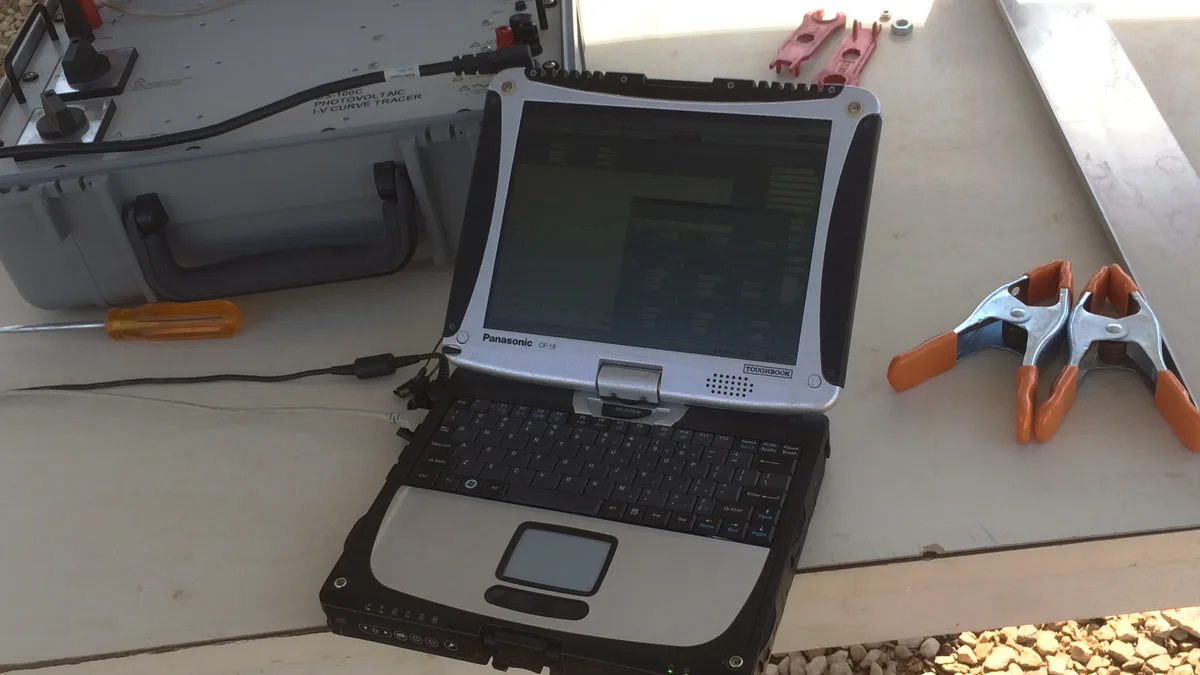
Best Rugged Laptops in 2026
Quick Answer: A rugged laptop is built to keep working where a normal laptop gives up: drops, dust, rain and heat. For most field workers the best pick is the Panasonic Toughbook 40 Mk2, a fully rugged 14-inch machine sealed to IP66, drop-tested from 6 feet and rated to MIL-STD-810H, with a 1,200-nit screen you can read in full sun. If you want the same toughness in a smaller package, the Getac B360 Pro is the lightest fully rugged option at just over 5 pounds. And if your laptop mostly lives in a truck or a workshop rather than out in the rain, a semi-rugged model like the Dell Pro Rugged 14 costs less and weighs less while still surviving 3-foot drops.
How we picked these rugged laptops
We compared the current rugged lineups from Panasonic, Getac, Dell and Durabook against their own published spec sheets, then checked them against independent reviews: Notebookcheck measured the Getac B360 display at over 1,500 nits, TechRadar reviewed the Toughbook 40, and StorageReview tested the Dell Pro Rugged 14. We did not drop-test these machines ourselves, so every durability claim below comes from the maker’s own test reports or an independent review, not from a lab of ours.
The list below covers both classes of rugged laptop, fully rugged and semi-rugged, plus one detachable 2-in-1, so you can match the machine to the job instead of paying for toughness you will never use. Every pick is a current model you can still buy new, and each one links to its Amazon listing so you can check the exact configuration.
The 6 best rugged laptops at a glance
| Laptop | Class | Protection | Best for |
|---|---|---|---|
| Panasonic Toughbook 40 Mk2 | Fully rugged | IP66, 6-ft drop | Best overall |
| Getac B360 Pro | Fully rugged | IP66, 6-ft drop | Best portable |
| Dell Pro Rugged 14 | Semi-rugged | IP53, 3-ft drop | Best semi-rugged |
| Panasonic Toughbook 55 Mk3 | Semi-rugged | IP53, 3-ft drop | Best modular |
| Durabook S14I | Semi-rugged | IP53, 4-ft drop | Best value |
| Panasonic Toughbook 33 Mk4 | Fully rugged 2-in-1 | IP65, 5-ft drop | Best 2-in-1 |
Fully rugged vs semi-rugged: what the labels really mean
The two labels describe how much abuse the machine is built to take. A fully rugged laptop is sealed against dust and water jets, survives a 6-foot drop while running, and usually carries an IP65 or IP66 rating. A semi-rugged laptop is tougher than a normal business laptop but lighter and cheaper: it survives a 3- or 4-foot drop, shrugs off rain and spills, and usually carries an IP53 rating.
Both classes are tested to MIL-STD-810H, the US Department of Defense method for environmental testing. That standard describes test methods, not a pass mark, so two laptops can both claim MIL-STD-810H and still be built very differently. Read the IP rating and the drop height, not just the badge. Our guide to the best laptops for outdoor use explains how these ratings play out in real weather, and our picks for construction management show which machines survive a job site day after day. If you want the full side-by-side breakdown, our guide to fully rugged vs semi-rugged laptops compares the two classes spec by spec, including price and which jobs each one fits.
What the IP rating numbers mean
| Rating | Dust protection | Water protection | Good for |
|---|---|---|---|
| IP53 | Dust-protected | Water spray up to 60 degrees | Rain, spills, dusty workshops |
| IP65 | Dust-tight | Low-pressure water jets | Heavy rain, washdown areas |
| IP66 | Dust-tight | Powerful water jets | Storms, pressure washing, open decks |
None of these ratings means the laptop can be submerged. Even an IP66 machine is rated for jets of water, not for going under. That is the short answer to the most asked question about Toughbooks, and the FAQ at the end of this post covers it in full.
“Military laptop” does not mean military approved
You will see the phrase military laptop on a lot of listings, and it usually just means the machine was tested to MIL-STD-810H. That standard is a set of lab test methods, not a stamp of approval from any armed service, and it says nothing about security clearance or classified networks. Buy the rating that matches your job, not the word on the box.
1. Panasonic Toughbook 40 Mk2: Best overall rugged laptop
The Toughbook 40 is the machine every other rugged laptop gets measured against. The current Mk2 runs an Intel Core Ultra 5 135H or Ultra 7 165H processor with 16 GB of memory and a 512 GB SSD, both user-upgradeable to 64 GB and 2 TB, and the 14-inch Full HD touchscreen reaches 1,200 nits, bright enough to read in direct sun while wearing gloves. The magnesium chassis is sealed to IP66 and tested to MIL-STD-810H and MIL-STD-461G, with a 6-foot drop rating and an operating range from minus 29 to 63 degrees Celsius.
What sets it apart is the modular design. Eight expansion bays let you add a second SSD, a smart card reader, a serial port or a second battery in the field, with no tools and no trip to a service depot. Two hot-swappable batteries give up to 12 hours on one pack and up to 24 hours with both, according to Panasonic’s MobileMark testing. The newest Mk3 generation moves to Intel Core Ultra Series 2 processors and an optional AMD Radeon Pro graphics card, but the Mk2 is the widely stocked configuration right now. Check the current Toughbook 40 listings on Amazon for the exact build.
Best for: field engineers, utilities crews, public safety and anyone who needs one machine for every kind of bad day. Not for: buyers on a tight budget, or anyone who carries a laptop in a shoulder bag all day, because at 7.4 pounds it is the heaviest pick here.
2. Getac B360 Pro: Best portable fully rugged laptop
The B360 Pro packs full rugged protection into a 13.3-inch body that weighs just over 5 pounds, the lightest fully rugged laptop in this roundup. It carries the same IP66 sealing and 6-foot drop rating as the Toughbook 40, plus MIL-STD-461G electromagnetic shielding, and its 1,400-nit LumiBond touchscreen is the brightest screen here. Notebookcheck measured the B360 display at over 1,500 nits in its own testing, brighter than the maker’s own rating.
The current generation runs Intel Core Ultra Series 2 processors with up to 64 GB of memory, and an optional NVIDIA RTX A500 graphics card handles CAD and mapping work in the field. Getac’s 3-year Bumper-to-Bumper warranty covers accidental damage as standard, which matters when the whole point of the machine is to get knocked around. See the Getac B360 Pro listings on Amazon for current configurations.
Best for: police and utility vehicle mounts, surveyors and anyone who walks a site all day with the laptop in hand. Not for: buyers who need a 14-inch screen or a big keyboard, because the compact body trades a little typing room for portability.
3. Dell Pro Rugged 14: Best semi-rugged laptop
Dell refreshed the Pro Rugged 14 in October 2026, and the new model is the strongest semi-rugged laptop you can buy. It runs Intel Core Ultra Series 3 processors with an optional NVIDIA RTX Pro 500 Blackwell graphics card, and the 14-inch 16:10 Full HD display reaches 1,100 nits with glove and rain touch support. It is rated IP53 with a 3-foot drop rating and MIL-STD-810H testing, and it works from minus 29 to 63 degrees Celsius.
At about 4.7 pounds it is the lightest 14-inch pick here, and it takes two hot-swappable 53.5 Wh batteries, so a spare pack in the truck doubles your day. Memory is LPCAMM2, upgradeable to 64 GB without tools. The previous generation, with a Core Ultra 5 135U and an RTX 500 Ada card, is still in stores and worth a look if you find it discounted. Check Dell Pro Rugged 14 listings on Amazon to compare the two generations.
Best for: field service, construction supervisors and fleet buyers who want Dell support and docking. Not for: work in driving rain or on open decks, because IP53 handles spray, not jets. Our guide to the best laptop for contractors covers more machines built for this kind of job.
4. Panasonic Toughbook 55 Mk3: Best modular semi-rugged laptop
The Toughbook 55 is the semi-rugged classic, and the Mk3 keeps the formula that made it the best-selling rugged business laptop: a magnesium chassis, a built-in carry handle and seven user-replaceable areas. The current generation runs 13th Gen Intel Core i5 or i7 vPro processors with 16 to 64 GB of memory and a 512 GB to 2 TB SSD, and the optional 14-inch Full HD touchscreen reaches 1,000 nits.
It is rated IP53 with a 3-foot drop rating and MIL-STD-810H testing, and the dual hot-swap batteries run up to 10 hours on one pack and 20 hours with both under Panasonic’s MobileMark 25 testing. The xPAK bays take a DVD drive, a second SSD, a smart card reader or legacy serial and VGA ports, so one machine can replace a whole drawer of adapters. Amazon still lists the earlier Toughbook 55 configurations, including this FZ-55 i7 touch model with 4G LTE.
Best for: mobile professionals who want a tough laptop that still feels like a normal business machine. Not for: the harshest outdoor work, because IP53 and a 3-foot drop rating are a step below the fully rugged picks.
5. Durabook S14I: Best value rugged laptop
The Durabook S14I is the cheapest way into a proper rugged laptop without buying refurbished. It runs current Intel Core Ultra 5 or 7 processors with an optional NVIDIA RTX A500 graphics card, and the 14-inch Full HD DynaVue display is built for outdoor reading. It carries MIL-STD-810H certification with a 4-foot drop rating and an IP53 seal, the toughest rating in the semi-rugged class here.
Battery life is the surprise. The dual-battery setup runs up to 16 hours on one pack and up to 32 hours with both, according to Durabook, and the configurable expansion bay takes a smart card reader, an ExpressCard or a barcode scanner. It weighs 5.23 pounds, heavier than the Dell, but the price gap is wide enough to forgive that. Check the Durabook S14I listings on Amazon for current pricing.
Best for: small crews and solo field workers who need real ruggedness on a budget. Not for: buyers who want the lightest bag, or the longest manufacturer support network, because Durabook’s dealer network is smaller than Dell’s or Panasonic’s.
6. Panasonic Toughbook 33 Mk4: Best rugged 2-in-1 laptop
The Toughbook 33 is a 12-inch tablet that docks into a backlit keyboard, so it works as a clipboard on a walk-around and a laptop back at the truck. The 12-inch QHD screen uses a 3:2 ratio, which shows more of a map or a form than a wide 16:9 panel, and it reaches 1,200 nits with glove touch and a digitizer pen. The current Mk4 runs 13th Gen Intel Core i5 or i7 vPro processors with 16 to 32 GB of memory.
It is fully rugged: IP65 sealing, MIL-STD-810H testing and a drop rating of 5 feet as a tablet and 4 feet with the keyboard attached. Twin hot-swappable batteries run up to 15 hours, and the tablet alone weighs 3.4 pounds, which makes it the lightest way to carry a fully rugged screen. See Toughbook 33 listings on Amazon for tablet-only and keyboard bundles.
Best for: inspectors, surveyors and anyone who fills in forms standing up. Not for: long typing sessions, because the 12-inch keyboard is cramped next to a 14-inch machine, and the tablet-plus-keyboard setup costs more than a straight laptop.
How to choose a rugged laptop
Start with the environment, not the spec sheet. If the laptop will see rain, dust and drops every day, buy fully rugged and look for IP66 and a 6-foot drop rating. If it mostly travels in a vehicle or a workshop and only goes outside for short jobs, a semi-rugged machine with IP53 and a 3-foot drop rating saves weight and money. Our outdoor-use guide walks through the same decision for regular laptops, and it is worth reading before you spend rugged money.
Check the screen brightness next. A 250-nit office screen is unreadable in sunlight, while these picks run 1,000 to 1,400 nits. Then look at the battery system: hot-swappable batteries matter more than a single big battery, because you can swap a dead pack without shutting down. If your machine will spend long days plugged in at a desk, read our guide on how to check battery health on Windows 11 so the packs last.
Think about ports and docking before you buy. Rugged laptops keep serial ports, Ethernet and smart card readers that normal laptops dropped years ago, and vehicle docks are model-specific, so changing models later means changing docks too. Heat is the last check: a sealed chassis has less airflow than a vented one, so it pays to know what a good GPU temperature looks like before you push a rugged machine hard.
Finally, consider refurbished. A two-year-old Toughbook 40 or Getac B360 from a fleet refresh costs a fraction of a new one and still has years of life in it. Check the battery health and the screen brightness before you pay, because those are the parts that wear out first, and read our guide on how to tell how old a laptop is so you know what generation you are actually buying.
Do you actually need a fully rugged laptop?
Most buyers do not. If your laptop lives on a desk, in a car or in a padded bag, a good business laptop with a MIL-STD-810H badge is enough, and our picks for the best business laptops under $800 cover that ground for far less money. Fully rugged machines are heavy, thick and expensive, and they make sense only when the laptop itself is the tool that gets rained on, dropped and baked in the sun.
The honest test is simple: have you broken a laptop at work in the last two years? If the answer is yes, and it broke from a drop, water or dust rather than old age, buy rugged. If the answer is no, spend the money on a better screen, more memory or a longer warranty instead.
Frequently Asked Questions
Are Toughbooks waterproof?
No, not in the way most people mean. A Toughbook 40 is sealed to IP66, which means it resists powerful jets of water from any direction, and it will survive heavy rain and a spilled bottle. It is not rated for submersion, so do not drop it in a puddle or a river and expect it to keep working. The same applies to every IP65 and IP66 laptop: water jets yes, underwater no.
What is the best rugged laptop overall?
The Panasonic Toughbook 40 Mk2. It has the strongest combination of sealing, drop rating, screen brightness, battery life and modular expansion, and it is the machine most fleet buyers standardize on. If you want the same protection in a smaller body, the Getac B360 Pro is the pick.
What is the difference between fully rugged and semi-rugged laptops?
Fully rugged laptops are sealed to IP65 or IP66, survive a 6-foot drop while running and work in the worst weather. Semi-rugged laptops survive a 3- or 4-foot drop, carry an IP53 rating and handle rain and dust, but they are lighter and cheaper. Both are tested to MIL-STD-810H, so check the IP rating and the drop height rather than the badge.
How much does a rugged laptop cost?
A new semi-rugged laptop costs roughly what a good business laptop costs, while a new fully rugged machine costs several times more, with the price rising steeply with processors, memory and expansion options. Refurbished fleet machines cost far less and are often the best value, as long as you check the battery and the screen first.
Can I use a rugged laptop as my everyday laptop?
Yes, and plenty of people do. You get a bright screen, a great keyboard and a machine that shrugs off accidents, but you pay for it in weight, thickness and cost. A 7-pound laptop gets old fast in a shoulder bag, so try the weight before you commit.
Do rugged laptops overheat?
They run warm by design, because a sealed chassis has less airflow than a vented one. The makers handle this with low-power processors, heat pipes and magnesium shells that spread heat. Keep the vents clear, do not block the chassis on soft surfaces, and check your laptop temperature if you run heavy graphics work on one.